Apache Kafka Binder
参考指南
此指南描述了 Spring Cloud Stream 绑定器的 Apache Kafka 实现。 它包含了有关其设计、使用和配置选项的信息,以及 Stream Cloud Stream 概念如何映射到 Apache Kafka 特定结构的信息。 此外,该指南还解释了 Spring Cloud Stream 的 Kafka Streams 绑定能力。
1. Apache Kafka 绑定器
1.1. 使用方式
要使用Apache Kafka绑定程序,您需要将spring-cloud-stream-binder-kafka添加为Spring Cloud Stream应用程序的依赖项,如以下Maven示例所示:
<dependency>
  <groupId>org.springframework.cloud</groupId>
  <artifactId>spring-cloud-stream-binder-kafka</artifactId>
</dependency>
或者,您也可以使用 Spring Cloud Stream Kafka Starter,如下例所示(Maven):
<dependency>
  <groupId>org.springframework.cloud</groupId>
  <artifactId>spring-cloud-starter-stream-kafka</artifactId>
</dependency>
1.2. 概述
下图显示了Apache Kafka绑定程序如何操作的简化图:
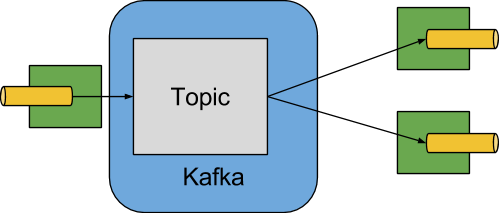
The Apache Kafka Binder 实现将每个目的地映射到一个 Apache Kafka 主题。 The consumer group 直接映射到相同的 Apache Kafka 概念。 分区也直接映射到 Apache Kafka 分区。
绑定程序当前使用 Apache Kafka kafka-clients 版本 3.1.0。 此客户端可以与较旧的代理服务器通信(请参阅 Kafka 文档),但某些功能可能不可用。 例如,早于 0.11.x.x 的版本不支持原生标头。 还有,0.11.x.x 不支持 autoAddPartitions 属性。
1.3. 配置选项
本节包含Apache Kafka绑定器使用的配置选项。
对于与绑定器相关的常见配置选项和属性,请参阅核心文档中的
1.3.1. Kafka 绑定属性
- spring.cloud.stream.kafka.binder.brokers
-
与Kafka绑定连接的经纪人的列表。
默认值:
localhost。 - spring.cloud.stream.kafka.binder.defaultBrokerPort
-
brokers允许不带端口信息的主机(例如,host1,host2:port2)。这设置了没有在代理列表中配置端口时的默认端口。默认值:
9092。 - spring.cloud.stream.kafka.binder.configuration
-
由绑定器创建的所有客户端传递的客户端属性(生产者和使用者)的键/值映射。 <br> 由于这些属性同时用于生产者和使用者,因此应将其限制使用于通用属性,例如安全性设置。 <br> 通过此配置提供的任何未知的Kafka生产者或使用者属性都会被筛选掉,不允许传播。 <br> 此处的属性会覆盖在启动中设置的任何属性。
默认值:空映射。
- spring.cloud.stream.kafka.binder.consumerProperties
-
任意Kafka客户端消费者属性的键值映射。除了支持已知的Kafka消费者属性外,还允许在此处设置未知的消费者属性。此处设置的属性会覆盖在boot和
configuration属性中设置的属性。默认值:空映射。
- spring.cloud.stream.kafka.binder.headers
-
列表中包含传输程序运输的自定义标题。仅在与旧版应用程序(< 1.3.x)通信时需要(使用版本号< 0.11.0.0)。较新版本(版本号> 0.11.0.0)原生支持标头。
默认:空。
- spring.cloud.stream.kafka.binder.healthTimeout
-
要等待获取分区信息的时间,以秒为单位。健康报告在计时器到期时变为离线状态。
默认值:10。
- spring.cloud.stream.kafka.binder.requiredAcks
-
在broker上所需确认的数量。 见producer的Kafka文档
acks属性。默认值:
1。 - spring.cloud.stream.kafka.binder.minPartitionCount
-
仅在设置为
autoCreateTopics或autoAddPartitions时有效。生产或消费数据的话题上配置绑定器的全局最小分区数。可以被partitionCount设置的生产者或instanceCount * concurrency设置的生产者(如果更大)所取代。默认值:
1。 - spring.cloud.stream.kafka.binder.producerProperties
-
任意 Kafka 客户端生产者属性的键/值映射。 除了支持已知的 Kafka 生产者属性外,这里也允许使用未知的生产者属性。 这里的属性会覆盖在 boot 和上一个
configuration属性中设置的任何属性。默认值:空映射。
- spring.cloud.stream.kafka.binder.replicationFactor
-
自动创建主题的复制因子,如果为
autoCreateTopics则有效。 可以在每个绑定上重写它。如果您使用的是 2.4 版本之前的 Kafka 代理版本,则此值应设置为至少 1。从版本 3.0.8 开始,绑定器默认使用
-1,表示将使用代理的 'default.replication.factor' 属性来确定副本数量。请与您的 Kafka 代理管理员确认是否有要求最小复制因子的策略,如果是这样,通常
default.replication.factor将匹配该值,而-1应在不需要大于最小值的复制因子时使用。默认值:
-1。 - spring.cloud.stream.kafka.binder.autoCreateTopics
-
如果设置为
true,绑定器会自动创建新主题。
如果设置为false,绑定器依赖于主题已经配置好。
在后一种情况下,如果主题不存在,绑定器将无法启动。这个设置独立于代理的
auto.create.topics.enable设置,并不影响它。如果服务器设置为自动创建主题,它们可能作为元数据检索请求的一部分被创建,具有默认的代理设置。
默认值:
true。 - spring.cloud.stream.kafka.binder.autoAddPartitions
-
如果设置为
true,则在必要时创建新分区。如果设置为false,则依赖于目标主题的分区大小已经配置。如果目标主题的分区数小于预期值,绑定程序将无法启动。默认值:
false。 - spring.cloud.stream.kafka.binder.transaction.transactionIdPrefix
-
在绑定程序中启用事务。请参阅Kafka文档中的
transaction.id和spring-kafka文档中的https://docs.spring.io/spring-kafka/reference/html/#transactions。当启用事务时,单独的producer属性被忽略,所有生产者使用spring.cloud.stream.kafka.binder.transaction.producer.*属性。默认的
null(无事务) - spring.cloud.stream.kafka.binder.transaction.producer.*
-
事务绑定程序中生产者的全局生产者属性。
有关所有绑定程序支持的通用生产者属性,请参阅
spring.cloud.stream.kafka.binder.transaction.transactionIdPrefix和Kafka Producer Properties。默认值:请参阅各个生产者属性。
- spring.cloud.stream.kafka.binder.headerMapperBeanName
-
用于将 Kafka 标头映射到和从 Kafka 标头进行映射的
KafkaHeaderMapper的 Bean 名称。
例如,如果您希望自定义使用 JSON 反序列化处理标头的BinderHeaderMapperbean 中的信任包集,则可以使用此功能。
如果未使用此属性提供此自定义BinderHeaderMapperbean,则绑定器将查找名称为kafkaBinderHeaderMapper且类型为BinderHeaderMapper的标头映射器 bean,然后回退到由绑定器创建的默认BinderHeaderMapper。默认值为 no.
- spring.cloud.stream.kafka.binder.considerDownWhenAnyPartitionHasNoLeader
-
标志,用于设置绑定器健康状态为
down,当发现主题上的任何分区没有领导者时(无论哪个消费者正在从中接收数据)。默认值:
false。 - spring.cloud.stream.kafka.binder.certificateStoreDirectory
-
当信任库或密钥库证书位置被指定为非本地文件系统资源(由org支持的资源)时。springframework.core.io.资源E。g.CLASSPATH、HTTP 等等。该绑定程序会将资源从可转换为org的路径复制到org。springframework.core.io.(类路径资源)到文件系统上的位置。This is true for both broker level certificates (0 and 1) and certificates intended for schema registry (2 and 3).请注意,信任库和密钥库的位置路径必须在
spring.cloud.stream.kafka.binder.configuration…下提供。例如,spring.cloud.stream.kafka.binder.configuration.ssl.truststore.location、spring.cloud.stream.kafka.binder.configuration.schema.registry.ssl.truststore.location等。
文件将在指定为该属性值的位置复制。该属性的值必须是文件系统上可由正在运行应用程序的进程写入的现有目录。If this value is not set and the certificate file is a non-local file system resource, then it will be copied to System’s temp directory as returned bySystem.getProperty("java.io.tmpdir").这也是正确的,如果存在此值,但文件夹在文件系统中找不到或不可写。默认值为 no.
- spring.cloud.stream.kafka.binder.metrics.defaultOffsetLagMetricsEnabled
-
当将其设置为true时,每次访问度量时都会计算每个consumer topic的偏移量滞后。当将其设置为false时,只使用定期计算的偏移量滞后。
默认值:true
- spring.cloud.stream.kafka.binder.metrics.offsetLagMetricsInterval
-
间隔用于计算每个消费者主题的偏移滞后。 当禁用 0 或其 计算太长时使用此值。
默认值:60秒
- spring.cloud.stream.kafka.binder.enableObservation
-
在此绑定器中启用所有绑定的 Micrometer 观察注册表。
(默认值:false)
1.3.2. Kafka消费者属性
避免重复,Spring Cloud Stream 支持为所有通道设置值,格式为 spring.cloud.stream.kafka.default.consumer.<property>=<value>。 |
以下属性仅适用于Kafka消费者,并且必须以spring.cloud.stream.kafka.bindings.<channelName>.consumer.为前缀。
- admin.configuration
-
{ 'html':'***' }
- admin.replicas-assignment
-
{ 'html':'***' }
- admin.replication-factor
-
{ 'html':'***' }
- autoRebalanceEnabled
-
当为
0时,主题分区会自动在消费者组成员之间重新平衡。当为
1时,每个消费者根据2和3分配一组固定的分区。这需要在每个已启动的实例上适当地设置
4和5属性。6的值在这种情况下通常必须大于 1。默认值:
true。 - 处理每条记录
-
当为
autoCommitOffset时,此设置确定是否在处理每个记录后提交偏移量。默认情况下,所有记录都已处理后,会提交所有记录的偏移量。
一次返回的记录数可以通过Kafka属性控制,该属性通过consumerconsumer.poll()属性进行设置。通过max.poll.records。
将此设置为configuration可能会导致性能下降,但这样做可以减少故障发生时重复传递记录的可能性。
另外,请参阅绑定器true属性,它也影响提交偏移量的性能。
此属性从3.1版本开始弃用,建议使用ackMode。
如果未设置ackMode且批处理模式未启用,则将使用RECORDackMode。默认值:
false。 - 自动提交偏移量
-
从版本 3.1 开始,此属性已过时。请参阅有关替代方案的详细信息。当消息已处理时,是否自动提交偏移量。如果设置为 1,在传入消息的标题中存在一个键为 2 的标题。标题的类型为 3。应用程序可以使用此标题进行确认消息。有关详细信息,请参阅示例部分。当此属性设置为 4 时,Kafka 绑定程序将确认模式设置为 5,并且应用程序负责确认记录。另请参阅 6。
默认值:
true。 - 确认模式
-
指定容器确认模式。 此模式基于 Spring Kafka 中定义的 AckMode 枚举进行设置。 如果
ackEachRecord属性设置为true,且消费者未处于批处理模式,则使用确认模式RECORD,否则,使用此属性提供的确认模式。 - 自动提交错误
-
在可轮询的使用者中,如果设置为
true,则在出错时始终自动提交。如果未设置(默认)或false,则在可轮询的使用者中不自动提交。请注意,此属性仅适用于可轮询的使用者。默认值:未设置。
- 重置偏移量
-
是否将消费者的偏移量重置为startOffset提供的值。如果提供
KafkaBindingRebalanceListener,则必须为false;请参阅使用KafkaBindingRebalanceListener。有关此属性的更多信息,请参阅重置偏移量。默认值:
false。 - startOffset
-
新组的起始偏移量。
允许的值:earliest和latest。
如果显式为消费者 'binding' 设置了消费者组(通过spring.cloud.stream.bindings.<channelName>.group),则 'startOffset' 设置为earliest。否则,对于anonymous消费者组将其设置为latest。
有关此属性的更多信息,请参阅重置偏移量。默认值:null(等同于
earliest)。 - 启用死信队列
-
当设置为 true 时,它会为消费者启用死信队列(DLQ)行为。
默认情况下,出现错误的消息会被转发到名为error.<destination>.<group>的主题。
通过设置dlqName属性或定义类型为DlqDestinationResolver的@Bean,可以配置 DLQ 主题名称。
这提供了一种替代方案,用于处理错误数量相对较少的情况,而不是常见的 Kafka 重放场景,因为重放整个原始主题可能过于繁琐。
死信主题处理 获取更多信息。
从版本 2.0 开始,发送到 DLQ 主题的消息增强了以下标头:x-original-topic、x-exception-message和x-exception-stacktrace,作为byte[]。
默认情况下,失败的记录被发送到与原始记录相同的分区编号中。
死信主题分区选择 如何更改该行为。
当destinationIsPattern是true时不允许。默认值:
false。 - 分区
-
当
enableDlq为 true,且此属性未设置时,会创建一个与主主题分区数相同的死信主题。
通常情况下,死信记录会被发送到与原始记录相同分区的死信主题中。
可以更改这种行为;请参阅死信主题分区选择。
如果将此属性设置为1并且没有DqlPartitionFunction的 Bean,则所有死信记录都将写入分区0。
如果此属性大于1,则您必须提供一个DlqPartitionFunction的 Bean。
请注意,实际的分区数量受绑定器的minPartitionCount属性影响。默认值:
none - 配置
-
包含通用 Kafka 消费者属性的键/值对映射。除了具有 Kafka 消费者属性外,还可以传递其他配置属性。例如应用程序所需的某些属性,如
spring.cloud.stream.kafka.bindings.input.consumer.configuration.foo=bar。bootstrap.servers属性不能在此处设置;如果需要连接到多个集群,请使用多绑定器支持。默认值:空映射。
- 死信队列名称
-
接收错误消息的死信队列(DLQ)主题的名称。
默认值:null(如果未指定,则导致错误的消息会转发到名为
error.<destination>.<group>的主题)。 - 延迟消息生产者属性
-
使用此功能,可以设置与死信队列(DLQ)相关的生产者属性。
所有可以通过 Kafka 生产者属性设置的属性都可以通过此属性进行设置。
当在消费者上启用原生解码时(即 useNativeDecoding: true),应用程序必须为 DLQ 提供相应的键/值序列化器。
这必须以dlqProducerProperties.configuration.key.serializer和dlqProducerProperties.configuration.value.serializer的形式提供。默认:Kafka 生产者默认属性。
- standardHeaders
-
指示入站通道适配器填充哪些标准标头。
允许值:none,id,timestamp,或both。
如果使用原生反序列化并且接收消息的第一个组件需要一个id(例如配置为使用JDBC消息存储的聚合器),则很有用。默认值:
none - 转换器Bean名称
-
实现
RecordMessageConverter的bean的名称。用于入站通道适配器中,以替换默认的MessagingMessageConverter。默认值:
null - 空闲事件间隔
-
表示没有最近收到消息的事件之间的时间间隔(单位:毫秒)。 使用
ApplicationListener<ListenerContainerIdleEvent>来接收这些事件。 参见消费者暂停与恢复示例,了解使用示例。默认值:
30000 - 目的地是模式
-
当为 true 时,目的地被视为正则表达式
Pattern,代理用其匹配主题名称。
当为 true 时,不会配置主题,并且不允许使用enableDlq,因为在配置阶段绑定器不知道主题名称。
请注意,检测与模式匹配的新主题所需的时间由消费者属性metadata.max.age.ms控制(在编写本文时),默认值为 300,000 毫秒(5 分钟)。
可以使用上面的configuration属性进行配置。默认值:
false - topic.properties
-
用于在配置新主题时使用的Kafka主题属性的
Map——例如,spring.cloud.stream.kafka.bindings.input.consumer.topic.properties.message.format.version=0.9.0.0默认值为 no.
- topic.replicas-assignment
-
一个<Integer, List<Integer>> 的副本分配映射,其中键为分区,值为分配。
用于配置新主题时使用。
参见 <code>0</code> Java 文档在 <code>1</code> jar 中的说明。
默认值为 no.
- topic.replication-factor
-
配置主题时要使用的复制因子。覆盖绑定器范围内的设置。
如果存在replicas-assignments,则忽略此设置。缺点:无(使用绑定器公共默认值-1)。}
- 轮询超时
-
轮询中用于可轮询消费者超时时间。
默认值:5秒。
- 事务管理器
-
用于覆盖此绑定的Binder事务管理器的
KafkaAwareTransactionManager的Bean名称。如果要使用ChainedKafkaTransactionManaager将另一个事务与Kafka事务同步,则通常需要它。为了实现记录的精确一次消费和生产,必须为所有消费者和生产者绑定配置相同的事务管理器。默认值为 no.
- 事务提交恢复
-
使用事务性绑定器时,恢复记录(例如重试次数耗尽后发送到死信主题的记录)的偏移量将默认通过新事务进行提交。将此属性设置为
false会抑制已恢复记录的偏移量提交。默认值:true。
- 全局错误处理程序Bean名称
-
CommonErrorHandler每个消费者绑定使用的bean名称。当提供时,此用户提供的CommonErrorHandler优先于捆绑器定义的任何其他错误处理器。ListenerContainerCustomizer不使用并检查目标/组组合来设置错误处理器的应用程序可以方便地表达错误处理器。默认值为 no.
1.3.3. 重置偏移量
当应用程序启动时,每个分配分区中的初始位置取决于两个属性startOffset和1。如果 resetOffsets 是 false,则正常的 Kafka 消费者 auto.offset.reset 语义适用。
i.e.如果绑定的消费者组对该分区没有已提交偏移量,则位置为earliest或7。默认情况下,显式group使用earliest,没有group的匿名绑定使用latest。这些默认值可以通过设置startOffset绑定属性来覆盖。第一次使用特定的group启动绑定时,不会产生任何已提交的偏移量(s)。除了偏移量已过期的情况外,还存在没有提交过的偏移量的条件。随着现代经纪人(自2起)。1)且默认代理属性,偏移量在最后一名成员离开组后7天过期。有关更多详细信息,请参阅offsets.retention.minutes代理属性。
当 resetOffsets 是 true 时,绑定器应用与代理上没有提交偏移量时适用的类似语义,就好像此绑定从未从此主题消费过一样;即忽略任何当前已提交的偏移量。
以下是此用法的两个使用场景。
-
从包含键/值对的压缩主题中消费。
将resetOffsets设置为true,将startOffset设置为earliest;绑定将在所有新分配的分区上执行seekToBeginning。 -
从包含事件的主题中消费,仅对在绑定运行期间发生的事件感兴趣。 将
resetOffsets设置为true并将startOffset设置为latest;该绑定将在所有新分配的分区上执行seekToEnd。
| <br>如果在初始分配后发生重新平衡,则仅对在此前未分配期间新分配的分区执行seek操作。 |
有关更精确地控制主题偏移量的信息,请参阅使用KafkaBindingRebalanceListener;当提供监听器时,不应将resetOffsets设置为true,否则会导致错误。
1.3.4. 批量消费
从版本 3.0 开始,当spring.cloud.stream.bindings.<name>.consumer.batch-mode设置为true时,轮询 Kafka Consumer接收的所有记录都将作为List<?>传递给监听器方法。否则,该方法将一个记录接一个地被调用。批处理的大小由 Kafka 消费者属性max.poll.records、fetch.min.bytes、fetch.max.wait.ms
从版本4.0.2开始,当以批量模式消费时,绑定器支持死信队列(DLQ)功能。
请注意,当在处于批量模式的消费者绑定上使用DLQ时,将从之前的轮询中接收到的所有记录都会被传递到DLQ主题。
在使用批处理模式时,绑定器内不支持重试,因此maxAttempts会被覆盖为1。您可以配置一个 您还可以手动使用 有关这些技术的更多信息,请参阅Spring for Apache Kafka 文档。 |
1.3.5. Kafka生产者属性
避免重复,Spring Cloud Stream 支持为所有通道设置值,格式为 spring.cloud.stream.kafka.default.producer.<property>=<value>。 |
仅适用于Kafka生产者的以下属性可用,并且必须使用spring.cloud.stream.kafka.bindings.<channelName>.producer.作为前缀。
- admin.configuration
-
{ 'html':'***' }
- admin.replicas-assignment
-
{ 'html':'***' }
- admin.replication-factor
-
{ 'html':'***' }
- 缓冲区大小
-
Kafka 生产者在发送前尝试批处理数据的最大字节数上限。
默认值:
16384。 - 同步
-
生产者是否为同步的。
默认值:
false。 - 发送超时表达式
-
在启用同步发布时,针对传出消息评估的 SpEL 表达式用于确定等待确认的时间(以毫秒为单位)——例如,
headers['mySendTimeout']。
当版本低于 3.0 时,除非使用原生编码,否则无法使用负载,因为在评估此表达式时,负载已经是byte[]的形式。现在,在转换负载之前就评估该表达式。默认值:
none。 - 批量超时
-
生产者在发送同一批次中的消息之前等待多长时间以允许更多消息累积。(通常,生产者不会等待,并且会立即发送所有已累积的消息。非零值可能会增加吞吐量,但会增加延迟)。
默认值:
0。 - 消息键表达式
-
针对传出消息求值的 SpEL 表达式,用于填充生成的 Kafka 消息的键——例如,
headers['myKey']。在 3.0 版本之前,除非使用原生编码,否则无法使用负载,因为在表达式被评估时,负载已经是byte[]的形式。现在,在负载转换之前就对表达式进行评估。对于常规处理器(Function<String, String>或Function<Message<?>, Message<?>),如果要使生成的键与来自主题的传入键相同,则可以按如下方式设置此属性。spring.cloud.stream.kafka.bindings.<output-binding-name>.producer.messageKeyExpression: headers['kafka_receivedMessageKey']对于反应函数,请记住一个重要注意事项。在这种情况下,应用程序必须手动将传入消息的头复制到传出消息中。您可以设置标头,如myKey并按照上述方法使用headers['myKey'],或者为了方便起见,只需设置KafkaHeaders.MESSAGE_KEY标头即可,根本不需要设置此属性。默认值:
none。 - headerPatterns
-
用于匹配Spring消息头并映射到Kafka
Headers的简单模式的逗号分隔列表,位于ProducerRecord中。
模式可以以通配符(星号)开头或结尾。
可以通过在前面加上!来否定模式。
匹配将在第一次匹配(正向或负向)后停止。
例如!ask,as*将通过ash但不通过ask。id和timestamp永远不会被映射。默认值:
*(所有请求头,除了id和timestamp) - 配置
-
包含通用 Kafka 生产者属性的键/值对映射。
bootstrap.servers属性不能在其中设置;如果需要连接到多个集群,请使用多绑定器支持。默认值:空映射。
- topic.properties
-
用于在配置新主题时使用的Kafka主题属性的
Map——例如,spring.cloud.stream.kafka.bindings.output.producer.topic.properties.message.format.version=0.9.0.0 - topic.replicas-assignment
-
一个<Integer, List<Integer>> 的副本分配映射,其中键为分区,值为分配。
用于配置新主题时使用。
参见 <code>0</code> Java 文档在 <code>1</code> jar 中的说明。
默认值为 no.
- topic.replication-factor
-
配置主题时要使用的复制因子。覆盖绑定器范围内的设置。
如果存在replicas-assignments,则忽略此设置。缺点:无(使用绑定器公共默认值-1)。}
- 使用主题标题
-
设置为
true,以使用传出消息中的KafkaHeaders.TOPIC消息头的值来覆盖默认绑定目标(主题名称)。如果不存在该头部,则使用默认绑定目标。默认值:
false。 - 记录元数据通道
-
成功发送结果应被发送到的
MessageChannel的bean名称;该bean必须存在于应用程序上下文中。
发送到通道的消息是已转换(如果有)的已发送消息,并带有额外的标头KafkaHeaders.RECORD_METADATA。
此标头包含Kafka客户端提供的RecordMetadata对象;它包括记录在主题中写入的分区和偏移量。ResultMetadata meta = sendResultMsg.getHeaders().get(KafkaHeaders.RECORD_METADATA, RecordMetadata.class)发送失败的消息会进入生产者错误通道(如果已配置);参见错误通道。
默认值:null。
Kafka 绑定器使用生产者的 partitionCount 设置作为提示,以创建具有给定分区数目的主题(结合minPartitionCount,两者中的最大值被用作该值)。当同时为绑定器配置 如果一个已经存在的主题分区数目较小,并且 如果一个已经存在的主题分区数目较小,并且 如果一个已存在的主题分区数目大于 ( |
- 压缩
-
设置
compression.type生产者属性。
支持的值为none、gzip、snappy、lz4和zstd。
如果您覆盖kafka-clientsjar到2.1.0(或更高版本),如Apache Kafka文档中的Spring讨论,并希望使用zstd压缩,请使用spring.cloud.stream.kafka.bindings.<binding-name>.producer.configuration.compression.type=zstd。默认值:
none。 - 事务管理器
-
用于覆盖此绑定的Binder事务管理器的
KafkaAwareTransactionManager的Bean名称。如果要使用ChainedKafkaTransactionManaager将另一个事务与Kafka事务同步,则通常需要它。为了实现记录的精确一次消费和生产,必须为所有消费者和生产者绑定配置相同的事务管理器。默认值为 no.
- 关闭超时
-
关闭生产者时等待的超时时间(以秒为单位)。
默认值:
30 - 允许非事务性
-
通常,与事务绑定器关联的所有输出绑定都会在新事务中发布,除非已有事务正在运行。此属性允许您覆盖该行为。如果设置为 true,则发布的记录将不会在此输出绑定中运行事务,除非已经存在一个事务。
默认值:
false
1.3.6. 使用示例
在本节中,我们展示了如何针对特定场景使用前面所述的属性。
示例:将ackMode设置为MANUAL并依赖手动确认
此示例说明了如何在使用者应用程序中手动确认偏移量。
此示例要求将spring.cloud.stream.kafka.bindings.input.consumer.ackMode设置为1 。使用相应的输入通道名称为您示例。
@SpringBootApplication
public class ManuallyAcknowdledgingConsumer {

 public static void main(String[] args) {
     SpringApplication.run(ManuallyAcknowdledgingConsumer.class, args);
 }

 @Bean
 public Consumer<Message<?>> process() {
    return message -> {
        Acknowledgment acknowledgment = message.getHeaders().get(KafkaHeaders.ACKNOWLEDGMENT, Acknowledgment.class);
        if (acknowledgment != null) {
         System.out.println("Acknowledgment provided");
         acknowledgment.acknowledge();
        }
    };
}
示例:安全配置
Apache Kafka 0.9 支持客户端和代理之间的安全连接。为了利用此功能,请遵循Apache Kafka 文档以及Kafka 0.9的Confluent文档中的安全性指南。使用spring.cloud.stream.kafka.binder.configuration选项为绑定器创建的所有客户端设置安全属性。
例如,要将security.protocol设置为SASL_SSL,请设置以下属性:
spring.cloud.stream.kafka.binder.configuration.security.protocol=SASL_SSL其他所有安全性属性可以采用类似的方式设置。
使用 Kerberos 时,请按照参考文档中的说明创建和引用 JAAS 配置。参考文档
Spring Cloud Stream 支持通过使用 JAAS 配置文件和使用 Spring Boot 属性来向应用程序传递 JAAS 配置信息。
使用 JAAS 配置文件
可以通过使用系统属性为 Spring Cloud Stream 应用程序设置 JAAS 和(可选地)krb5 文件位置。<br/>以下示例显示了如何通过使用 JAAS 配置文件来启动具有 SASL 和 Kerberos 的 Spring Cloud Stream 应用程序:<br/>
 java -Djava.security.auth.login.config=/path.to/kafka_client_jaas.conf -jar log.jar \
   --spring.cloud.stream.kafka.binder.brokers=secure.server:9092 \
   --spring.cloud.stream.bindings.input.destination=stream.ticktock \
   --spring.cloud.stream.kafka.binder.configuration.security.protocol=SASL_PLAINTEXT
使用 Spring Boot 属性
作为使用 JAAS 配置文件的替代方案,Spring Cloud Stream 提供了一种通过使用 Spring Boot 属性来为 Spring Cloud Stream 应用程序设置 JAAS 配置的机制。
可以使用以下属性来配置Kafka客户端的登录上下文:
- spring.cloud.stream.kafka.binder.jaas.loginModule
-
登录模块名称。在正常情况下无需设置。
默认值:
com.sun.security.auth.module.Krb5LoginModule。 - spring.cloud.stream.kafka.binder.jaas.controlFlag
-
登录模块的控制标志。
默认值:
required。 - spring.cloud.stream.kafka.binder.jaas.options
-
包含登录模块选项的键/值对映射。
默认值:空映射。
以下示例显示了如何通过使用Spring Boot配置属性来启动带有SASL和Kerberos的Spring Cloud Stream应用程序:
 java --spring.cloud.stream.kafka.binder.brokers=secure.server:9092 \
   --spring.cloud.stream.bindings.input.destination=stream.ticktock \
   --spring.cloud.stream.kafka.binder.autoCreateTopics=false \
   --spring.cloud.stream.kafka.binder.configuration.security.protocol=SASL_PLAINTEXT \
   --spring.cloud.stream.kafka.binder.jaas.options.useKeyTab=true \
   --spring.cloud.stream.kafka.binder.jaas.options.storeKey=true \
   --spring.cloud.stream.kafka.binder.jaas.options.keyTab=/etc/security/keytabs/kafka_client.keytab \
   --spring.cloud.stream.kafka.binder.jaas.options.principal=kafka-client-1@EXAMPLE.COM
前面的示例表示等效于以下JAAS文件:<br>
KafkaClient {
    com.sun.security.auth.module.Krb5LoginModule required
    useKeyTab=true
    storeKey=true
    keyTab="/etc/security/keytabs/kafka_client.keytab"
    principal="[email protected]";
};
如果所需的主题已存在于代理上或由管理员创建,则可以关闭自动创建功能,只需发送客户端JAAS属性即可。
| 不要在同一应用程序中混合使用 JAAS 配置文件和 Spring Boot 属性。 如果 |
使用autoCreateTopics和autoAddPartitions时请谨慎操作Kerberos。通常,应用程序可以使用在Kafka和Zookeeper中没有管理权限的主体。 因此,依赖Spring Cloud Stream创建/修改主题可能会失败。 在安全环境中,我们强烈建议通过使用Kafka工具手动创建主题并管理ACLs。 |
多绑定器配置和JAAS
当连接到多个集群时,每个集群都需要单独的 JAAS 配置,然后使用属性 sasl.jaas.config 设置 JAAS 配置。
如果应用程序中存在此属性,则它会优先于上述其他策略。
详细了解,请参阅此KIP-85。
例如,如果您的应用程序中有两个具有独立 JAAS 配置的集群,则可以使用以下模板:<br>
spring.cloud.stream:
    binders:
        kafka1:
          type: kafka
          environment:
             spring:
               cloud:
                 stream:
                  kafka:
                    binder:
                      brokers: localhost:9092
                      configuration.sasl.jaas.config: "org.apache.kafka.common.security.plain.PlainLoginModule required username=\"admin\" password=\"admin-secret\";"
        kafka2:
          type: kafka
          environment:
            spring:
              cloud:
                stream:
                  kafka:
                    binder:
                      brokers: localhost:9093
                      configuration.sasl.jaas.config: "org.apache.kafka.common.security.plain.PlainLoginModule required username=\"user1\" password=\"user1-secret\";"
    kafka.binder:
        configuration:
          security.protocol: SASL_PLAINTEXT
          sasl.mechanism: PLAIN
请注意,上述配置中两个 Kafka 集群以及它们各自的 sasl.jaas.config 值均有所不同。
有关如何设置和运行此类应用程序的更多详细信息,请参见此示例应用。
示例:暂停和恢复消费者
如果您希望暂停使用但不导致分区重新平衡,可以暂停和恢复使用者。 这通过如在 绑定可视化和控制 中所示管理绑定生命周期来实现,使用 0 和 1 。
概括来说,您可以使用ApplicationListener(或@EventListener)方法来接收ListenerContainerIdleEvent个实例。事件发布的频率由idleEventInterval属性控制。
1.4. 事务绑定器
通过将spring.cloud.stream.kafka.binder.transaction.transactionIdPrefix设置为非空值(例如tx-)来启用事务。在处理器应用程序中,消费者启动事务;任何由消费者线程发送的记录都参与同一事务。当监听器正常退出时,监听器容器会向事务发送偏移量并提交该事务。使用公共生产者工厂用于所有使用spring.cloud.stream.kafka.binder.transaction.producer.*属性配置的生产者绑定;忽略单个绑定Kafka生产者属性。
普通绑定器重试(以及死信)在事务中不受支持,因为重试将在原始事务中运行,该事务可能会回滚,并且任何已发布的记录也会被回滚。当启用重试时(常见属性maxAttempts大于零),将使用重试属性来配置DefaultAfterRollbackProcessor以在容器级别启用重试。同样地,不是在事务内发布死信记录,而是通过DefaultAfterRollbackProcessor将此功能移至监听器容器,在主事务回滚之后运行。 |
如果要在源应用程序中使用事务,或从任意线程为仅生产者事务(例如 @Scheduled 方法)使用事务,则必须获取事务性生产者工厂的引用,并使用它定义一个 KafkaTransactionManager bean。
@Bean
public PlatformTransactionManager transactionManager(BinderFactory binders,
        @Value("${unique.tx.id.per.instance}") String txId) {

    ProducerFactory<byte[], byte[]> pf = ((KafkaMessageChannelBinder) binders.getBinder(null,
            MessageChannel.class)).getTransactionalProducerFactory();
    KafkaTransactionManager tm = new KafkaTransactionManager<>(pf);
    tm.setTransactionId(txId)
    return tm;
}
请注意,我们使用BinderFactory获取绑定程序的引用;当只有一个绑定程序配置时,在第一个参数中使用null。
如果配置了多个绑定程序,请使用绑定程序名称来获取引用。
一旦我们有了绑定程序的引用,就可以获得ProducerFactory的引用并创建一个事务管理器。
然后,您将使用正常的Spring事务支持,例如TransactionTemplate或@Transactional,例如:
public static class Sender {

    @Transactional
    public void doInTransaction(MessageChannel output, List<String> stuffToSend) {
        stuffToSend.forEach(stuff -> output.send(new GenericMessage<>(stuff)));
    }

}
如果您希望将仅生产者事务与来自其他某些事务管理器的事务同步,请使用ChainedTransactionManager。
如果您部署了应用程序的多个实例,每个实例都需要一个唯一的transactionIdPrefix。 |
1.5. 错误通道
从版本 1.3 开始,绑定器会无条件地将每个消费者目标的异常发送到错误通道,并且还可以配置为将异步生产者发送失败发送到错误通道。有关错误处理的更多信息,请参见此部分。
请求的 ErrorMessage 负载为带有属性的 KafkaSendFailureException:
-
failedMessage: Spring 消息Message<?>: 发送失败的消息。 -
record: The rawProducerRecordthat was created from thefailedMessage
没有对生产者异常(例如发送到死信队列)进行自动处理。 您可以使用自己的Spring Integration流程来消费这些异常。
1.6. Kafka指标
Kafka 绑定模块公开了以下指标:
spring.cloud.stream.binder.kafka.offset: 此指标表示有多少消息尚未从给定绑定器的主题中由给定消费组消费。
这些指标是基于 Micrometer 库提供的。
如果类路径上有 Micrometer,且应用程序未提供其他此类 Bean,则绑定器会创建 KafkaBinderMetrics 个 Bean。
该度量包含消费者组信息、主题和主题上的最新偏移量提交的滞后数量。
此度量对于向 PaaS 平台提供自动扩展反馈特别有用。
The metric collection behaviour can be configured by setting properties in the spring.cloud.stream.kafka.binder.metrics namespace,
refer to the kafka binder properties section for more information.
您可以从创建必要的基础设施(如使用者)中排除KafkaBinderMetrics,然后通过在应用程序中提供以下组件来报告指标。
@Component
class NoOpBindingMeters {
	NoOpBindingMeters(MeterRegistry registry) {
		registry.config().meterFilter(
				MeterFilter.denyNameStartsWith(KafkaBinderMetrics.OFFSET_LAG_METRIC_NAME));
	}
}
有关如何选择性地抑制仪表的更多详情请参见 此处。
1.7. 垃圾记录(空记录值)
在使用压缩主题时,一个值为null的记录(也称为墓碑记录)表示键的删除。
要接收此类消息,可以在Spring Cloud Stream函数中使用以下策略。
@Bean
public Function<Message<Person>, String> myFunction() {
    return value -> {
        Object v = value.getPayload();
        String className = v.getClass().getName();
        if (className.isEqualTo("org.springframework.kafka.support.KafkaNull")) {
            // this is a tombstone record
        }
        else {
            // continue with processing
        }
    };
}
1.8. 使用KafkaBindingRebalanceListener
应用程序可能希望在初始分配分区时寻找任意偏移量的主题/分区,或者对使用者执行其他操作。
从版本 2.1 开始,如果在应用程序上下文中提供一个单例 KafkaBindingRebalanceListener bean,则将其注入所有 Kafka 消费器绑定中。
public interface KafkaBindingRebalanceListener {

	/**
	 * Invoked by the container before any pending offsets are committed.
	 * @param bindingName the name of the binding.
	 * @param consumer the consumer.
	 * @param partitions the partitions.
	 */
	default void onPartitionsRevokedBeforeCommit(String bindingName, Consumer<?, ?> consumer,
			Collection<TopicPartition> partitions) {

	}

	/**
	 * Invoked by the container after any pending offsets are committed.
	 * @param bindingName the name of the binding.
	 * @param consumer the consumer.
	 * @param partitions the partitions.
	 */
	default void onPartitionsRevokedAfterCommit(String bindingName, Consumer<?, ?> consumer, Collection<TopicPartition> partitions) {

	}

	/**
	 * Invoked when partitions are initially assigned or after a rebalance.
	 * Applications might only want to perform seek operations on an initial assignment.
	 * @param bindingName the name of the binding.
	 * @param consumer the consumer.
	 * @param partitions the partitions.
	 * @param initial true if this is the initial assignment.
	 */
	default void onPartitionsAssigned(String bindingName, Consumer<?, ?> consumer, Collection<TopicPartition> partitions,
			boolean initial) {

	}

}
不能将 resetOffsets 消费器属性设置为 true,同时提供平衡侦听器。
1.9. 重试和死信处理
默认情况下,当您在 consumer 绑定中配置重试(例如 0 和 1),这些功能由 binder 完成,无需 listener 容器或 Kafka 消费者参与。
有几种情况更适合将此功能移到侦听器容器中,例如:
-
聚合重试和延迟将超过消费者的
max.poll.interval.ms属性,可能会导致分区重新平衡。 -
您希望将死信消息发布到不同的Kafka集群。
-
您希望向错误处理程序添加重试侦听器。
-
…
如果想将该操作选择移动到审拟审投源实例,可以定义一个实例不及注入平号量,Spring MVC 将在支持 Servlet 3.0+ 环境的时候,将自动报地该实例,具体说æ68明:
/**
 * Configure the container.
 * @param container the container.
 * @param destinationName the destination name.
 * @param group the group.
 * @param dlqDestinationResolver a destination resolver for the dead letter topic (if
 * enableDlq).
 * @param backOff the backOff using retry properties (if configured).
 * @see #retryAndDlqInBinding(String, String)
 */
void configure(AbstractMessageListenerContainer<?, ?> container, String destinationName, String group,
        @Nullable BiFunction<ConsumerRecord<?, ?>, Exception, TopicPartition> dlqDestinationResolver,
        @Nullable BackOff backOff);

/**
 * Return false to move retries and DLQ from the binding to a customized error handler
 * using the retry metadata and/or a {@code DeadLetterPublishingRecoverer} when
 * configured via
 * {@link #configure(AbstractMessageListenerContainer, String, String, BiFunction, BackOff)}.
 * @param destinationName the destination name.
 * @param group the group.
 * @return false to disable retries and DLQ in the binding
 */
default boolean retryAndDlqInBinding(String destinationName, String group) {
    return true;
}
目标解析程序和BackOff是从绑定属性(如果配置)创建的。使用KafkaTemplate使用来自spring.kafka….属性的配置。然后,您可以使用这些来创建自定义错误处理程序和死信发布程序;例如:
@Bean
ListenerContainerWithDlqAndRetryCustomizer cust(KafkaTemplate<?, ?> template) {
    return new ListenerContainerWithDlqAndRetryCustomizer() {

        @Override
        public void configure(AbstractMessageListenerContainer<?, ?> container, String destinationName,
                String group,
                @Nullable BiFunction<ConsumerRecord<?, ?>, Exception, TopicPartition> dlqDestinationResolver,
                @Nullable BackOff backOff) {

            if (destinationName.equals("topicWithLongTotalRetryConfig")) {
                ConsumerRecordRecoverer dlpr = new DeadLetterPublishingRecoverer(template,
                        dlqDestinationResolver);
                container.setCommonErrorHandler(new DefaultErrorHandler(dlpr, backOff));
            }
        }

        @Override
        public boolean retryAndDlqInBinding(String destinationName, String group) {
            return !destinationName.contains("topicWithLongTotalRetryConfig");
        }

    };
}
现在,只要单次重试延迟大于消费者的 max.poll.interval.ms 属性即可。
当与多个绑定器一起使用时,'ListenerContainerWithDlqAndRetryCustomizer' bean 被'DefaultBinderFactory'覆盖。 为了使 bean 可用,需要使用'BinderCustomizer'来设置容器自定义器(请参阅 [binder-customizer]):
@Bean
public BinderCustomizer binderCustomizer(ListenerContainerWithDlqAndRetryCustomizer containerCustomizer) {
    return (binder, binderName) -> {
        if (binder instanceof KafkaMessageChannelBinder kafkaMessageChannelBinder) {
            kafkaMessageChannelBinder.setContainerCustomizer(containerCustomizer);
        }
        else if (binder instanceof KStreamBinder) {
            ...
        }
        else if (binder instanceof RabbitMessageChannelBinder) {
            ...
        }
    };
}
1.10. 自定义消费者和生产者配置
如果您想要对用于创建 ConsumerFactory 和 ProducerFactory 的 Kafka 消费者和生产者的配置进行高级自定义,您可以实现以下定制器。
-
消费者配置自定义
-
生产者配置自定义器
这两个接口提供了一种方法来配置用于消费者和生产者属性的配置映射。
例如,如果您想访问在应用程序级别定义的bean,则可以将该bean注入到configure方法的实现中。
当binder发现这些自定义程序作为bean可用时,它将在创建消费者和生产者工厂之前调用configure方法。
这两个接口还提供了绑定和目标名称的访问,以便在自定义生产者和消费者属性时可以访问它们。
1.11. 自定义 AdminClient 配置
与上面的消费者和生产者配置自定义一样,应用程序也可以通过提供一个AdminClientConfigCustomizer来自定义管理客户端的配置。
管理员ClientConfigCustomizer的configure方法提供了对管理员客户端属性的访问,可以使用这些属性定义进一步自定义。
Binder的Kafka主题提供程序对通过此自定义程序给出的属性具有最高优先级。
下面是一个提供此自定义程序 bean 的示例。
@Bean
public AdminClientConfigCustomizer adminClientConfigCustomizer() {
    return props -> {
        props.put(CommonClientConfigs.SECURITY_PROTOCOL_CONFIG, "SASL_SSL");
    };
}
1.12. 自定义Kafka绑定器健康指标
当 Spring Boot 监管器在类路径中时,Kafka 绑定程序会激活一个默认的健康指标。
此健康指标检查绑定程序的健康状态以及与 Kafka 代理的任何通信问题。
如果应用程序想要禁用此默认的健康检查实现并包含自定义实现,则可以提供对KafkaBinderHealth接口的实现。
KafkaBinderHealth是扩展自HealthIndicator的标记接口。
在自定义实现中,必须为health()方法提供实现。
自定义实现必须作为应用程序配置中的 Bean 提供。
当绑定程序发现自定义实现时,它将使用该实现而不是默认实现。
这是应用程序中此类自定义实现 Bean 的示例。
@Bean
public KafkaBinderHealth kafkaBinderHealthIndicator() {
    return new KafkaBinderHealth() {
        @Override
        public Health health() {
            // custom implementation details.
        }
    };
}
1.13. 死信主题处理
1.13.1. 死信主题分区选择
按默认值,记录使用与原始记录相同的分区发布到死信主题。这意味着死信主题必须至少具有与原始记录相同的分区数。
要更改此行为,请添加一个DlqPartitionFunction实现作为@Bean到应用程序上下文中。 只能有一个这样的Bean存在。 函数接收消费者组、失败的ConsumerRecord和异常。 例如,如果总是想路由到分区0,可以使用:
@Bean
public DlqPartitionFunction partitionFunction() {
    return (group, record, ex) -> 0;
}
如果您将消费者绑定的dlqPartitions属性设置为1(且绑定器的minPartitionCount等于1),则无需提供DlqPartitionFunction;框架将始终使用分区0。如果您将消费者绑定的 |
还可以为死信队列(DLQ)主题定义一个自定义名称。为此,需要创建DlqDestinationResolver的一个实现作为@Bean添加到应用程序上下文中。当绑定器检测到此类bean时,它将优先使用该bean,否则会使用dlqName属性。如果未找到这些选项,则默认使用error.<destination>.<group>。下面是一个DlqDestinationResolver作为@Bean的例子。
@Bean
public DlqDestinationResolver dlqDestinationResolver() {
    return (rec, ex) -> {
        if (rec.topic().equals("word1")) {
            return "topic1-dlq";
        }
        else {
            return "topic2-dlq";
        }
    };
}在为DlqDestinationResolver提供实现时需要注意,绑定器中的提供器不会自动为应用程序创建主题。
这是因为绑定器无法推断实现可能发送到的所有DLQ主题的名称。
因此,如果使用这种策略提供DLQ名称,就由应用程序负责确保这些主题在之前已创建好。
1.13.2. 处理死信主题中的记录
因为框架无法预测用户希望如何处理死信消息,因此没有提供任何标准处理机制。<br>如果死信的原因是暂时性的,您可能希望将消息重新路由回原始主题。<br>但是,如果问题是永久性问题,那可能会导致无限循环。<br>此主题中的Spring Boot示例应用程序是一个如何将这些消息重新路由回原始主题的示例,但它会在三个尝试后将它们移动到“停车场”主题。<br>该应用程序是从死信主题读取的另一个spring-cloud-stream应用程序。<br>当5秒钟内未收到任何消息时,它会退出。
示例假设原始目标为 so8400out,消费组为 so8400。
有几种策略要考虑:
-
考虑仅在主应用程序未运行时运行重新路由。否则,非常快速地用完临时错误重试。
-
另外,可以使用两阶段的方法:使用此应用程序对第三个主题进行路由,并使用另一个对从那里返回到主主题。
下面的代码清单显示了示例应用程序:
spring.cloud.stream.bindings.input.group=so8400replay
spring.cloud.stream.bindings.input.destination=error.so8400out.so8400

spring.cloud.stream.bindings.output.destination=so8400out

spring.cloud.stream.bindings.parkingLot.destination=so8400in.parkingLot

spring.cloud.stream.kafka.binder.configuration.auto.offset.reset=earliest

spring.cloud.stream.kafka.binder.headers=x-retries@SpringBootApplication
public class ReRouteDlqKApplication implements CommandLineRunner {
private static final String X_RETRIES_HEADER = "x-retries";
public static void main(String[] args) {
SpringApplication.run(ReRouteDlqKApplication.class, args).close();
}
private final AtomicInteger processed = new AtomicInteger();
@Autowired
private StreamBridge streamBridge;
@Bean
public Function<Message<?>, Message<?>> reRoute() {
return failed -> {
processed.incrementAndGet();
Integer retries = failed.getHeaders().get(X_RETRIES_HEADER, Integer.class);
if (retries == null) {
System.out.println("First retry for " + failed);
return MessageBuilder.fromMessage(failed)
.setHeader(X_RETRIES_HEADER, 1)
.setHeader(BinderHeaders.PARTITION_OVERRIDE,
failed.getHeaders().get(KafkaHeaders.RECEIVED_PARTITION_ID))
.build();
}
else if (retries < 3) {
System.out.println("Another retry for " + failed);
return MessageBuilder.fromMessage(failed)
.setHeader(X_RETRIES_HEADER, retries + 1)
.setHeader(BinderHeaders.PARTITION_OVERRIDE,
failed.getHeaders().get(KafkaHeaders.RECEIVED_PARTITION_ID))
.build();
}
else {
System.out.println("Retries exhausted for " + failed);
streamBridge.send("parkingLot", MessageBuilder.fromMessage(failed)
.setHeader(BinderHeaders.PARTITION_OVERRIDE,
failed.getHeaders().get(KafkaHeaders.RECEIVED_PARTITION_ID))
.build());
}
return null;
};
}
@Override
public void run(String... args) throws Exception {
while (true) {
int count = this.processed.get();
Thread.sleep(5000);
if (count == this.processed.get()) {
System.out.println("Idle, exiting");
return;
}
}
}
}
1.14. 使用Kafka Binder进行分区<br>
Apache Kafka 原生支持主题分区。
有时将数据发送到特定分区是有利的——例如,当您希望严格按顺序处理消息时(针对特定客户的的所有消息应发送到同一分区)。
下面的例子展示了如何配置生产者和消费者端:
@SpringBootApplication
public class KafkaPartitionProducerApplication {

    private static final Random RANDOM = new Random(System.currentTimeMillis());

    private static final String[] data = new String[] {
            "foo1", "bar1", "qux1",
            "foo2", "bar2", "qux2",
            "foo3", "bar3", "qux3",
            "foo4", "bar4", "qux4",
            };

    public static void main(String[] args) {
        new SpringApplicationBuilder(KafkaPartitionProducerApplication.class)
            .web(false)
            .run(args);
    }

    @Bean
    public Supplier<Message<?>> generate() {
        return () -> {
            String value = data[RANDOM.nextInt(data.length)];
            System.out.println("Sending: " + value);
            return MessageBuilder.withPayload(value)
                    .setHeader("partitionKey", value)
                    .build();
        };
    }

}
spring:
  cloud:
    stream:
      bindings:
        generate-out-0:
          destination: partitioned.topic
          producer:
            partition-key-expression: headers['partitionKey']
partition-count: 12| 请注意,由于Apache Kafka原生支持分区,因此除非您像示例中那样使用自定义分区键或涉及有效负载本身的表达式,否则无需依赖上述绑定器分区。 绑定器提供的分区选择通常用于不支持原生分区的中间件技术。请注意,上面的示例中使用了一个自定义键 partitionKey,这将是决定分区的因素,在这种情况下,适合使用绑定器分区。使用原生Kafka分区时,i。e,如果您不提供partition-key-expression,则Apache Kafka会选择一个分区,默认情况下该分区将是记录键的哈希值与可用分区数的比值。要向出站记录添加密钥,请在 spring-messaging Message<?> 中将 KafkaHeaders.KEY 标头设置为所需的密钥值。当未提供记录键时,Apache Kafka 默认会根据Apache Kafka 文档中描述的逻辑选择一个分区。
|
主题必须配置足够的分区,以便为所有消费者组实现所需的并发性。
上述配置最多支持12个消费者实例(如果它们的concurrency是2,则最多支持6个;如果并发度是3,则最多支持4个,以此类推)。
通常最好“过度配置”分区,以允许未来增加消费者或提高并发度。 |
先前的配置使用了默认分区(key.hashCode() % partitionCount)。
这可能提供也可能不提供一个合适平衡的算法,具体取决于键值。特别是,请注意此分区策略与独立Kafka生产者使用的默认策略不同——例如Kafka Streams所用的一个,这意味着当由这些客户端产生时,相同的键值可能会在不同的分区中以不同的方式平衡。
您可以使用partitionSelectorExpression或partitionSelectorClass属性来覆盖这个默认设置。 |
由于分区由 Kafka 原生处理,因此消费者端不需要特殊配置。Kafka 会在实例之间分配分区。
| 对于 Kafka 主题,分区数量可能会在运行时发生更改(例如由于管理任务)。</p><p>计算出的分区数在此之后会有所不同(例如将使用新分区)。</p><p>从 Spring Cloud Stream 4.0.3 版本开始,支持运行时对分区数量进行更改。</p><p>请参阅参数“spring.kafka.producer.properties.metadata.max.age.ms”,用于配置更新间隔。</p><p>由于某些限制,在引用消息的“payload”时无法使用“partition-key-expression”,在这种情况下该机制将被禁用。</p><p>默认情况下,整体行为是禁用的,并且可以使用配置参数“producer.dynamicPartitionUpdatesEnabled=true”来启用它。 |
以下 Spring Boot 应用程序侦听 Kafka 流,并将每个消息进入的分区 ID 打印到控制台(Console):
@SpringBootApplication
public class KafkaPartitionConsumerApplication {

    public static void main(String[] args) {
        new SpringApplicationBuilder(KafkaPartitionConsumerApplication.class)
            .web(WebApplicationType.NONE)
            .run(args);
    }

    @Bean
    public Consumer<Message<String>> listen() {
        return message -> {
            int partition = (int) message.getHeaders().get(KafkaHeaders.RECEIVED_PARTITION);
            System.out.println(message + " received from partition " + partition);
        };
    }

}
spring:
  cloud:
    stream:
      bindings:
        listen-in-0:
          destination: partitioned.topic
          group: myGroup
可以根据需要添加实例。
Kafka 会重新平衡分区分配。
如果实例数量(或 instance count * concurrency)超过分区数,则某些消费者处于空闲状态。
2. 响应式 Kafka 绑定
Kafka 绑定器在 Spring Cloud Stream 中提供了一个基于 Reactor Kafka 项目的专用响应式绑定器。此响应式 Kafka 绑定器使基于 Apache Kafka 的应用程序能够实现完整的端到端响应式功能,例如背压、反应流等。当您的 Spring Cloud Stream Kafka 应用程序使用反应类型(Flux、Mono 等)编写时,建议使用此响应式 Kafka 绑定器而不是常规的消息通道基础 Kafka 绑定器。
2.1. Maven 坐标
以下是响应式 Kafka 绑定的 Maven 坐标。
<dependency>
  <groupId>org.springframework.cloud</groupId>
  <artifactId>spring-cloud-stream-binder-kafka-reactive</artifactId>
</dependency>
2.2. 使用响应式 Kafka 绑定的基本示例
本节展示了使用响应式绑定器编写响应式Kafka应用程序的一些基本代码片段,并详细介绍了它们。
@Bean
public Function<Flux<String>, Flux<String>> uppercase() {
    return s -> s.map(String::toUpperCase);
}
您可以使用上述upppercase功能与基于消息通道的Kafka绑定器(spring-cloud-stream-binder-kafka)以及响应式Kafka绑定器(spring-cloud-stream-binder-kafka-reactive)一起使用,讨论的主题是本节。
如果使用此功能与常规Kafka绑定器一起使用,虽然在应用程序中使用了反应类型(即uppercase功能),但在函数执行范围内只有反应流。
在函数执行上下文之外,没有响应式优势,因为底层绑定器不是基于反应堆栈的。因此,尽管这看起来像是带来端到端反应堆栈,但该应用程序只是部分响应式的。
现在假设您正在使用适当的响应式绑定器用于Kafka -0 与上面函数的应用。此绑定器实现将在整个链的顶端到底部的发布处提供完整的反应性优势。这是因为在基础绑定器之上构建了
从 4.0.2 版本开始,您可以使用提供一个或多个ReceiverOptionsCustomizer或SenderOptionsCustomizerbean来自定义ReceiverOptions和SenderOptions。它们是接收绑定名称和初始选项并返回自定义选项的BiFunction。Ordered接口扩展使当存在多个时定制器将按所需的顺序应用。
编绑器不默认提交偏移量。
从版本 4.0.2 开始,标题 0 包含一个 1 对象,这允许通过调用其 2 方法或 3 方法来导致偏移量被提交。 |
@Bean
public Consumer<Flux<Message<String>> consume() {
    return msg -> {
        process(msg.getPayload());
        msg.getHeaders().get(KafkaHeaders.ACKNOWLEDGMENT, ReceiverOffset.class).acknowledge();
    }
}
有关更多详细信息,请参阅reactor-kafka文档和javadoc。
此外,从版本4.0.3开始,可以将Kafka消费者属性reactiveAtmostOnce设置为true,binder将在处理每次poll返回的记录之前自动提交偏移量。
同样,从版本4.0.3开始,您可以将消费者属性reactiveAutoCommit设置为true,binder将在处理每次poll返回的记录后自动提交偏移量。
在这些情况下,确认头不存在。
4.0.2 虽然也提供了 reactiveAutoCommit,但实现不正确,其行为类似于 reactiveAtMostOnce。 |
以下是一个如何使用reaciveAutoCommit的示例。
@Bean
Consumer<Flux<Flux<ConsumerRecord<?, String>>>> input() {
	return flux -> flux
			.doOnNext(inner -> inner
				.doOnNext(val -> {
					log.info(val.value());
				})
				.subscribe())
			.subscribe();
}
请注意,使用自动提交时,reactor-kafka 返回 Flux<Flux<ConsumerRecord<?, ?>>>。
由于 Spring 对内部流的内容没有访问权限,应用程序必须处理原生的 ConsumerRecord;不会对内容应用消息转换或转换服务。
这需要使用原生解码(在配置中指定适当类型的 Deserializer)来返回所需类型的记录键/值。
2.3. 以原始格式消费记录
在上面的upppercase函数中,我们消费记录为Flux<String>,然后以Flux<String>的形式产生它。
在某些情况下,你可能需要接收原始接收到的记录格式 - ReceiverRecord。
以下是这样的一个函数。
@Bean
public Function<Flux<ReceiverRecord<byte[], byte[]>>, Flux<String>> lowercase() {
    return s -> s.map(rec -> new String(rec.value()).toLowerCase());
}
在这个功能中,请注意,我们把记录作为0 ,然后把它生产为1 。 ReceiverRecord是在Reactor Kafka中作为Kafka特化的ConsumerRecord的基本接收记录。当使用响应式Kafka绑定器时,上面的函数将为每个传入的记录提供对ReceiverRecord类型的访问。但是,在这种情况下,您需要为 RecordMessageConverter 提供自定义实现。默认情况下,反应性Kafka绑定器使用<1>转换器,该转换器从<2>中转换有效负载和标头。因此,当你的处理器方法接收它时,有效负载已经从接收到的记录中提取出来,并像我们上面看过的第一个函数一样传递给该方法。通过在应用程序中提供自定义RecordMessageConverter实现,您可以覆盖默认行为。比如,如果你想把记录当作原始的Flux<ReceiverRecord<byte[], byte[]>>来使用,那么你可以提供以下在应用程序中的Bean定义。
@Bean
RecordMessageConverter fullRawReceivedRecord() {
    return new RecordMessageConverter() {

        private final RecordMessageConverter converter = new MessagingMessageConverter();

        @Override
        public Message<?> toMessage(ConsumerRecord<?, ?> record, Acknowledgment acknowledgment,
                Consumer<?, ?> consumer, Type payloadType) {
            return MessageBuilder.withPayload(record).build();
        }

        @Override
        public ProducerRecord<?, ?> fromMessage(Message<?> message, String defaultTopic) {
            return this.converter.fromMessage(message, defaultTopic);
        }

    };
}
然后,您需要指示框架在所需绑定中使用此转换器。下面是一个基于我们lowercase函数的例子。
spring.cloud.stream.kafka.bindings.lowercase-in-0.consumer.converterBeanName=fullRawReceivedRecord"lowercase-in-0是我们的lowercase函数的输入绑定名称。
对于出站(lowecase-out-0),我们仍然使用常规MessagingMessageConverter。
在上面的toMessage实现中,我们接收原始的ConsumerRecord(ReceiverRecord,因为我们处于响应式绑定器上下文)并将其包装在Message中。
然后,这个消息载荷,即ReceiverRecord,将提供给用户方法。
如果reactiveAutoCommit是false(默认值),调用rec.receiverOffset().acknowledge()(或commit())以导致偏移量被提交;如果reactiveAutoCommit是true,流提供ConsumerRecord个s。
2.4. 并发性
当与响应式 Kafka 绑定器一起使用响应式函数时,如果在消费者绑定上设置并发性,则绑定器会创建所提供值数量的专用KafkaReceiver对象。
换句话说,这会创建多个单独的Flux实现的反应流。
这对从分区主题中消耗记录非常有用。
例如,假设传入的主题至少有三个分区。 那么您可以设置以下属性。
spring.cloud.stream.bindings.lowercase-in-0.consumer.concurrency=3这将创建三个专用的KafkaReceiver对象,它们生成三个单独的Flux实现,并将其流式传输到处理程序方法。
2.5. 多路复用
(开始使用版本 4.0.3,常见的消费者属性 multiplex 现在由响应式绑定器支持,其中单个绑定可以从多个主题中消费。 当 false(默认值)时,在公共 destination 属性中指定的逗号分隔列表中指定的每个主题都会创建单独的绑定。)
2.6. 目的地是模式
从版本 4.0.3 开始,destination-is-pattern Kafka 绑定消费者属性现在得到支持。接收器选项使用正则表达式 Pattern 配置,允许绑定从匹配该模式的任何主题中消费。
2.7. 发送者结果频道
从版本 4.0.3 开始,您可以配置 resultMetadataChannel 来接收 SenderResult<?> 以确定发送的成功/失败。
该 SenderResult 包含 correlationMetadata,用于将结果与发送相关联;它还包含 RecordMetadata,指示已发送记录的 TopicPartition 和偏移量。
代码resultMetadataChannel必须是FluxMessageChannel实例。必须
以下是使用此功能的示例,其中相关联的元数据类型为Integer:
@Bean
FluxMessageChannel sendResults() {
    return new FluxMessageChannel();
}

@ServiceActivator(inputChannel = "sendResults")
void handleResults(SenderResult<Integer> result) {
    if (result.exception() != null) {
        failureFor(result);
    }
    else {
        successFor(result);
    }
}
要将关联元数据设置到输出记录上,请设置CORRELATION_ID头:
streamBridge.send("words1", MessageBuilder.withPayload("foobar")
        .setCorrelationId(42)
        .build());
使用该功能时,如果参数为Function,则函数输出类型必须是Message<?>,并且关联ID头部需要设置为目标值。
元数据应是唯一的,至少在发送期间如此。
3. Kafka Streams绑定
3.1 使用方法
对于使用 Kafka Streams 绑定器,您只需将其添加到 Spring Cloud Stream 应用程序中,使用以下 Maven 坐标:
<dependency>
  <groupId>org.springframework.cloud</groupId>
  <artifactId>spring-cloud-stream-binder-kafka-streams</artifactId>
</dependency>
一个快速启动Kafka Streams绑定器的新项目的方法是使用Spring初始器,然后选择“云流”和“Spring for Kafka Streams”,如下面所示。

3.2. 概述
Spring Cloud Stream 包含一个专门设计用于绑定的 Apache Kafka 流库实现。使用此本机集成,Spring Cloud Stream 处理程序应用程序可以直接在核心业务逻辑中使用 Apache Kafka 流 API。
Kafka Streams binder实现建立在Spring for Apache Kafka项目提供的基础上。
Kafka 流式处理程序绑定器提供对 Kafka 流式处理中的三大主要类型的支持 - < code > 0 、 < code > 1 和 < code > 2 。
Kafka 流应用程序通常遵循这样的模型:从入站主题读取记录,应用业务逻辑,然后将转换后的记录写入出站主题。 也可以定义没有出站目标的处理器应用程序。
在下面的节中,我们将详细介绍Spring Cloud Stream与Kafka Streams的集成。
3.3. 编程模型
在使用 Kafka Streams 绑定器提供的编程模型时,可以使用高级 Streams DSL 和高级与低级 处理器-API 的混合作为选项。当混合使用高级和低级 API 时,通常通过调用 transform 或 process 上 KStream 的 API 方法来实现。
3.3.1. 功能样式
从 Spring Cloud Stream 3.0.0 开始,Kafka Streams 绑定器允许应用程序使用 Java 8 中可用的函数式编程风格进行设计和开发。这意味着应用程序可以简洁地表示为类型 java.util.function.Function 或 java.util.function.Consumer 的 lambda 表达式。
让我们看一个非常基础的例子。
@SpringBootApplication
public class SimpleConsumerApplication {

    @Bean
    public java.util.function.Consumer<KStream<Object, String>> process() {

        return input ->
                input.foreach((key, value) -> {
                    System.out.println("Key: " + key + " Value: " + value);
                });
    }
}
虽然简单,但这是一个完整的独立Spring Boot应用程序,利用Kafka Streams进行流处理。这是一个没有出站绑定且只有一个入站绑定的消费者应用程序。该应用程序消耗数据,并将KStream键和值的信息记录到标准输出中。该应用程序包含SpringBootApplication注解和一个标记为Bean的方法。bean方法是类型java.util.function.Consumer,其参数化为KStream。然后在实现中,我们返回了一个Consumer对象,它基本上是一个lambda表达式。在lambda表达式内部提供了处理数据的代码。
在此应用程序中,有一个单一输入绑定,其类型为KStream。
绑定器为此应用程序创建此绑定,并为其分配名称process-in-0,即函数bean名称后跟连字符(-)和字面量in,再跟另一个连字符以及参数的序数位置。
您使用此绑定名称来设置其他属性,例如目标。
例如,spring.cloud.stream.bindings.process-in-0.destination=my-topic。
| 如果绑定上未设置目标属性,则会创建一个与绑定同名的主题(如果有足够的权限),或者期望该主题已经存在。 |
构建为一个 uber-jar 后(例如,kstream-consumer-app.jar),您可以像下面这样运行上面的例子。
如果应用程序选择使用Spring的Component注释来定义功能bean,则绑定器也支持该模型。
上述功能bean可以重写为如下所示。
@Component(name = "process")
public class SimpleConsumer implements java.util.function.Consumer<KStream<Object, String>> {

    @Override
    public void accept(KStream<Object, String> input) {
        input.foreach((key, value) -> {
            System.out.println("Key: " + key + " Value: " + value);
        });
    }
}
java -jar kstream-consumer-app.jar --spring.cloud.stream.bindings.process-in-0.destination=my-topic这里是另一个完整的处理器示例,它同时具有输入和输出绑定。这是经典的单词计数示例,在该示例中,应用程序从主题接收数据,并在滚动时间窗口内计算每个单词出现的次数。
@SpringBootApplication
public class WordCountProcessorApplication {

  @Bean
  public Function<KStream<Object, String>, KStream<?, WordCount>> process() {

    return input -> input
                .flatMapValues(value -> Arrays.asList(value.toLowerCase().split("\\W+")))
                .map((key, value) -> new KeyValue<>(value, value))
                .groupByKey(Serialized.with(Serdes.String(), Serdes.String()))
                .windowedBy(TimeWindows.of(5000))
                .count(Materialized.as("word-counts-state-store"))
                .toStream()
                .map((key, value) -> new KeyValue<>(key.key(), new WordCount(key.key(), value,
                        new Date(key.window().start()), new Date(key.window().end()))));
  }

	public static void main(String[] args) {
		SpringApplication.run(WordCountProcessorApplication.class, args);
	}
}
这里再次是一个完整的 Spring Boot 应用程序。与第一个应用程序的不同之处在于,bean 方法的类型是 java.util.function.Function。
对于 Function 的第一个参数化类型用于输入 KStream,第二个类型用于输出。
在方法体中,提供了一个 lambda 表达式,其类型为 Function,并给出了实际业务逻辑作为实现。
类似于之前讨论过的基于 Consumer 的应用程序,这里的输入绑定默认命名为 process-in-0。对于输出,绑定名称也自动设置为 process-out-0。
构建为一个可执行 jar 文件(例如,wordcount-processor.jar)后,您可以像下面这样运行上面的例子。
java -jar wordcount-processor.jar --spring.cloud.stream.bindings.process-in-0.destination=words --spring.cloud.stream.bindings.process-out-0.destination=counts此应用程序将从 Kafka 主题 words 中获取消息,并将计算结果发布到输出主题 counts。
Spring Cloud Stream 将确保来自入站和出站主题的消息自动绑定为 KStream 对象。作为开发人员,您可以专注于代码的业务方面,即编写处理器所需的逻辑。设置 Kafka Streams 基础设施所需的特定配置由框架自动处理。
我们上面看到的两个示例都有一个KStream输入绑定。在这两种情况下,这些绑定都从单个主题接收记录。
如果您希望将多个主题多路复用到单个KStream绑定中,则可以在下面提供逗号分隔的Kafka主题作为目标。
spring.cloud.stream.bindings.process-in-0.destination=topic-1,topic-2,topic-3
另外,如果您希望将主题模式作为目标位置提供以与正则表达式匹配,则可以做到。
spring.cloud.stream.bindings.process-in-0.destination=input.*
多重输入绑定
许多非平凡的 Kafka Streams 应用程序通常通过多个绑定从多个主题中消费数据。例如,一个主题被作为 Kstream 消费,而另一个主题则被作为 KTable 或 GlobalKTable 消费。应用程序可能希望将数据以表格类型接收有许多原因。考虑一种使用场景,其中底层主题是通过数据库中的变更数据捕获(CDC)机制填充的,或者也许应用程序只关心下游处理的最新更新。如果应用程序指定数据需要绑定为KTable或GlobalKTable,那么Kafka Streams绑定器会正确地将目的地绑定到KTable或GlobalKTable,以便应用程序可以操作它们。我们将看看几种不同的场景,如何在Kafka Streams绑定器中处理多个输入绑定。
Kafka Streams绑定中的BiFunction
这里有一个包含两个输入和一个输出的示例。在这种情况下,应用程序可以利用java.util.function.BiFunction。
@Bean
public BiFunction<KStream<String, Long>, KTable<String, String>, KStream<String, Long>> process() {
    return (userClicksStream, userRegionsTable) -> (userClicksStream
            .leftJoin(userRegionsTable, (clicks, region) -> new RegionWithClicks(region == null ?
                            "UNKNOWN" : region, clicks),
                    Joined.with(Serdes.String(), Serdes.Long(), null))
            .map((user, regionWithClicks) -> new KeyValue<>(regionWithClicks.getRegion(),
                    regionWithClicks.getClicks()))
            .groupByKey(Grouped.with(Serdes.String(), Serdes.Long()))
            .reduce(Long::sum)
            .toStream());
}
再次,基本主题与前面的示例相同,但这里有两个输入。
Java 的 BiFunction 支持用于将输入绑定到所需的目标。
绑定器为输入生成的默认绑定名称分别为 process-in-0 和 process-in-1。默认输出绑定是 process-out-0。
在此示例中,BiFunction 的第一个参数被绑定为第一个输入的 KStream,第二个参数被绑定为第二个输入的 KTable。
BiConsumer 在 Kafka Streams 绑定中
如果有两个输入,但没有输出,则可以使用java.util.function.BiConsumer,如下所示。
@Bean
public BiConsumer<KStream<String, Long>, KTable<String, String>> process() {
    return (userClicksStream, userRegionsTable) -> {}
}
超过两个输入
如果需要超过两个输入怎么办?<br/>在某些情况下,您可能需要使用多于两个的输入。在这种情况下,绑定器允许您链接部分函数。<br/>用函数式编程术语来说,这种技术通常被称为柯里化(currying)。<br/>随着Java 8添加了函数式编程支持,现在Java可以编写柯里化函数。<br/>Spring Cloud Stream Kafka Streams绑定器可以利用此功能来实现多个输入绑定。
让我们看一个例子。
@Bean
public Function<KStream<Long, Order>,
        Function<GlobalKTable<Long, Customer>,
                Function<GlobalKTable<Long, Product>, KStream<Long, EnrichedOrder>>>> enrichOrder() {

    return orders -> (
              customers -> (
                    products -> (
                        orders.join(customers,
                            (orderId, order) -> order.getCustomerId(),
                                (order, customer) -> new CustomerOrder(customer, order))
                                .join(products,
                                        (orderId, customerOrder) -> customerOrder
                                                .productId(),
                                        (customerOrder, product) -> {
                                            EnrichedOrder enrichedOrder = new EnrichedOrder();
                                            enrichedOrder.setProduct(product);
                                            enrichedOrder.setCustomer(customerOrder.customer);
                                            enrichedOrder.setOrder(customerOrder.order);
                                            return enrichedOrder;
                                        })
                        )
                )
    );
}让我们看看上面提出的绑定模型的详细信息。在此模型中,我们对传入的数据应用了三个部分函数。让我们将它们称为f(x)、f(y)和f(z)。如果我们将这些函数扩展为真正的数学函数,它们看起来会像这样:f(x) → (fy) → f(z) → KStream<Long, EnrichedOrder>。变量x代表KStream<Long, Order>,变量y代表GlobalKTable<Long, Customer>,而变量z则代表GlobalKTable<Long, Product>。第一个函数 f(x) 具有应用程序的第一个输入绑定 (KStream<Long, Order>),其输出是该函数 f(y)。函数f(y)具有应用程序的第二个输入绑定(GlobalKTable<Long, Customer>),并且其输出是另一个函数,f(z)。应用程序的第三个输入(GlobalKTable<Long, Product>)是该函数 f(z) 的输入,其输出为 KStream<Long, EnrichedOrder>,即应用程序的最终输出绑定。三个部分函数的输入分别为KStream、GlobalKTable和GlobalKTable,您可以在方法体中使用它们来实现业务逻辑。
输入绑定分别命名为enrichOrder-in-0、enrichOrder-in-1和enrichOrder-in-2。输出绑定命名为enrichOrder-out-0。
使用柯里化函数,您实际上可以拥有任意数量的输入。但是请记住,如果超过少量输入,并且像上面在Java中那样部分应用这些函数,则可能导致代码难以阅读。<br/>因此,如果您的Kafka Streams应用程序需要比合理的小数量更多的输入绑定,并且想要使用这种功能模型,那么可能需要重新考虑您的设计并适当地分解应用程序。
输出绑定
Kafka Streams 绑定器允许输出绑定的类型为 KStream 或 KTable。
在幕后,绑定器使用 to 方法在 KStream 上将生成的记录发送到输出主题。
如果应用程序在函数中提供 KTable 作为输出,则绑定器仍然通过委托给 to 方法来使用此技术。
例如,下面两个函数都可以工作:
@Bean
public Function<KStream<String, String>, KTable<String, String>> foo() {
    return KStream::toTable;
    };
}

@Bean
public Function<KTable<String, String>, KStream<String, String>> bar() {
    return KTable::toStream;
}
多个输出绑定
Kafka Streams 允许将传出数据写入多个主题。此功能在 Kafka Streams 中称为分支。
当使用多个输出绑定时,需要提供一个 KStream 数组(KStream[])作为传出返回类型。
这是一个示例:
@Bean
public Function<KStream<Object, String>, KStream<?, WordCount>[]> process() {

    Predicate<Object, WordCount> isEnglish = (k, v) -> v.word.equals("english");
    Predicate<Object, WordCount> isFrench = (k, v) -> v.word.equals("french");
    Predicate<Object, WordCount> isSpanish = (k, v) -> v.word.equals("spanish");

    return input -> {
        final Map<String, KStream<Object, WordCount>> stringKStreamMap = input
                .flatMapValues(value -> Arrays.asList(value.toLowerCase().split("\\W+")))
                .groupBy((key, value) -> value)
                .windowedBy(TimeWindows.of(Duration.ofSeconds(5)))
                .count(Materialized.as("WordCounts-branch"))
                .toStream()
                .map((key, value) -> new KeyValue<>(null, new WordCount(key.key(), value,
                        new Date(key.window().start()), new Date(key.window().end()))))
                .split()
                .branch(isEnglish)
                .branch(isFrench)
                .branch(isSpanish)
                .noDefaultBranch();

        return stringKStreamMap.values().toArray(new KStream[0]);
    };
}编程模型保持不变,但是出站参数化类型是KStream[]。默认输出绑定名称分别是process-out-0、process-out-1和process-out-2,对应于上面的函数。
生成三个输出绑定的原因是因为绑定器检测到返回的KStream数组长度为三。
请注意,在此示例中我们提供了一个noDefaultBranch();如果使用了defaultBranch(),则需要额外的一个输出绑定,实际上返回的是一个长度为四的KStream数组。
关于Kafka Streams函数式编程风格的总结
总之,下表显示了在函数式编程中可以使用的各种选项。
| 输入数量 | 输出数量 | 要使用的组件 |
|---|---|---|
1 |
0 |
java.util.function.Consumer |
2 |
0 |
java.util.function.BiConsumer |
1 |
1..n |
java.util.function.Function |
2 |
1..n |
java.util.function.BiFunction |
>= 3 |
0..n |
使用柯里化函数 |
-
如果此表中有多个输出,则类型将简单地变为
KStream[]。
Kafka Streams绑定中的函数组合
Kafka Streams绑定支持线性拓扑的最小形式的功能组合。使用Java函数API支持,您可以编写多个函数,然后使用andThen方法自行组合它们。例如,假设您有以下两个函数。
@Bean
public Function<KStream<String, String>, KStream<String, String>> foo() {
    return input -> input.peek((s, s2) -> {});
}

@Bean
public Function<KStream<String, String>, KStream<String, Long>> bar() {
    return input -> input.peek((s, s2) -> {});
}
即使没有绑定器中的函数组合支持,您也可以如下组合这两个函数。
@Bean
public Function<KStream<String, String>, KStream<String, Long>> composed() {
    foo().andThen(bar());
}然后您可以提供spring.cloud.function.definition=foo;bar;composed形式的定义。
借助绑定器中的函数组合支持,您无需编写这个第三个函数,在该函数中进行显式函数组合。
您可以这样做:<br>
spring.cloud.function.definition=foo|bar您甚至可以这样做:<br/>
spring.cloud.function.definition=foo|bar;foo;bar此示例中,组合函数的默认绑定名称变为foobar-in-0和foobar-out-0。
在Kafka Streams中函数组合的局限性bincer
当您有 java.util.function.Function 个可以与其他函数或多个函数组合的 Bean 时。
同一个函数 Bean 也可以与一个 java.util.function.Consumer 组合。在这种情况下,消费者是最后组合的组件。
一个函数可以与多个函数组合,然后也以一个 java.util.function.Consumer 的 Bean 结束。
在组合类型为 java.util.function.BiFunction 的 Bean 时,BiFunction 必须是定义中的第一个函数。
组合后的实体必须是 java.util.function.Function 或 java.util.funciton.Consumer 类型之一。
换句话说,您不能先获取一个 BiFunction 类型的 Bean 然后与另一个 BiFunction 类型进行组合。
你不能将类型为BiConsumer的元素或以Consumer作为第一个组件的定义进行组合。
同样,除非这是定义中的最后一个组件,否则你也不能对输出为数组(KStream[]表示分支)的函数进行组合。
函数定义中的第一个Function也可以使用柯里化形式。
例如,如下写法是可行的。
@Bean
public Function<KStream<String, String>, Function<KTable<String, String>, KStream<String, String>>> curriedFoo() {
    return a -> b ->
            a.join(b, (value1, value2) -> value1 + value2);
}

@Bean
public Function<KStream<String, String>, KStream<String, String>> bar() {
    return input -> input.mapValues(value -> value + "From-anotherFooFunc");
}
函数定义可以是 curriedFoo|bar。
幕后,绑定器将为柯里化函数创建两个输入绑定,并基于定义中的最终函数创建一个输出绑定。
在这种情况下,默认的输入绑定将是 curriedFoobar-in-0 和 curriedFoobar-in-1。
此示例的默认输出绑定变为 curriedFoobar-out-0。
函数组合中使用KTable作为输出的特别说明
假设您有两个以下函数。
@Bean
public Function<KStream<String, String>, KTable<String, String>> foo() {
    return KStream::toTable;
    };
}

@Bean
public Function<KTable<String, String>, KStream<String, String>> bar() {
    return KTable::toStream;
}您可以将它们组合为foo|bar,但请记住第二个函数(在这种情况下是bar)必须有KTable作为输入,因为第一个函数(foo)输出的是KTable。
3.4. 编程模型的辅助功能
3.4.1. 在单个应用程序中使用多个 Kafka 流处理器
Binder 允许在一个单个的 Spring Cloud Stream 应用程序中拥有多个 Kafka Streams 处理器。</p><p>您可以拥有如下的应用程序。
@Bean
public java.util.function.Function<KStream<Object, String>, KStream<Object, String>> process() {
   ...
}

@Bean
public java.util.function.Consumer<KStream<Object, String>> anotherProcess() {
  ...
}

@Bean
public java.util.function.BiFunction<KStream<Object, String>, KTable<Integer, String>, KStream<Object, String>> yetAnotherProcess() {
   ...
}
在本例中,绑定器将创建具有不同应用ID(稍后详细介绍)的3个单独的Kafka Streams对象。<br>但是,如果您有多个处理器,则必须告诉Spring Cloud Stream,需要激活哪些函数。这是激活这些函数的方法。
spring.cloud.function.definition: process;anotherProcess;yetAnotherProcess
如果您希望某些功能在一开始时不立即激活,可以从这个列表中移除它们。
这也同样适用于在同一应用程序中有一个单独的Kafka Streams处理程序,并且还有通过不同绑定器(例如基于常规Kafka消息通道绑定器的函数Bean)处理的其他类型为Function的Bean
3.4.2. Kafka 流应用程序 ID
应用程序 ID 是 Kafka 流应用程序所需属性之一。 Spring Cloud Stream Kafka 流绑定程序允许您通过多种方式配置此应用程序 ID。
If you only have one single processor in the application, 那么你可以通过设置 binder 水平的以下属性来实现:
spring.cloud.stream.kafka.streams.binder.applicationId.
作为一个方便的选项,如果你只有一台处理器,也可以使用 spring.application.name 作为属性将应用程序 id 委托出去。
如果您的应用程序中有多个 Kafka 流处理器,那么需要为每个处理器设置应用程序 ID。在函数式模型中,可以将其附加到每个函数作为属性。
例如,假设您有以下功能。
@Bean
public java.util.function.Consumer<KStream<Object, String>> process() {
   ...
}
和
@Bean
public java.util.function.Consumer<KStream<Object, String>> anotherProcess() {
  ...
}
然后您可以为每个使用以下绑定器级属性设置应用程序ID。
spring.cloud.stream.kafka.streams.binder.functions.process.applicationId
和
spring.cloud.stream.kafka.streams.binder.functions.anotherProcess.applicationId
对于基于函数的模型,也可以在此处设置应用程序 ID。如果使用的是函数式模型,则如上文所示在绑定程序级别设置每函数会更简单。
在生产部署中,强烈建议通过配置显式指定应用程序ID。 如果您正在自动扩展应用程序,则需要确保每个实例都使用相同的application ID进行部署,这尤其重要。
如果应用程序没有提供应用程序ID,则在这种情况下,绑定器将为您自动生成一个静态应用程序ID。
这在开发方案中很方便,因为它无需显式提供应用程序ID。
这样生成的应用程序ID在整个应用程序重新启动期间都是静态的。
在函数模型的情况下,生成的应用程序ID将是函数 bean 名称后跟字面量applicationID,例如process-applicationID如果process如果函数 bean 名称是。
spring 概述
-
默认情况下,binder 将根据功能方法自动为应用程序生成 ID。
-
如果您有单处理器,那么您可以使用
spring.kafka.streams.applicationId、spring.application.name或spring.cloud.stream.kafka.streams.binder.applicationId。 -
如果要为每个函数设置多个处理器和应用ID,请使用属性-
spring.cloud.stream.kafka.streams.binder.functions.<function-name>.applicationId。
3.4.3. 使用函数式风格重写绑定器生成的默认绑定名称
默认情况下,当使用函数式风格时,绑定器使用上述策略生成绑定名称,即 function-bean-name-in|-out-[0..n],例如 process-in-0、process-out-0 等。</p><p>如果您想覆盖这些绑定名称,可以这样做,通过指定以下属性。
0. 绑定的默认名称是绑定器生成的原始绑定名称。
例如,假设你有一个这个函数。
@Bean
public BiFunction<KStream<String, Long>, KTable<String, String>, KStream<String, Long>> process() {
...
}
Binder 将生成具有名称的绑定,process-in-0、process-in-1 和 process-out-0。
现在,如果你希望将它们完全更改为其他不同的名称,比如更具体的领域绑定名称,你可以按下面的方式进行更改。
spring.cloud.stream.function.bindings.process-in-0=users
spring.cloud.stream.function.bindings.process-in-0=regions
和
spring.cloud.stream.function.bindings.process-out-0=clicks
在那之后,您必须在这些新的绑定名称上设置所有绑定级别属性。
请注意,即使使用上述功能性编程模型,大多数情况下遵循默认绑定名称也是有意义的。 如果您有大量配置属性,并且希望将绑定映射到更友好的领域,那么仍然可能需要这样做覆盖。
3.4.4. 设置引导服务器配置
当运行 Kafka 流应用程序时,您必须提供 Kafka broker 服务器信息。
如果您没有提供这些信息,那么 binder 将假定您正在运行 broker 的默认值为 localhost:9092。
如果情况并非如此,那么您需要进行重写。这里有几种方法可以做到这一点。
-
使用boot属性-
spring.kafka.bootstrapServers -
Binder级属性-<代码>0
当涉及到绑定程序级别属性时,无论您使用的是通过常规 Kafka 绑定程序提供的代理属性 spring.cloud.stream.kafka.binder.brokers。Kafka 流绑定程序将首先检查是否设置了 Kafka 流绑定程序特定代理属性 spring.cloud.stream.kafka.streams.binder.brokers,如果未找到,则查找 spring.cloud.stream.kafka.binder.brokers。
3.5. 记录序列化和反序列化
Kafka Streams binder 允许您以两种方式对记录进行序列化和反序列化。一个是 Kafka 提供的本机序列化和反序列化设施,另一个是 Spring Cloud Stream 框架的消息转换功能。让我们看看一些细节。
3.5.1. 入站反序列化
<keysAreAlwaysDeserializedUsingNativeSerdes/>
对于值,入站处的反序列化默认情况下由Kafka原生完成。请注意,这与Kafka Streams绑定器之前版本中的默认行为有重大变化,那时反序列化是由框架完成的。
Kafka Streams binder 将尝试通过查看 java.util.function.Function|Consumer 的类型签名来推断匹配的 Serde 类型。
它匹配 Serdes 的顺序如下:
-
如果应用程序提供了类型为
Serde的 bean,并且返回类型使用实际键或值类型参数化,那么它将为此使用该Serde进行反序列化。
例如,如果您在应用程序中具有以下内容,则检测器会发现KStream的传入值类型与Serdebean 的参数化类型匹配。
它将使用它进行反序列化。
@Bean
public Serde<Foo> customSerde() {
 ...
}

@Bean
public Function<KStream<String, Foo>, KStream<String, Foo>> process() {
}-
接下来,它查看类型,看看它们是否是Kafka Streams公开的其中一个类型。如果是,就使用它们。<br /> 下面是绑定程序将从Kafka Streams匹配的Serde类型。
Integer, Long, Short, Double, Float, byte[], UUID and String.
-
如果Kafka Streams提供的所有Serdes都不匹配类型,那么它将使用Spring Kafka提供的JsonSerde。在这种情况下,绑定器假设这些类型是JSON友好的。 这在有多个值对象作为输入时很有用,因为绑定器将内部推断它们为正确的Java类型。 在转而回到
JsonSerde之前,绑定器会检查Kafka Streams配置中设置的默认Serdes,看看是否有一个Serde,它可以与传入KStream的类型相匹配。
如果上述策略均不奏效,那么应用必须通过配置提供零个Serde。这有两种配置方式——绑定或默认值。
First the binder will look if a Serde is provided at the binding level. For e.g. if you have the following processor,
@Bean
public BiFunction<KStream<CustomKey, AvroIn1>, KTable<CustomKey, AvroIn2>, KStream<CustomKey, AvroOutput>> process() {...}然后,您可以使用以下内容提供级别Serde的绑定:
spring.cloud.stream.kafka.streams.bindings.process-in-0.consumer.keySerde=CustomKeySerde
spring.cloud.stream.kafka.streams.bindings.process-in-0.consumer.valueSerde=io.confluent.kafka.streams.serdes.avro.SpecificAvroSerde

spring.cloud.stream.kafka.streams.bindings.process-in-1.consumer.keySerde=CustomKeySerde
spring.cloud.stream.kafka.streams.bindings.process-in-1.consumer.valueSerde=io.confluent.kafka.streams.serdes.avro.SpecificAvroSerde如果为输入绑定提供如上所述的Serde,则该值将具有更高优先级,绑定器将避免任何Serde推断。 |
如果要在解压缩时使用默认密钥/值Serdes,可以在绑定程序级别执行此操作。
spring.cloud.stream.kafka.streams.binder.configuration.default.key.serde
spring.cloud.stream.kafka.streams.binder.configuration.default.value.serde
如果不想使用Kafka提供的原生解码,可以依赖Spring Cloud Stream提供的消息转换功能。 由于原生解码是默认的,为了使Spring Cloud Stream对入站值对象进行反序列化,需要显式地禁用原生解码。
例如,如果你使用上面相同的BiFunction处理器,那么spring.cloud.stream.bindings.process-in-0.consumer.nativeDecoding: false
你需要为所有输入单独禁用原生解码。否则,对于未禁用的输入仍然会应用原生解码。
默认情况下,Spring Cloud Stream 将使用 application/json 作为内容类型,并使用适当的 json 消息转换器。您可以通过使用以下属性和相应的 MessageConverter Bean 来使用自定义消息转换器。
spring.cloud.stream.bindings.process-in-0.contentType3.5.2. 出站序列化
外出序列化基本上遵循上述与 inbound 反序列化相同的规则。 与 inbound 反序列化类似,从 Spring Cloud Stream 3.0 版本之前的 binder 开始的一个重大变化是,outbound 的序列化现在由 Kafka 原生处理。 在 3.0 版本之前的 binder 中,这是由框架本身处理的。
Keys on the outbound are always serialized by Kafka using a matching Serde that is inferred by the binder. If it can’t infer the type of the key, then that needs to be specified using configuration.
值序列化器和反序列化器是使用与入站反序列化相同的规则推断出来的。
首先,它会匹配检查出站类型是否来自应用程序中提供的bean。
如果没有,则检查其是否与Kafka公开的Serde之一匹配,例如:Integer、Long、Short、Double、Float、byte[]、UUID和String。
如果这也不行,那么将回退到Spring Kafka项目提供的JsonSerde,但在那之前,请先查看默认的Serde配置以确定是否有匹配项。
请记住,所有这些操作对应用程序来说都是透明的。
如果以上都不起作用,用户必须通过配置提供所需的Serde。
假设您正在使用与上述相同的BiFunction处理器。那么,您可以按照以下方式配置出站键/值Serdes。
spring.cloud.stream.kafka.streams.bindings.process-out-0.producer.keySerde=CustomKeySerde
spring.cloud.stream.kafka.streams.bindings.process-out-0.producer.valueSerde=io.confluent.kafka.streams.serdes.avro.SpecificAvroSerde
如果 Serde 推断失败,并且未提供绑定级别的 Serdes,则 binder 将回退到JsonSerde,但会查找默认 Serdes 是否匹配。
默认的序列化/反序列化器配置方式与上文中描述的反序列化部分相同。
spring.cloud.stream.kafka.streams.binder.configuration.default.key.serde
spring.cloud.stream.kafka.streams.binder.configuration.default.value.serde
如果您的应用程序使用分支功能并且具有多个输出绑定,则必须为每个绑定进行配置。再次强调,如果绑定程序能够推断出Serde类型,则不需要进行此配置。
如果您不希望使用 Kafka 提供的原生编码,而想使用框架提供的消息转换,则需要显式禁用原生编码,因为原生编码是默认选项。
例如,如果您的处理器与上面相同,则spring.cloud.stream.bindings.process-out-0.producer.nativeEncoding: false
在分支的情况下,您需要为所有输出单独禁用原生编码。否则,对于未禁用的输出仍将应用原生编码。
当Spring Cloud Stream进行转换时,默认情况下,它将使用application/json作为内容类型,并使用适当的JSON消息转换器。
您可以使用以下属性和相应的MessageConverter Bean来使用自定义消息转换器。
spring.cloud.stream.bindings.process-out-0.contentType当禁用原生编码/解码时,binder 不会进行任何推断,这与使用原生序列化/反序列化的情况不同。
应用程序需要显式提供所有配置选项。
因此,通常建议对于序列化和反序列化的默认选项保持不变,并且在编写 Spring Cloud Stream Kafka Streams 应用程序时坚持使用 Kafka Streams 提供的原生反序列化。
你必须使用框架提供的消息转换功能的一个场景是,当你上游生产者正在使用特定的序列化策略时。
在这种情况下,你想使用匹配的反序列化策略,因为原生机制可能会失败。
当依赖于默认的Serde机制时,应用程序必须确保 binder 能够正确地将入站和出站映射到合适的Serde,否则事情可能会失败。
值得一提的是,上述数据序列化和反序列化的方案仅适用于处理器的边缘,即传入和传出。您的业务逻辑可能仍需要调用显式需要Serde对象的Kafka Streams API。这些仍然属于应用程序的责任,并且必须由开发人员相应地处理。
3.6. 错误处理
Apache Kafka Streams 提供了从反序列化错误处理异常的功能。
有关此支持的详细信息,请单击此处。
出站,Apache Kafka Streams 为反序列化异常提供两种类型的处理程序 - LogAndContinueExceptionHandler 和 LogAndFailExceptionHandler。
顾名思义,前者会记录错误并继续处理下一条记录,后者会记录错误并失败。 LogAndFailExceptionHandler 是默认的反序列化异常处理程序。
3.6.1. 处理绑定器中的反序列化异常
Kafka 流绑定器允许使用以下属性指定反序列化异常处理程序。
spring.cloud.stream.kafka.streams.binder.deserializationExceptionHandler: logAndContinueor
spring.cloud.stream.kafka.streams.binder.deserializationExceptionHandler: logAndFail在上面两个反序列化异常处理程序之外,绑定器还提供了一个第三个处理程序,用于将错误记录(毒药药丸)发送到 DLQ(死信队列)主题。 下面是如何启用此 DLQ 异常处理程序。
spring.cloud.stream.kafka.streams.binder.deserializationExceptionHandler: sendToDlq当设置此属性时,反序列化错误中的所有记录都会自动发送到DLQ主题。
您可以在下面设置 DLQ 消息发布的话题名称。
你可以在实现类中提供对 0 接口的支持,该接口是函数式接口。1 可以接收 2 和异常作为输入,并允许指定主题名称作为输出。通过获取 Kafka 3 的访问权限,在 4 的实现中可以检查头记录。
这里是提供 DlqDestinationResolver 的实现示例。
@Bean
public DlqDestinationResolver dlqDestinationResolver() {
    return (rec, ex) -> {
        if (rec.topic().equals("word1")) {
            return "topic1-dlq";
        }
        else {
            return "topic2-dlq";
        }
    };
}在为DlqDestinationResolver提供实现时需要注意,绑定器中的提供器不会自动为应用程序创建主题。
这是因为绑定器无法推断实现可能发送到的所有DLQ主题的名称。
因此,如果使用这种策略提供DLQ名称,就由应用程序负责确保这些主题在之前已创建好。
如果在应用中存在值为DlqDestinationResolver的bean,它将具有更高的优先级。
如果您不希望遵循这种方法,而是使用配置提供静态DLQ名称,您可以设置以下属性。
spring.cloud.stream.kafka.streams.bindings.process-in-0.consumer.dlqName: custom-dlq (Change the binding name accordingly)如果已设置此选项,则错误记录会发送到主题custom-dlq。
如果应用程序未使用上述任何一种策略,则会创建一个具有名称error.<input-topic-name>.<application-id>的死信队列(DLQ)主题。
例如,如果绑定的目标主题为inputTopic,且应用 ID 为process-applicationId,则默认 DLQ 主题为error.inputTopic.process-applicationId。
通常建议为每个输入绑定显式创建一个 DLQ 主题,以便启用 DLQ。
3.6.2. 每个输入消费者的死信队列绑定
属性spring.cloud.stream.kafka.streams.binder.deserializationExceptionHandler适用于整个应用程序。这意味着如果同一应用程序中有多个函数,该属性将应用于所有这些属性。但是,如果您在同一处理器中有多个处理器或多个输入绑定,则可以使用每输入使用者绑定 Binder 提供的更精细的 DLQ 控制。
如果拥有以下处理器,
@Bean
public BiFunction<KStream<String, Long>, KTable<String, String>, KStream<String, Long>> process() {
...
}
如果您只想在第一个输入绑定上启用DLQ,跳过并继续第二个绑定,那么您可以在使用者上执行此操作,如下所示。
spring.cloud.stream.kafka.streams.bindings.process-in-0.consumer.deserializationExceptionHandler: sendToDlq
spring.cloud.stream.kafka.streams.bindings.process-in-1.consumer.deserializationExceptionHandler: skipAndContinue
以这种方式设置反序列化异常处理程序具有比在绑定器级别设置更高的优先级。
3.6.3. 死信队列分区
按默认值,记录使用与原始记录相同的分区发布到死信主题。这意味着死信主题必须至少具有与原始记录相同的分区数。
若要更改此行为,请将DlqPartitionFunction实现作为@Bean添加到应用程序上下文中。只能存在一个这样的bean。该函数会提供消费者组(在大多数情况下与应用ID相同)、失败的ConsumerRecord和异常。例如,如果您始终希望路由到分区0,则可以使用:
@Bean
public DlqPartitionFunction partitionFunction() {
    return (group, record, ex) -> 0;
}
如果您将消费者绑定的dlqPartitions属性设置为1(且绑定器的minPartitionCount等于1),则无需提供DlqPartitionFunction;框架将始终使用分区0。如果您将消费者绑定的 |
使用Kafka Streams绑定中的异常处理功能时需要注意的一些事项。
-
属性
spring.cloud.stream.kafka.streams.binder.deserializationExceptionHandler适用于整个应用程序。这意味着,如果同一应用程序中有多个函数,则该属性会应用于所有这些函数。 -
反序列化时的异常处理与原生反序列化以及框架提供的消息转换一致。
3.6.4. 处理绑定器中的生产异常
与上述描述的反序列化异常处理器支持不同,绑定器不提供此类用于处理生产异常的一流机制。然而,您仍然可以使用StreamsBuilderFactoryBean自定义程序来配置生产异常处理器,有关更多信息,请参阅下面后续部分。
3.7. 重试关键业务逻辑
在某些情况下,您可能需要重试对应用程序至关重要的业务逻辑部分。
可能存在对关系型数据库的外部调用或从 Kafka Streams 处理器调用 REST 端点。
由于网络问题或远程服务不可用等原因,这些调用可能会失败。
通常,如果您可以再次尝试,这些故障会自行解决。
默认情况下,Kafka Streams 绑定程序为所有输入绑定创建 RetryTemplate 个 bean。
如果函数具有以下签名,
@Bean
public java.util.function.Consumer<KStream<Object, String>> process()并且使用默认绑定名称时,RetryTemplate 将被注册为 process-in-0-RetryTemplate。这遵循了绑定名称(process-in-0)后跟字面量 -RetryTemplate 的约定。在多个输入绑定的情况下,每个绑定都会有一个单独的 RetryTemplate Bean 可用。如果应用程序中存在通过 spring.cloud.stream.bindings.<binding-name>.consumer.retryTemplateName 提供的自定义 RetryTemplate Bean,则该 Bean 优先于任何输入绑定级别的重试模板配置属性。
一改技术从绑定中注入的 RetryTemplate 可以运用于重试应用程序的任何重要部分.
以下是一个例子:
@Bean
public java.util.function.Consumer<KStream<Object, String>> process(@Lazy @Qualifier("process-in-0-RetryTemplate") RetryTemplate retryTemplate) {

    return input -> input
            .process(() -> new Processor<Object, String>() {
                @Override
                public void init(ProcessorContext processorContext) {
                }

                @Override
                public void process(Object o, String s) {
                    retryTemplate.execute(context -> {
                       //Critical business logic goes here.
                    });
                }

                @Override
                public void close() {
                }
            });
}
或者您可以像下面这样使用自定义的 RetryTemplate。
@EnableAutoConfiguration
public static class CustomRetryTemplateApp {

    @Bean
    @StreamRetryTemplate
    RetryTemplate fooRetryTemplate() {
        RetryTemplate retryTemplate = new RetryTemplate();

        RetryPolicy retryPolicy = new SimpleRetryPolicy(4);
        FixedBackOffPolicy backOffPolicy = new FixedBackOffPolicy();
        backOffPolicy.setBackOffPeriod(1);

        retryTemplate.setBackOffPolicy(backOffPolicy);
        retryTemplate.setRetryPolicy(retryPolicy);

        return retryTemplate;
    }

    @Bean
    public java.util.function.Consumer<KStream<Object, String>> process() {

        return input -> input
                .process(() -> new Processor<Object, String>() {
                    @Override
                    public void init(ProcessorContext processorContext) {
                    }

                    @Override
                    public void process(Object o, String s) {
                        fooRetryTemplate().execute(context -> {
                           //Critical business logic goes here.
                        });

                    }

                    @Override
                    public void close() {
                    }
                });
    }
}请注意,当重试次数耗尽时,默认情况下会抛出最后一个异常,导致处理器终止。如果您希望处理该异常并继续处理,可以向execute方法添加一个RecoveryCallback:以下是示例。
retryTemplate.execute(context -> {
    //Critical business logic goes here.
    }, context -> {
       //Recovery logic goes here.
       return null;
    ));
有关 RetryTemplate、重试策略、退避策略等方面的更多信息,请参阅Spring Retry项目。
3.8. 状态存储
当使用高级 DSL 并执行相应调用触发状态存储时,Kafka Streams 将自动创建状态存储。
如果您希望将传入的KTable绑定作为命名状态存储进行实例化,可以使用以下策略。
假设你有以下函数。
@Bean
public BiFunction<KStream<String, Long>, KTable<String, String>, KStream<String, Long>> process() {
   ...
}然后通过设置下面的属性,传入的KTable数据将会在命名状态存储中进行重构。
spring.cloud.stream.kafka.streams.bindings.process-in-1.consumer.materializedAs: incoming-store你可以在应用程序中定义自定义状态存储作为bean,这些存储将被绑定程序检测到,并添加到Kafka流生成器中。 特别是当使用处理器api时,您需要手动注册一个状态存储。 为此,您可以在应用程序中创建StateStore作为bean的示例。
@Bean
public StoreBuilder myStore() {
    return Stores.keyValueStoreBuilder(
            Stores.persistentKeyValueStore("my-store"), Serdes.Long(),
            Serdes.Long());
}

@Bean
public StoreBuilder otherStore() {
    return Stores.windowStoreBuilder(
            Stores.persistentWindowStore("other-store",
                    1L, 3, 3L, false), Serdes.Long(),
            Serdes.Long());
}
这些状态存储可以直接被应用程序访问。
在引导过程中,将由绑定器处理这些bean,并传递给Streams builder对象。
访问状态存储:
Processor<Object, Product>() {

    WindowStore<Object, String> state;

    @Override
    public void init(ProcessorContext processorContext) {
        state = (WindowStore)processorContext.getStateStore("mystate");
    }
    ...
}
当涉及到注册全局状态存储时,这将无法工作。 要注册全局状态存储,请参阅下面关于自定义StreamsBuilderFactoryBean的部分。
3.9. 交互式查询
Kafka Streams 绑定器 API 暴露了一个名为 InteractiveQueryService 的类,用于与状态存储进行交互式查询。您可以在应用程序中将其作为 Spring Bean 访问。从应用程序中获取此 Bean 的简单方法是 autowire 这个 Bean。
@Autowired
private InteractiveQueryService interactiveQueryService;
Once you gain access to this bean, then you can query for the particular state-store that you are interested. See below.
ReadOnlyKeyValueStore<Object, Object> keyValueStore =
						interactiveQueryService.getQueryableStoreType("my-store", QueryableStoreTypes.keyValueStore());
在启动期间,上述调用retrieve方法从存储中获取数据时可能会失败。例如,它可能仍处于中间状态初始化过程。 在这种情况下,重试此操作会很有用。Kafka Streams绑定器提供了一个简单的重试机制来满足这种需求。
您可使用以下两个属性来控制重试行为。
-
默认值为 1。 -
spring.cloud.stream.kafka.streams.binder.stateStoreRetry.backOffInterval - 默认是
1000毫秒。
如果运行了多个 Kafka 流应用程序实例,那么在可以对其进行交互式查询之前,需要确定哪个应用实例托管要查询的特定密钥。
0 API 提供了用于确定主机信息的方法。
在进行此操作之前,必须按如下所示配置属性application.server:
spring.cloud.stream.kafka.streams.binder.configuration.application.server: <server>:<port>这里有一些代码片段:
org.apache.kafka.streams.state.HostInfo hostInfo = interactiveQueryService.getHostInfo("store-name",
						key, keySerializer);

if (interactiveQueryService.getCurrentHostInfo().equals(hostInfo)) {

    //query from the store that is locally available
}
else {
    //query from the remote host
}
关于这些主机查找方法的更多信息,请参阅这些方法的Javadoc。 对于这些方法,在启动期间,如果底层KafkaStreams对象尚未准备就绪,可能会抛出异常。 前述重试属性也适用于这些方法。
3.9.1. 可通过InteractiveQueryService获得的其他API方法
使用以下 API 方法来检索与给定商店和键组合相关的 KeyQueryMetadata 对象。
public <K> KeyQueryMetadata getKeyQueryMetadata(String store, K key, Serializer<K> serializer)使用以下 API 方法来检索与给定商店和键组合相关的 KakfaStreams 对象。
public <K> KafkaStreams getKafkaStreams(String store, K key, Serializer<K> serializer)3.9.2. 自定义存储查询参数
有时,在通过InteractiveQueryService查询存储之前,需要调整存储查询参数。为此,从绑定器的4.0.1版本开始,您可以提供一个StoreQueryParametersCustomizer,它是一个具有方法customize的函数式接口,该方法采用StoreQueryParameter作为参数。 这是它的方法签名。
StoreQueryParameters<T> customize(StoreQueryParameters<T> storeQueryParameters);使用这种方法,应用程序可以进一步自定义StoreQueryParameters,例如启用旧存储。
当该 Bean 在此应用程序中存在时,InteractiveQueryService 将在查询状态存储之前调用其 customize 方法。
请记住,应用程序中必须有一个唯一的StoreQueryParametersCustomizer类型的bean可用。 |
3.10. 健康指标
健康指示器需要依赖项 spring-boot-starter-actuator。对于 maven,请使用:
<dependency>
  <groupId>org.springframework.boot</groupId>
  <artifactId>spring-boot-starter-actuator</artifactId>
</dependency>
Spring Cloud Stream Kafka Streams Binder 提供了一个健康指示器,用于检查底层流线程的状态。 Spring Cloud Stream 定义了属性 management.health.binders.enabled 来启用健康指示器。请参阅 Spring Cloud Stream 文档。
健康指标为每个流线程的元数据提供以下详细信息:
-
线程名称
-
线程状态:
CREATED,RUNNING,PARTITIONS_REVOKED,PARTITIONS_ASSIGNED,PENDING_SHUTDOWN或DEAD -
活动任务:任务 ID 和分区
-
待处理任务:任务 ID 和分区
默认情况下,只有全局状态可见(UP或DOWN)。要显示详细信息,属性management.endpoint.health.show-details必须设置为ALWAYS或WHEN_AUTHORIZED。
有关健康信息的更多详细信息,请参阅Spring Boot操作员文档。
健康指标的状态为 UP,如果所有Kafka线程注册状态为RUNNING。 |
由于Kafka Streams binder中有三个单独的Binder(KStream、KTable和GlobalKTable),所有这些Binder都会报告健康状态。
当启用show-details时,可能会报告一些冗余信息。
当同一应用中有多个Kafka Streams处理器存在时,将为所有处理器报告健康检查,并按Kafka Streams的应用程序ID进行分类。
3.11. 访问Kafka Streams指标
Spring Cloud Stream Kafka Streams binder 提供 Kafka Streams 指标,这些指标可以通过 Micrometer MeterRegistry 导出。
对于版本为 2.2.x 的 Spring Boot,指标支持是通过绑定程序提供的自定义 Micrometer 指标实现。对于版本为 2.3.x 的 Spring Boot,Kafka 流量指标支持是通过 Micrometer 提供原生支持。
当通过启动程序端点访问度量指标时,请确保添加代码0到属性代码1。 然后,您可以访问代码2以获取所有可用度量标准的列表,然后可以通过同一URI(代码3)单独访问这些度量标准。
3.12. 高级DSL与低级Processor API混合使用
Kafka Streams 提供两种变体的 API。它有一个类似高级 DSL 的 API,其中可以链接各种操作,这对许多函数式程序员来说可能是熟悉的。Kafka Streams 还提供了低级处理器 API。处理器 API 尽管非常强大,能够以更低级别的控制方式处理事物,但它是命令式的。Spring Cloud Stream Kafka 流绑定器允许您使用高级 DSL 或混合使用 DSL 和处理器 API。这两种变体的混合使用为您在应用程序中提供了很多选项来控制各种用例。应用程序可以调用 transform 或 process 方法调用来访问处理器 API。
让我们看看如何在一个Spring Cloud Stream应用程序中使用process API,组合DSL和处理器API。
@Bean
public Consumer<KStream<Object, String>> process() {
    return input ->
        input.process(() -> new Processor<Object, String>() {
            @Override
            @SuppressWarnings("unchecked")
            public void init(ProcessorContext context) {
               this.context = context;
            }

            @Override
            public void process(Object key, String value) {
                //business logic
            }

            @Override
            public void close() {

        });
}这是一个使用transformAPI的示例。
@Bean
public Consumer<KStream<Object, String>> process() {
    return (input, a) ->
        input.transform(() -> new Transformer<Object, String, KeyValue<Object, String>>() {
            @Override
            public void init(ProcessorContext context) {

            }

            @Override
            public void close() {

            }

            @Override
            public KeyValue<Object, String> transform(Object key, String value) {
                // business logic - return transformed KStream;
            }
        });
}
process 方法调用是终端操作,而transform 方法是非终端,并提供了一个可能转换后的KStream,您可以使用它继续使用 DSL 或处理器 API 进行进一步处理。
3.13. 出站分区支持
一个Kafka Streams处理器通常将处理后的输出发送到出站Kafka主题。
如果出站主题被分区,并且处理器需要将传出数据发送到特定分区,则应用程序需要提供类型为StreamPartitioner的bean。
有关更多详细信息,请参阅StreamPartitioner。
让我们看一些示例。
这是我们已经多次看到的同一处理器,
@Bean
public Function<KStream<Object, String>, KStream<?, WordCount>> process() {

    ...
}
这是输出绑定目标:
spring.cloud.stream.bindings.process-out-0.destination: outputTopic如果主题 outputTopic 有4个分区,并且您没有提供一个分区策略,Kafka Streams 将使用默认的分区策略,这可能不是根据特定用例想要的结果。假设您希望将任何匹配到 spring 的键发送到分区 0,cloud 到分区 1,stream 到分区 2,而其他所有内容则发送到分区 3。这就是您需要在应用程序中执行的操作。
@Bean
public StreamPartitioner<String, WordCount> streamPartitioner() {
    return (t, k, v, n) -> {
        if (k.equals("spring")) {
            return 0;
        }
        else if (k.equals("cloud")) {
            return 1;
        }
        else if (k.equals("stream")) {
            return 2;
        }
        else {
            return 3;
        }
    };
}
这是一个基本的实现,但是您可以访问记录的关键字/值、主题名称以及分区总数。因此,如有需要,可以实现复杂的分区策略。
您还需要提供此 Bean 名称以及应用程序配置。
spring.cloud.stream.kafka.streams.bindings.process-out-0.producer.streamPartitionerBeanName: streamPartitioner应用程序中的每个输出主题都需要像这样单独配置。
3.14. 流工厂构建器 bean 的附加自定义
通常需要自定义创建StreamsBuilderFactoryBean对象的KafkaStreams。基于Spring Kafka提供的底层支持,绑定器允许您自定义StreamsBuilderFactoryBean。您可以使用来自Spring for Apache Kafka项目的org.springframework.kafka.config.StreamsBuilderFactoryBeanConfigurer来定制/配置StreamsBuilderFactoryBean本身。
Here is an example of using the StreamsBuilderFactoryBeanConfigurer.
@Bean
public StreamsBuilderFactoryBeanConfigurer streamsBuilderFactoryBeanConfigurer() {
    return sfb -> sfb.setStateListener((newState, oldState) -> {
         //Do some action here!
    });
}上面所示的是你可以用来配置StreamsBuilderFactoryBean的事项说明。基本上,你可以从StreamsBuilderFactoryBean调用任何可用的变异操作来对其进行配置。此配置器将在工厂bean启动之前由绑定器调用。
一旦您获得对StreamsBuilderFactoryBean的访问权限,还可以通过KafkaStreams自定义底层的KafkaStreamsCustomizer对象。以下是一个操作蓝图。
@Bean
public StreamsBuilderFactoryBeanConfigurer streamsBuilderFactoryBeanConfigurer() {
    return factoryBean -> {
        factoryBean.setKafkaStreamsCustomizer(new KafkaStreamsCustomizer() {
            @Override
            public void customize(KafkaStreams kafkaStreams) {
                kafkaStreams.setUncaughtExceptionHandler((t, e) -> {

                });
            }
        });
    };
}
KafkaStreamsCustomizer 将在底层 KafkaStreams 启动前由 StreamsBuilderFactoryBean 调用。
在整个应用程序中,只能有一个StreamsBuilderFactoryBeanConfigurer。
那么,如何处理多个Kafka Streams处理器(每个都由独立的StreamsBuilderFactoryBean对象进行后备)呢?在这种情况下,如果针对这些处理器需要不同的自定义设置,应用程序需要根据应用程序ID应用一些过滤器。
例如,
@Bean
public StreamsBuilderFactoryBeanConfigurer streamsBuilderFactoryBeanConfigurer() {

    return factoryBean -> {
        if (factoryBean.getStreamsConfiguration().getProperty(StreamsConfig.APPLICATION_ID_CONFIG)
                .equals("processor1-application-id")) {
            factoryBean.setKafkaStreamsCustomizer(new KafkaStreamsCustomizer() {
                @Override
                public void customize(KafkaStreams kafkaStreams) {
                    kafkaStreams.setUncaughtExceptionHandler((t, e) -> {

                    });
                }
            });
        }
    };
3.14.1. 使用Customizer注册全局状态存储
如上所述,绑定器没有提供一种原生的方式来注册全局状态存储作为功能。为此,您需要使用自定义程序。以下是实现方法。
@Bean
public StreamsBuilderFactoryBeanCustomizer customizer() {
    return fb -> {
        try {
            final StreamsBuilder streamsBuilder = fb.getObject();
            streamsBuilder.addGlobalStore(...);
        }
        catch (Exception e) {

        }
    };
}
再次强调,如果您有多个处理器,则需要将全局状态存储附加到正确的 StreamsBuilder 上,并使用上述应用程序 ID 过滤掉其他 StreamsBuilderFactoryBean 对象。
3.14.2. 使用自定义程序注册生产异常处理器
在错误处理部分,我们指出绑定器不提供处理生产异常的一流方式。
虽然这是事实,但您仍然可以使用StreamsBuilderFacotryBean定制器注册生产异常处理程序。请参见下文。
@Bean
public StreamsBuilderFactoryBeanCustomizer customizer() {
    return fb -> {
        fb.getStreamsConfiguration().put(StreamsConfig.DEFAULT_PRODUCTION_EXCEPTION_HANDLER_CLASS_CONFIG,
                            CustomProductionExceptionHandler.class);
    };
}再次,如果您的处理器有多个,您可能需要针对StreamsBuilderFactoryBean设置它。
您也可以使用配置属性(有关更多详细信息,请参阅下面),但如果您选择采用程序化方法,这是一项选择。
3.15. 时间戳提取器
Kafka 流允许您根据各种时间戳概念控制对使用者记录的处理。默认情况下,Kafka 流从使用者记录中提取嵌入式时间戳元数据。您可以通过为每个输入绑定提供不同的TimestampExtractor实现来更改此默认行为。下面是一些关于如何做到这一点的详细信息。
@Bean
public Function<KStream<Long, Order>,
        Function<KTable<Long, Customer>,
                Function<GlobalKTable<Long, Product>, KStream<Long, Order>>>> process() {
    return orderStream ->
            customers ->
                products -> orderStream;
}

@Bean
public TimestampExtractor timestampExtractor() {
    return new WallclockTimestampExtractor();
}然后你为每个消费者绑定设置上面的TimestampExtractorbean名字。
spring.cloud.stream.kafka.streams.bindings.process-in-0.consumer.timestampExtractorBeanName=timestampExtractor
spring.cloud.stream.kafka.streams.bindings.process-in-1.consumer.timestampExtractorBeanName=timestampExtractor
spring.cloud.stream.kafka.streams.bindings.process-in-2.consumer.timestampExtractorBeanName=timestampExtractor"
如果跳过输入消费者绑定以设置自定义时间戳提取器,该消费者将使用默认设置。
3.16. 使用基于Kafka Streams的绑定器和常规Kafka Binder进行多绑定
你可以在一个应用程序中同时拥有基于常规Kafka绑定器的功能/消费者/提供商和基于Kafka Streams的处理器。 然而,你不能在同一功能或消费者中混合使用这两种方式。
此处是一个示例,其中在同一应用程序中同时存在基于绑定的组件。
@Bean
public Function<String, String> process() {
    return s -> s;
}

@Bean
public Function<KStream<Object, String>, KStream<?, WordCount>> kstreamProcess() {

    return input -> input;
}
这是配置的相关部分。
spring.cloud.function.definition=process;kstreamProcess
spring.cloud.stream.bindings.process-in-0.destination=foo
spring.cloud.stream.bindings.process-out-0.destination=bar
spring.cloud.stream.bindings.kstreamProcess-in-0.destination=bar
spring.cloud.stream.bindings.kstreamProcess-out-0.destination=foobar如果您的应用与上面的示例相似,但同时处理两个不同的Kafka集群,则事情会变得更加复杂,例如,process同时连接到Kafka集群1和集群2(从集群-1接收数据并发送到集群-2),而Kafka流处理器仅连接到Kafka集群2。
这时,您需要使用Spring Cloud Stream提供的多绑定器功能。
这是您在该场景中可能需要更改的配置方式。
# multi binder configuration
spring.cloud.stream.binders.kafka1.type: kafka
spring.cloud.stream.binders.kafka1.environment.spring.cloud.stream.kafka.streams.binder.brokers=${kafkaCluster-1} #Replace kafkaCluster-1 with the approprate IP of the cluster
spring.cloud.stream.binders.kafka2.type: kafka
spring.cloud.stream.binders.kafka2.environment.spring.cloud.stream.kafka.streams.binder.brokers=${kafkaCluster-2} #Replace kafkaCluster-2 with the approprate IP of the cluster
spring.cloud.stream.binders.kafka3.type: kstream
spring.cloud.stream.binders.kafka3.environment.spring.cloud.stream.kafka.streams.binder.brokers=${kafkaCluster-2} #Replace kafkaCluster-2 with the approprate IP of the cluster

spring.cloud.function.definition=process;kstreamProcess

# From cluster 1 to cluster 2 with regular process function
spring.cloud.stream.bindings.process-in-0.destination=foo
spring.cloud.stream.bindings.process-in-0.binder=kafka1 # source from cluster 1
spring.cloud.stream.bindings.process-out-0.destination=bar
spring.cloud.stream.bindings.process-out-0.binder=kafka2 # send to cluster 2

# Kafka Streams processor on cluster 2
spring.cloud.stream.bindings.kstreamProcess-in-0.destination=bar
spring.cloud.stream.bindings.kstreamProcess-in-0.binder=kafka3
spring.cloud.stream.bindings.kstreamProcess-out-0.destination=foobar
spring.cloud.stream.bindings.kstreamProcess-out-0.binder=kafka3
注意以上配置。我们有两种类型的绑定器,但实际上有 3 种绑定器,第一个是基于群集 1(kafka1)的常规 Kafka 绑定器,然后是基于群集 2(kafka2)的另一个 Kafka 绑定器,以及最后一个(kstream)(kafka3)。 第一个处理器从 kafka1 接收数据并发布到 kafka2,其中这两个绑定器都基于常规 Kafka 绑定器但不同的群集。 第二个处理器是一个 Kafka 流处理器,它从 kafka3 消费数据,该组与 kafka2 同一集群,但不同类型的绑定器。
因为Kafka Streams绑定器家族中有三种不同的绑定器类型可用——kstream、ktable和globalktable——如果您的应用基于这些绑定器中的任何一种有多个绑定,那么需要显式地提供作为绑定器类型。
对于例如,如果你有一个处理器如下,
@Bean
public Function<KStream<Long, Order>,
        Function<KTable<Long, Customer>,
                Function<GlobalKTable<Long, Product>, KStream<Long, EnrichedOrder>>>> enrichOrder() {

    ...
}
然后,在多绑定程序的情况下,必须按如下所示进行配置。 请注意,只有在有真正的多绑定程序场景中,即在一个应用程序中有多个处理器处理多个群集时,才需要这样做。 在这种情况下,需要显式地向绑定器提供绑定,以区分其他处理器绑定器类型和群集。
spring.cloud.stream.binders.kafka1.type: kstream
spring.cloud.stream.binders.kafka1.environment.spring.cloud.stream.kafka.streams.binder.brokers=${kafkaCluster-2}
spring.cloud.stream.binders.kafka2.type: ktable
spring.cloud.stream.binders.kafka2.environment.spring.cloud.stream.kafka.streams.binder.brokers=${kafkaCluster-2}
spring.cloud.stream.binders.kafka3.type: globalktable
spring.cloud.stream.binders.kafka3.environment.spring.cloud.stream.kafka.streams.binder.brokers=${kafkaCluster-2}

spring.cloud.stream.bindings.enrichOrder-in-0.binder=kafka1  #kstream
spring.cloud.stream.bindings.enrichOrder-in-1.binder=kafka2  #ktablr
spring.cloud.stream.bindings.enrichOrder-in-2.binder=kafka3  #globalktable
spring.cloud.stream.bindings.enrichOrder-out-0.binder=kafka1 #kstream

# rest of the configuration is omitted.
3.17. 状态清理
默认情况下,停止绑定时不会清理任何本地状态。这是从 Spring Kafka 版本 2.7 开始有效的相同行为。有关详细信息,请参阅Spring Kafka 文档。只需在应用程序上下文中添加一个单个CleanupConfig@Bean(配置为在启动、停止或都不执行清理),该 bean 将被检测到并连接到工厂 bean。
3.18. Kafka Streams拓扑可视化
Kafka Streams绑定器提供了以下用于检索拓扑描述的执行器端点,您可以使用外部工具对其进行可视化。
/actuator/kafkastreamstopology
/actuator/kafkastreamstopology/<application-id of the processor>
您需要包含来自 Spring Boot 的Starters和 Web 依赖项才能访问这些端点。另外,您还需要添加kafkastreamstopology到management.endpoints.web.exposure.include属性。默认情况下,kafkastreamstopology端点是禁用的。
3.19. 基于事件类型的Kafka Streams应用程序路由
在常规消息通道绑定程序中可用的路由功能在 Kafka 流式处理程序绑定器中不受支持。但是,Kafka 流式处理程序绑定器仍然通过传入记录上的事件类型记录头提供路由能力。
要根据事件类型启用路由,应用程序必须提供以下属性。
spring.cloud.stream.kafka.streams.bindings.<binding-name>.consumer.eventTypes.
这是可以是一个逗号分隔值。
例如,假设我们有一个这个函数:
@Bean
public Function<KStream<Integer, Foo>, KStream<Integer, Foo>> process() {
    return input -> input;
}让我们也假设,我们只希望在传入记录的事件类型为foo或bar时执行此函数中的业务逻辑。
可以使用绑定上的eventTypes属性来表示这一点。
spring.cloud.stream.kafka.streams.bindings.process-in-0.consumer.eventTypes=foo,bar
现在,当应用程序运行时,绑定器检查每个传入记录的标头event_type,看看它的值是否设置为foo或bar。如果找不到其中任何一个,则函数执行将被跳过。
默认情况下,绑定器期望记录头键为event_type,但可以根据每个绑定情况进行更改。
例如,如果我们想将此绑定的标题键更改为my_event而不是默认值,则可以按以下方式更改。
spring.cloud.stream.kafka.streams.bindings.process-in-0.consumer.eventTypeHeaderKey=my_event.
在Kafkfa Streams绑定中使用事件路由功能时,它会使用字节数组Serde来反序列化所有传入的记录。如果记录头匹配事件类型,则仅使用实际的Serde通过配置或推断出的Serde进行正确的反序列化。如果您在绑定上设置了一个反序列化异常处理程序,由于预期的反序列化只发生在堆栈下方,这会导致意外错误。为了解决此问题,您可以在绑定上设置以下属性,强制绑定器使用配置或推断出的Serde而不是字节数组Serde。
spring.cloud.stream.kafka.streams.bindings.<process-in-0>.consumer.useConfiguredSerdeWhenRoutingEvents
这样,应用程序在使用事件路由功能时可以立即检测到反序列化问题,并可以采取适当的处理决策。
3.20. Kafka Streams 绑定中的绑定可视化和控制
从版本3.1.2开始,Kafka Streams绑定支持绑定可视化和控制。
唯一受支持的生命周期阶段是STOPPED和STARTED。
生命周期阶段PAUSED和RESUMED在Kafka Streams绑定中不可用。
为了激活绑定可视化和控制,应用程序需要包含以下两个依赖项。
<dependency>
    <groupId>org.springframework.boot</groupId>
    <artifactId>spring-boot-starter-actuator</artifactId>
</dependency>
<dependency>
     <groupId>org.springframework.boot</groupId>
     <artifactId>spring-boot-starter-web</artifactId>
</dependency>如果你更喜欢使用webflux,那么你可以包含spring-boot-starter-webflux而不是标准的web依赖。
此外,您还需要设置以下属性:
management.endpoints.web.exposure.include=bindings为了进一步说明此功能,让我们使用以下应用程序作为指南:
@SpringBootApplication
public class KafkaStreamsApplication {

	public static void main(String[] args) {
		SpringApplication.run(KafkaStreamsApplication.class, args);
	}

	@Bean
	public Consumer<KStream<String, String>> consumer() {
		return s -> s.foreach((key, value) -> System.out.println(value));
	}

	@Bean
	public Function<KStream<String, String>, KStream<String, String>> function() {
		return ks -> ks;
	}

}
正如我们所见,应用程序有两个Kafka Streams函数——一个是消费者,另一个是函数。
默认情况下,消费者绑定的名称为consumer-in-0。
同样地,对于该函数,输入绑定是function-in-0,输出绑定是function-out-0。
应用程序启动后,我们可以使用以下绑定端点找到有关绑定的详细信息。
 curl http://localhost:8080/actuator/bindings | jq .
[
  {
    "bindingName": "consumer-in-0",
    "name": "consumer-in-0",
    "group": "consumer-applicationId",
    "pausable": false,
    "state": "running",
    "paused": false,
    "input": true,
    "extendedInfo": {}
  },
  {
    "bindingName": "function-in-0",
    "name": "function-in-0",
    "group": "function-applicationId",
    "pausable": false,
    "state": "running",
    "paused": false,
    "input": true,
    "extendedInfo": {}
  },
  {
    "bindingName": "function-out-0",
    "name": "function-out-0",
    "group": "function-applicationId",
    "pausable": false,
    "state": "running",
    "paused": false,
    "input": false,
    "extendedInfo": {}
  }
]
所有三个绑定的详细信息请参见上文。
现在让我们停止 consumer-in-0 绑定。
curl -d '{"state":"STOPPED"}' -H "Content-Type: application/json" -X POST http://localhost:8080/actuator/bindings/consumer-in-0此时,通过此绑定将不会接收到任何记录。
重新开始绑定。
curl -d '{"state":"STARTED"}' -H "Content-Type: application/json" -X POST http://localhost:8080/actuator/bindings/consumer-in-0当单个函数上有多个绑定时,调用这些操作中的任意一个绑定都可以工作。
这是因为在同一个函数上的所有绑定都由相同的StreamsBuilderFactoryBean支持。
因此,对于上面的函数来说,无论是function-in-0还是function-out-0都会起作用。
3.21. 手动启动 Kafka Streams 处理器
Spring Cloud Stream Kafka Streams binder为Spring for Apache Kafka中的StreamsBuilderFactoryManager提供了一个抽象层,该层又建立在StreamsBuilderFactoryBean之上。此管理器API用于在基于绑定器的应用程序中控制每个处理器的多个StreamsBuilderFactoryBean。因此,如果使用绑定器,并且想手动控制应用程序中各种StreamsBuilderFactoryBean对象的自动启动,则需要使用4。可以将属性spring.kafka.streams.auto-startup设置为false,以关闭处理器的自动启动。然后,在应用程序中,可以使用下面的示例来使用StreamsBuilderFactoryManager启动处理器。
@Bean
public ApplicationRunner runner(StreamsBuilderFactoryManager sbfm) {
    return args -> {
        sbfm.start();
    };
}
此功能非常方便,当您希望应用程序在主线程中启动,而让Kafka Streams处理器单独启动时使用。例如,如果您有一个需要恢复的大状态存储,在默认情况下处理器被启动的情况下,这可能会阻止您的应用程序启动。如果您使用某种活动性探测机制(例如在Kubernetes上),它可能会认为应用程序已关闭并尝试重新启动。要纠正这一点,可以将spring.kafka.streams.auto-startup设置为false,然后遵循上面介绍的方法。
请记住,当使用Spring Cloud Stream绑定器时,你不是直接处理Spring for Apache Kafka的StreamsBuilderFactoryBean,而是StreamsBuilderFactoryManager,因为StreamsBuilderFactoryBean对象由绑定器内部管理。
3.22. 手动选择性地启动 Kafka Streams 处理器
尽管上面介绍的方法将无条件地通过StreamsBuilderFactoryManager将所有Kafka Streams处理器的自动启动设置为false,但通常只有选择性地使个别Kafka Streams处理器不自动启动是 desirable 的。例如,假设您的应用程序中有三个不同的函数(处理器),并且您不想在应用启动时启动其中一个处理器。下面是一个这种情况下示例。
@Bean
public Function<KStream<?, ?>, KStream<?, ?>> process1() {

}

@Bean
public Consumer<KStream<?, ?>> process2() {

}

@Bean
public BiFunction<KStream<?, ?>, KTable<?, ?>, KStream<?, ?>> process3() {

}在上面的场景中,如果您将spring.kafka.streams.auto-startup设置为false,那么在应用程序启动期间将没有任何处理器自动启动。如果出现这种情况,您必须按照上述通过在基础start()上调用StreamsBuilderFactoryManager来编程式启动它们。但是,如果我们有一个用例需要选择性地仅禁用一个处理器,那么您必须在该处理器的单独绑定上设置auto-startup。假设我们不想让我们的process3函数自动启动。这是一个带有两个输入绑定的BiFunction-process3-in-0和8。为了避免此处理器自动启动,您可以选择任何这些输入绑定并将其设置为 9 。
它不关心您选择哪个绑定; 如果您愿意, 可以为它们都设置为 10 到 11, 但只需要一个。因为它们共享同一个工厂 bean,所以您不需要在两个绑定上都将 autoStartup 设置为 false,但这样做可能有意义,为了清晰起见。
这里是您可以用于禁用此处理器自动启动的 Spring Cloud Stream 属性。
spring.cloud.stream.bindings.process3-in-0.consumer.auto-startup: falseor
spring.cloud.stream.bindings.process3-in-1.consumer.auto-startup: false再来,患你可以抽助REST结构(endpoint)或者Spring Boot actuator推写(API),并自动同步运行备注解推理型。对此,患你必修确保,Spring Boot actuator双文(jar)(dependency)在classpath下.
curl -d '{"state":"STARTED"}' -H "Content-Type: application/json" -X POST http://localhost:8080/actuator/bindings/process3-in-0or
@Autowired
BindingsEndpoint endpoint;

@Bean
public ApplicationRunner runner() {
    return args -> {
        endpoint.changeState("process3-in-0", State.STARTED);
    };
}
见 this section 从参考文档中的更多此机制的详细信息。
当按照本节中禁用auto-startup所述控制绑定时,请注意,这仅适用于消费者绑定。
换句话说,如果您使用生产者绑定,process3-out-0,则在禁用处理器自动启动方面没有任何效果,尽管此生产者绑定与使用相同的StreamsBuilderFactoryBean的消费者绑定相同。 |
3.23 使用 Spring Cloud Sleuth 进行跟踪
当Spring Cloud Sleuth位于类路径中时,基于Spring Cloud Stream Kafka Streams绑定器的应用程序的消费者和生产者都会自动使用跟踪信息进行仪器记录。但是,为了对任何应用程序特定的操作进行跟踪,需要由用户代码显式地对其进行仪器记录。这可以通过在应用程序中注入Spring Cloud Sleuth的0 bean来完成,然后通过此注入的bean调用各种Kafka Streams操作。下面是使用它的几个示例。
@Bean
public BiFunction<KStream<String, Long>, KTable<String, String>, KStream<String, Long>> clicks(KafkaStreamsTracing kafkaStreamsTracing) {
    return (userClicksStream, userRegionsTable) -> (userClicksStream
            .transformValues(kafkaStreamsTracing.peek("span-1", (key, value) -> LOG.info("key/value: " + key + "/" + value)))
            .leftJoin(userRegionsTable, (clicks, region) -> new RegionWithClicks(region == null ?
                            "UNKNOWN" : region, clicks),
                    Joined.with(Serdes.String(), Serdes.Long(), null))
            .transform(kafkaStreamsTracing.map("span-2", (key, value) -> {
                LOG.info("Click Info: " + value.getRegion() + "/" + value.getClicks());
                return new KeyValue<>(value.getRegion(),
                        value.getClicks());
            }))
            .groupByKey(Grouped.with(Serdes.String(), Serdes.Long()))
            .reduce(Long::sum, Materialized.as(CLICK_UPDATES))
            .toStream());
}在上面的示例中,有两个地方添加了显式跟踪仪器。首先,我们记录传入的KStream中的键/值信息。当记录这些信息时,相关的跨度和跟踪ID也会被记录下来,这样监控系统就可以跟踪它们并与此相同跨度相关联。其次,当我们调用一个map操作时,我们不是直接在KStream类上进行调用,而是将其包装在一个transform操作中,然后从KafkaStreamsTracing调用map。在这种情况下,日志消息也将包含跨度和跟踪ID。
这是另一个示例,我们使用低级转换器 API 访问各种 Kafka 流标题。</p> <p>如果类路径上有 spring-cloud-sleuth,还可以像这样访问所有跟踪标头。
@Bean
public Function<KStream<String, String>, KStream<String, String>> process(KafkaStreamsTracing kafkaStreamsTracing) {
    return input -> input.transform(kafkaStreamsTracing.transformer(
            "transformer-1",
            () -> new Transformer<String, String, KeyValue<String, String>>() {
                ProcessorContext context;

                @Override
                public void init(ProcessorContext context) {
                    this.context = context;
                }

                @Override
                public KeyValue<String, String> transform(String key, String value) {
                    LOG.info("Headers: " + this.context.headers());
                    LOG.info("K/V:" + key + "/" + value);
                    // More transformations, business logic execution, etc. go here.
                    return KeyValue.pair(key, value);
                }

                @Override
                public void close() {
                }
            }));
}
3.24. 配置选项
本节包含Kafka Streams绑定器使用的配置选项。
有关绑定器的常见配置选项和属性,请参阅核心文档。
3.24.1. Kafka Streams Binder 属性
绑定器级别的以下属性可用,并且必须使用spring.cloud.stream.kafka.streams.binder.作为前缀。在Kafka流绑定器中重复使用的任何由提供的Kafka绑定器属性都必须使用spring.cloud.stream.kafka.streams.binder而不是spring.cloud.stream.kafka.binder作为前缀。此规则唯一的例外是在定义Kafka引导服务器属性时,任一前缀都可以工作。
- 配置
-
包含与 Apache Kafka Streams API 相关的属性键/值对映射。此属性必须使用
spring.cloud.stream.kafka.streams.binder.前缀。以下是一些使用此属性的示例。
spring.cloud.stream.kafka.streams.binder.configuration.default.key.serde=org.apache.kafka.common.serialization.Serdes$StringSerde
spring.cloud.stream.kafka.streams.binder.configuration.default.value.serde=org.apache.kafka.common.serialization.Serdes$StringSerde
spring.cloud.stream.kafka.streams.binder.configuration.commit.interval.ms=1000
有关流配置中可能包含的所有属性的更多信息,请参阅Apache Kafka Streams文档中的StreamsConfig JavaDoc。所有可以从StreamsConfig设置的配置都可以通过这种方式进行设置。使用此属性时,由于这是绑定器级别的属性,因此适用于整个应用程序。如果您的应用程序中有多个处理器,则它们都将获取这些属性。对于像application.id这样的属性,这将成为一个问题,因此您必须仔细检查如何使用这个绑定器级别的configuration属性来映射StreamsConfig的属性。
- functions.<function-bean-name>.applicationId
-
仅适用于函数式处理器。 可以用于为应用程序中的每个功能设置应用ID。 在有多个功能的情况下,这是一种方便的方式来设置应用ID。
- functions.<function-bean-name>.configuration
-
仅适用于函数式风格处理器。
包含与Apache Kafka Streams API相关的属性的键/值对映射。
这类似于上述描述的绑定器级别的configuration属性,但这个configuration级别的属性仅限于命名函数使用。
当您有多个处理器并且希望根据特定函数限制配置访问时,可能需要使用此功能。
所有StreamsConfig属性都可以在此处使用。 - 经纪人
-
代理网址
默认值:
localhost - zk节点
-
Zookeeper 地址
默认值:
localhost - 反序列化异常处理程序
-
反序列化错误处理器类型。 此处理器应用于绑定器级别,因此对应用程序中的所有输入绑定都适用。 在消费者绑定级别可以更细致地控制它。 可能的值为 -
logAndContinue、logAndFail、skipAndContinue或sendToDlq默认值:
logAndFail - applicationId
-
在绑定器级别全局设置 Kafka Streams 应用程序的应用程序 ID 的便捷方法。如果应用程序包含多个函数,则应分别设置应用程序 ID。详细讨论请参阅上文。
默认情况下,应用程序会生成一个静态的应用程序ID。有关更多详细信息,请参阅应用程序ID部分。
- stateStoreRetry.maxAttempts
-
尝试连接到状态存储的最大重试次数。
默认值:1
- stateStoreRetry.backoffPeriod
-
重试时尝试连接到状态存储的退避周期。
默认值:1000 毫秒
- 消费者属性
-
绑定器级别的任意消费者属性。
- 生产者属性
-
绑定器级别的任意生产者属性。
- 包含已停止处理器的健康检查
-
当通过执行器停止处理器的绑定时,此处理器默认将不参与健康检查。将此属性设置为
true可启用所有处理器(包括当前通过绑定执行器端点停止的处理器)的健康检查。(默认值:false)
3.24.2. Kafka 流生产者属性
以下属性仅适用于Kafka Streams生产者,且必须使用spring.cloud.stream.kafka.streams.bindings.<binding name>.producer.作为前缀。
为了方便起见,如果存在多个输出绑定并且它们都需要一个公共值,则可以使用前缀spring.cloud.stream.kafka.streams.default.producer.进行配置。
- 密钥序列化器
-
键序列化器/反序列化器
默认:参见上述关于消息序列化/反序列化的讨论
- 值序列化器
-
序列化/反序列化器
默认:参见上述关于消息序列化/反序列化的讨论
- 使用原生编码
-
启用/禁用原生编码的标志
默认值:
true。 - 流分区程序Bean名称
-
消费者处要使用的自定义传出分区程序bean名称。
应用程序可以提供自定义StreamPartitioner作为Spring bean,该bean的名称可被提供给生产者以代替默认值使用。默认:参见上文关于出站分区支持的讨论。
- 产生的
-
处理器生产数据的目标接收组件的自定义名称。
默认值:
none(由 Kafka Streams 生成)
3.24.3. Kafka Streams 消费者属性
以下属性可用于Kafka Streams消费者,并且必须使用spring.cloud.stream.kafka.streams.bindings.<binding-name>.consumer.作为前缀。为了方便起见,如果存在多个输入绑定并且它们都需要一个公共值,则可以使用前缀spring.cloud.stream.kafka.streams.default.consumer.进行配置。
- applicationId
-
根据输入绑定设置 application.id。
默认值:见上文。
- 密钥序列化器
-
键序列化器/反序列化器
默认:参见上述关于消息序列化/反序列化的讨论
- 值序列化器
-
序列化/反序列化器
默认:参见上述关于消息序列化/反序列化的讨论
- 物化为
-
使用传入的 KTable 类型时,用于生成状态存储
默认值:
none。 - 使用原生解码
-
启用/禁用原生解码的标志
默认值:
true。 - 死信队列名称
-
死信队列主题名称。
默定:请参考上面错误处理和DLQ的讨论。
- startOffset
-
如果消费者没有已提交的偏移量可以从中消费,则开始的位置偏移。 这主要用于当消费者第一次从主题中消费时的情况。 Kafka Streams 使用
earliest作为默认策略,绑定器也使用相同的默认值。 可以通过此属性将其覆盖为latest。默认值:
earliest。
注:在消费者中使用 resetOffsets 对 Kafka Streams 绑定器没有任何影响。
与基于消息通道的绑定器不同,Kafka Streams 绑定器不会根据需求寻求开始或结束位置。
- 反序列化异常处理程序
-
反序列化错误处理程序类型。此处理器按消费者绑定应用,而不是前面所述的绑定器级别属性。
可能的值为 -logAndContinue、logAndFail、skipAndContinue或sendToDlq默认值:
logAndFail - 时间戳提取器Bean名称
-
消费者使用的特定时间戳提取器的bean名称。
应用程序可以提供TimestampExtractor作为Spring bean,并且此bean的名称可以提供给消费者,以代替默认值使用。默认值:参见上文关于时间戳提取器的讨论。
- 事件类型
-
此绑定支持的事件类型的逗号分隔列表。
默认值:
none - 事件类型标头键
-
通过此绑定传入的每个记录上的事件类型标题键。
默认值:
event_type - 已消费作为
-
处理器从中消费的源组件的自定义名称。
默认值:
none(由 Kafka Streams 生成)
3.24.4. 并发性注意事项
在 Kafka Streams 中,您可以使用 num.stream.threads 属性来控制处理器可以创建的线程数量。
您可以通过上述绑定器、函数、生产者或消费者级别的各种 configuration 选项来实现这一点。
您还可以使用核心 Spring Cloud Stream 提供的 concurrency 属性来达到此目的。
使用此属性时,需要将其应用于消费者。
当您有多个输入绑定时,在第一个输入绑定上设置它。
例如,当设置 spring.cloud.stream.bindings.process-in-0.consumer.concurrency 时,将由绑定器转换为 num.stream.threads。
如果您有多个处理器,并且一个处理器定义了绑定级别并发性,但其他处理器没有,则那些未定义绑定级别并发性的处理器将默认回通过 spring.cloud.stream.kafka.streams.binder.configuration.num.stream.threads 指定的绑定器范围属性。
如果此绑定器配置不可用,则应用程序将使用 Kafka Streams 设置的默认值。
4. 提示、技巧和Recipes
4.1. 使用Kafka进行简单的死信队列
4.1.1. 问题陈述
作为一名开发者,我想要编写一个消费者应用程序,处理来自Kafka主题的记录。 然而,如果在处理过程中出现某些错误,我不想应用程序完全停止。 相反,我想要将出错的记录发送到DLT(死信主题),然后继续处理新的记录。
4.1.2. 解决方案
<ol> <li><p>解决这个问题的方案是使用Spring Cloud Stream中的死信队列(DLQ)功能。</p></li> <li><p>为了讨论的目的,让我们假设我们的处理器函数如下所示。</p></li> </ol>
@Bean
public Consumer<byte[]> processData() {
  return s -> {
     throw new RuntimeException();
  };
}
这是一个非常简单的函数,它对处理的所有记录都抛出异常,但您可以扩展此函数以适用于任何其他类似情况。
要将错误记录发送到 DLT,我们需要提供以下配置。
spring.cloud.stream:
  bindings:
   processData-in-0:
     group: my-group
     destination: input-topic
 kafka:
   bindings:
     processData-in-0:
       consumer:
         enableDlq: true
         dlqName: input-topic-dlq
要激活 DLQ,应用程序必须提供组名。匿名使用者无法使用 DLQ 功能。我们还需要通过将 Kafka 消费器绑定上的 0 属性设置为 1 来启用 DLQ。最后,我们可以通过在 Kafka 消费器绑定上提供 2 属性来选择性地提供 DLT 名称,否则在这种情况下默认为 3。
注意在上面提供的示例消费者中,负载的类型为byte[]。
默认情况下,Kafka 绑定器中的死信队列(DLQ)生产者期望负载的类型为byte[]。
如果情况并非如此,就需要提供正确的序列化器配置。
例如,让我们将消费者函数重写为如下:
@Bean
public Consumer<String> processData() {
  return s -> {
     throw new RuntimeException();
  };
}
现在,我们需要告诉Spring Cloud Stream,在写入DLT时,我们希望如何序列化数据。</p><p>这是此方案的修改后的配置:
spring.cloud.stream:
  bindings:
   processData-in-0:
     group: my-group
     destination: input-topic
 kafka:
   bindings:
     processData-in-0:
       consumer:
         enableDlq: true
         dlqName: input-topic-dlq
         dlqProducerProperties:
           configuration:
             value.serializer: org.apache.kafka.common.serialization.StringSerializer
4.2. 带有高级重试选项的死信队列(DLQ)
4.2.1. 问题陈述
这与上面的配方类似,但作为一名开发者,我希望配置重试的处理方式。
4.2.2. 解决方案
如果您遵循了上面的Recipes,那么在处理遇到错误时,您将获得Kafka绑定器中内置的默认重试选项。
默认情况下,绑定程序重试3次,初始延迟为1秒,每次退避的乘数为2.0,最大延迟为10秒。您可以在下面更改所有这些配置:
spring.cloud.stream.bindings.processData-in-0.consumer.maxAtttempts
spring.cloud.stream.bindings.processData-in-0.consumer.backOffInitialInterval
spring.cloud.stream.bindings.processData-in-0.consumer.backOffMultipler
spring.cloud.stream.bindings.processData-in-0.consumer.backOffMaxInterval
如果你需要,你也可以通过提供一个布尔值的异常列表来指定可重试的异常。 例如,
spring.cloud.stream.bindings.processData-in-0.consumer.retryableExceptions.java.lang.IllegalStateException=true
spring.cloud.stream.bindings.processData-in-0.consumer.retryableExceptions.java.lang.IllegalArgumentException=false
默认情况下,任何不在上面映射中的异常都会被重试。如果不需要这样做,可以提供来禁用它。
spring.cloud.stream.bindings.processData-in-0.consumer.defaultRetryable=false您还可以提供自己的 RetryTemplate 并将其标记为 @StreamRetryTemplate,这将由绑定程序扫描并使用。这样在出现错误时可以自动重试,并且有灵活的策略。如果您希望更复杂的重试策略和政策,请参阅下面的内容。
如果您有多个@StreamRetryTemplate个Bean,那么可以使用属性来指定您的绑定想要哪一个。
spring.cloud.stream.bindings.processData-in-0.consumer.retry-template-name=<your-retry-template-bean-name>4.3. 使用DLQ处理反序列化错误
4.3.1. 问题陈述
我有一个处理器在Kafka消费者中遇到反序列化异常。 我期望Spring Cloud Stream的DLQ机制能够捕获这种情况,但并没有。 我该如何处理?
4.3.2. 解决方案
正常情况下,Spring Cloud Stream 提供的普通 DLQ 机制在 Kafka 消费者抛出不可恢复的反序列化异常时将无济于事。这是因为在 Consumer 的 poll() 方法返回之前就发生了这个异常。 Spring for Apache Kafka 项目提供了许多出色的方法来帮助绑定器处理这种情况。 让我们探索这些方法。
假设这是我们的函数:<br/>
@Bean
public Consumer<String> functionName() {
    return s -> {
        System.out.println(s);
    };
}这是一个接受String参数的简单函数。
我们想绕过 Spring Cloud Stream 提供的消息转换器,而使用原生反序列化程序。
在String类型的情况下,这没有太多意义,但对于像 AVRO 等更复杂的类型,你必须依赖外部的反序列化程序,因此想要将转换委托给 Kafka。
现在,当消费者接收到数据时,假设有一条错误记录导致反序列化错误,例如有人传递了Integer而不是String。
在这种情况下,如果你不在应用程序中做些处理,异常将沿着链路传播,最终你的应用程序将会退出。
为了处理这个问题,您可以添加一个ListenerContainerCustomizer@Bean来配置一个DefaultErrorHandler。这个DefaultErrorHandler用DeadLetterPublishingRecoverer进行配置。我们还需要为消费者配置一个ErrorHandlingDeserializer。听起来有很多复杂的事情,但实际上,在这种情况下,它归结为这三个bean。
	@Bean
	public ListenerContainerCustomizer<AbstractMessageListenerContainer<byte[], byte[]>> customizer(DefaultErrorHandler errorHandler) {
		return (container, dest, group) -> {
			container.setCommonErrorHandler(errorHandler);
		};
	}
@Bean
public DefaultErrorHandler errorHandler(DeadLetterPublishingRecoverer deadLetterPublishingRecoverer) {
return new DefaultErrorHandler(deadLetterPublishingRecoverer);
} @Bean
public DeadLetterPublishingRecoverer publisher(KafkaOperations bytesTemplate) {
return new DeadLetterPublishingRecoverer(bytesTemplate);
}让我们逐一分析它们。
第一个是ListenerContainerCustomizer bean,它接受一个DefaultErrorHandler。
容器现在已使用该特定错误处理程序进行了自定义。
此处可以了解有关容器自定义的更多信息。
第二个 bean 是配置为向 DefaultErrorHandler 发布的 DLT。
有关https://docs.spring.io/spring-kafka/docs/current/reference/html/#seek-to-current 的更多详细信息,请参阅此处。
第三个bean是DeadLetterPublishingRecoverer,它最终负责向DLT发送数据。默认情况下,DLT主题被命名为ORIGINAL_TOPIC_NAME.DLT。不过你可以更改它。有关更多详细信息,请参阅文档。
我们还需要通过应用程序配置来设置ErrorHandlingDeserializer。
该ErrorHandlingDeserializer委托给实际的反序列化器。出现错误时,它会将记录的关键字/值设置为null,并包含消息的原始字节。然后在标头中设置异常并将此记录传递给监听器,监听器随后调用注册的错误处理程序。
以下是所需的配置:
spring.cloud.stream:
  function:
    definition: functionName
  bindings:
    functionName-in-0:
      group: group-name
      destination: input-topic
      consumer:
       use-native-decoding: true
  kafka:
    bindings:
      functionName-in-0:
        consumer:
          enableDlq: true
          dlqName: dlq-topic
          dlqProducerProperties:
            configuration:
              value.serializer: org.apache.kafka.common.serialization.StringSerializer
          configuration:
            value.deserializer: org.springframework.kafka.support.serializer.ErrorHandlingDeserializer
spring.deserializer.value.delegate.class: org.apache.kafka.common.serialization.StringDeserializer我们正在提供绑定上的ErrorHandlingDeserializer到configuration属性。我们还表明实际要委托的反序列化器是StringDeserializer。
请注意,上述死信队列(dlq)属性与本Recipes中的讨论无关。 它们仅用于解决任何应用程序级别的错误。
4.4. Kafka 绑定中的基本偏移量管理
4.4.1. 问题陈述
我想编写一个Spring Cloud Stream Kafka消费者应用程序,但不确定它如何管理Kafka消费者偏移量。<br/>你能解释一下吗?<br/>
4.4.2. 解决方案
我们鼓励您阅读本页上的文档部分,以获得对此的全面理解。
以下是它的gist:
Kafka 默认支持两种类型的偏移量来启动 - earliest 和 latest。它们的语义从名称中就可以明显看出。
假设您是第一次运行使用者。
如果您的 Spring Cloud Stream 应用程序中缺少 group.id,则它会成为一个匿名使用者。
每当存在一个匿名使用者时,Spring Cloud Stream 应用程序默认将从主题分区中的 latest 可用偏移量开始。
另一方面,如果您明确指定了一个 group.id,那么默认情况下,Spring Cloud Stream 应用程序将从主题分区中的 earliest 可用偏移量开始。
在上述两种情况下(具有显式组的使用者和匿名组),可以通过使用属性spring.cloud.stream.kafka.bindings.<binding-name>.consumer.startOffset并将其设置为earliest或latest来切换起始偏移量。
现在,假设您已经运行过消费者并再次启动它。在这种情况下,上文中的起始偏移语义不适用,因为消费者找到了已提交的消费者组偏移量(对于匿名消费者,尽管应用程序未提供 group.id,但绑定器会为您自动生成一个)。它简单地从上次提交的偏移量继续开始。即使提供了 startOffset 值也是如此。
但是,您可以覆盖默认行为(即消费者从最后提交的偏移量开始),方法是使用resetOffsets属性。为了实现这一点,请将属性spring.cloud.stream.kafka.bindings.<binding-name>.consumer.resetOffsets设置为true(这是false的默认值)。然后确保提供startOffset值(可以是earliest或latest)。当你这样操作并启动消费者应用程序时,每次启动都好像这是第一次启动一样,并且会忽略分区的任何已提交偏移量。
4.5. 在 Kafka 中查找任意偏移量
4.5.1. 问题陈述
使用Kafka绑定器时,我知道可以将偏移量设置为earliest或latest,但我有一个要求是将偏移量定位到中间位置,即任意偏移量。
是否可以通过Spring Cloud Stream Kafka绑定器实现这一目标?
4.5.2. 解决方案
之前,我们了解了Kafka绑定器如何处理基本的偏移量管理。 默认情况下,通过我们在上一Recipes中看到的机制,该绑定器不允许您重绕到任意偏移量。 然而,绑定器提供了一些底层策略来实现此用例。 让我们探讨一下它们。
首先,当您要重置到任意偏移量(earliest 或 latest 以外)时,请确保将 resetOffsets 配置保留为其默认值,即 false。
然后,您必须提供一个类型为 KafkaBindingRebalanceListener 的自定义 Bean,该 Bean 将注入所有消费者绑定中。
它是一个接口,并带有一些默认方法,但这里是我们感兴趣的方法:
/**
	 * Invoked when partitions are initially assigned or after a rebalance. Applications
	 * might only want to perform seek operations on an initial assignment. While the
	 * 'initial' argument is true for each thread (when concurrency is greater than 1),
	 * implementations should keep track of exactly which partitions have been sought.
	 * There is a race in that a rebalance could occur during startup and so a topic/
	 * partition that has been sought on one thread may be re-assigned to another
	 * thread and you may not wish to re-seek it at that time.
	 * @param bindingName the name of the binding.
	 * @param consumer the consumer.
	 * @param partitions the partitions.
	 * @param initial true if this is the initial assignment on the current thread.
	 */
	default void onPartitionsAssigned(String bindingName, Consumer<?, ?> consumer,
			Collection<TopicPartition> partitions, boolean initial) {
		// do nothing
	}
让我们看看详细信息。
本质上,每当为主题分区进行初始分配或重新平衡后,此方法都会被调用。
为了更好地说明,假设我们的主题是foo并且它有4个分区。
最初,我们组中只启动一个消费者,该消费者将从所有分区中消费数据。
当消费者第一次启动时,所有4个分区都将被首次分配。
但是,我们并不希望在默认情况下(因为我们定义了一个组),每个分区都从earliest开始消费,而是希望对每个分区,我们在寻找任意偏移量之后才开始消费。
想象一下你有一个业务场景需要如下所示的某些偏移量开始消费。
Partition   start offset

0           1000
1           2000
2           2000
3           1000
可以通过如下实现上述方法来达到此目的。
@Override
public void onPartitionsAssigned(String bindingName, Consumer<?, ?> consumer, Collection<TopicPartition> partitions, boolean initial) {

    Map<TopicPartition, Long> topicPartitionOffset = new HashMap<>();
    topicPartitionOffset.put(new TopicPartition("foo", 0), 1000L);
    topicPartitionOffset.put(new TopicPartition("foo", 1), 2000L);
    topicPartitionOffset.put(new TopicPartition("foo", 2), 2000L);
    topicPartitionOffset.put(new TopicPartition("foo", 3), 1000L);

    if (initial) {
        partitions.forEach(tp -> {
            if (topicPartitionOffset.containsKey(tp)) {
                final Long offset = topicPartitionOffset.get(tp);
                try {
                    consumer.seek(tp, offset);
                }
                catch (Exception e) {
                    // Handle exceptions carefully.
                }
            }
        });
    }
}这只是一个基本的实现。现实世界中的用例比这个复杂得多,你需要相应地进行调整,但这确实给了你一个基本的草图。当消费者seek失败时,它可能会抛出一些运行时异常,你需要决定在这些情况下如何处理。
4.5.3 如果我们使用相同的组ID启动第二个消费者怎么办?
当我们添加第二个消费者时,会发生重新平衡,部分分区会被移动。
假设新消费者获得分区 2 和 3。
当这个新的 Spring Cloud Stream 消费者调用此 onPartitionsAssigned 方法时,它会发现这是该消费者上分区 2 和 3 的初始分配。
因此,由于对 initial 参数的条件检查,它将执行 seek 操作。
对于第一个消费者来说,现在它只拥有分区 0 和 1。
然而,对于此消费者而言,这仅仅是一次重新平衡事件,并不被视为初始分配。
因此,由于对 initial 参数的条件检查,它不会重新寻找给定的偏移量。
4.6. 如何使用 Kafka 绑定手动确认?
4.6.1. 问题描述
使用 Kafka 绑定器,我想在我的消费者中手动确认消息。</p><p>我该如何操作?
4.6.2. 解决方案
默认情况下,Kafka 绑定程序会委托给 Spring for Apache Kafka 项目的默认提交设置。
Spring Kafka 中的默认 ackMode 是 batch。
有关详细信息,请参见此处。
在某些情况下,你可能希望禁用此默认提交行为并依赖手动提交。以下步骤可帮助你实现这一点。
将属性spring.cloud.stream.kafka.bindings.<binding-name>.consumer.ackMode设置为MANUAL或MANUAL_IMMEDIATE。当这样设置时,消费者方法接收到的消息中将包含一个来自KafkaHeaders.ACKNOWLEDGMENT的标题kafka_acknowledgment。
例如,将其视为您的消费者方法。
@Bean
public Consumer<Message<String>> myConsumer() {
    return msg -> {
        Acknowledgment acknowledgment = message.getHeaders().get(KafkaHeaders.ACKNOWLEDGMENT, Acknowledgment.class);
        if (acknowledgment != null) {
         System.out.println("Acknowledgment provided");
         acknowledgment.acknowledge();
        }
    };
}然后您将属性spring.cloud.stream.kafka.bindings.myConsumer-in-0.consumer.ackMode设置为MANUAL或MANUAL_IMMEDIATE。
4.7. 我如何在 Spring Cloud Stream 中覆盖默认绑定名称?
4.7.1. 问题陈述
Spring Cloud Stream 根据函数定义和签名创建默认绑定,但如何覆盖这些以更符合领域友好的名称呢?
4.7.2. 解决方案
假设以下是您的函数签名。
@Bean
public Function<String, String> uppercase(){
...
}
默认情况下,Spring Cloud Stream 将创建如下绑定。
-
uppercase-in-0
-
uppercase-out-0
您可以使用以下属性覆盖这些绑定。
spring.cloud.stream.function.bindings.uppercase-in-0=my-transformer-in
spring.cloud.stream.function.bindings.uppercase-out-0=my-transformer-out之后,所有绑定属性必须使用新名称进行设置,my-transformer-in 和 my-transformer-out。
这里是另一个使用Kafka Streams和多个输入的例子。
@Bean
public BiFunction<KStream<String, Order>, KTable<String, Account>, KStream<String, EnrichedOrder>> processOrder() {
...
}
默认情况下,Spring Cloud Stream 将为此函数创建三个不同的绑定名称。
-
processOrder-in-0
-
processOrder-in-1
-
processOrder-out-0
每次您想要在这些绑定上设置一些配置时,都必须使用这些绑定名称。<br>您不喜欢这样,而希望使用更符合领域且可读性更强的绑定名称,例如<br>
-
订单
-
账号
-
增强订单
您可以通过简单地设置这三个属性来轻松实现这一点
-
spring.cloud.stream.function.bindings.processOrder-in-0=orders
-
spring.cloud.stream.function.bindings.processOrder-in-1=accounts
-
spring.cloud.stream.function.bindings.processOrder-out-0=enrichedOrders
完成之后,它会覆盖默认的绑定名称,并且您想要在这些新的绑定名称上设置的任何属性都必须使用这些新的绑定名称。<br>
4.8 如何将消息键作为记录的一部分发送?
4.8.1. 问题陈述
我需要在记录的有效负载中附带一个密钥,是否可以在 Spring Cloud Stream 中实现这一点?
4.8.2. 解决方案
通常情况下,您可能需要像映射这样的关联数据结构一样发送带有键和值的记录。Spring Cloud Stream可以以简单直接的方式实现这一点。下面是一个基本蓝图,但您可能希望根据您的特定用例进行调整。
这是一个示例生产者方法(又称为Supplier)。
@Bean
public Supplier<Message<String>> supplier() {
    return () -> MessageBuilder.withPayload("foo").setHeader(KafkaHeaders.MESSAGE_KEY, "my-foo").build();
}这是一个简单的函数,它发送一条负载为String的消息,同时也包含一个键。
请注意,我们使用KafkaHeaders.MESSAGE_KEY将键设置为消息头。
如果您想要更改密钥从默认值 kafka_messageKey,则需要在配置中指定此属性:
spring.cloud.stream.kafka.bindings.supplier-out-0.producer.messageKeyExpression=headers['my-special-key']请注意,我们使用绑定名称supplier-out-0作为我们的函数名,请根据实际情况进行更新。
然后,我们在生成消息时使用这个新密钥。
4.9. 如何使用原生序列化器和反序列化器,而不是 Spring Cloud Stream 完成的消息转换?
4.9.1. 问题陈述
与在Spring Cloud Stream中使用消息转换器不同,我想在Kafka中使用本机序列化程序和反序列化程序。默认情况下,Spring Cloud Stream会使用其内置的消息转换器来处理此转换。如何绕过它并将责任委托给Kafka?
4.9.2. 解决方案
这其实很容易做到。
您要做的就是提供以下属性来启用原生序列化。
spring.cloud.stream.kafka.bindings.<binding-name>.producer.useNativeEncoding: true然后,您还需要设置序列化程序。<br/>有几种方法可以实现这一点。<br/>
spring.cloud.stream.kafka.bindings.<binding-name>.producer.configuration.key.serializer: org.apache.kafka.common.serialization.StringSerializer
spring.cloud.stream.kafka.bindings.<binding-name>.producer.configuration.value.serializer: org.apache.kafka.common.serialization.StringSerializer
或使用绑定器配置。
spring.cloud.stream.kafka.binder.configuration.key.serializer: org.apache.kafka.common.serialization.StringSerializer
spring.cloud.stream.kafka.binder.configuration.value.serializer: org.apache.kafka.common.serialization.StringSerializer
使用绑定器方式时,它会应用于所有绑定,而将它们设置在绑定上则是每个绑定单独设置。
在反序列化方面,您只需提供反序列化器作为配置即可。
例如,
spring.cloud.stream.kafka.bindings.<binding-name>.consumer.configuration.key.deserializer: org.apache.kafka.common.serialization.StringDeserializer
spring.cloud.stream.kafka.bindings.<binding-name>.producer.configuration.value.deserializer: org.apache.kafka.common.serialization.StringDeserializer
您也可以在绑定器级别上设置它们。
有一个可选的属性,您可以设置它以强制原生解码。
spring.cloud.stream.kafka.bindings.<binding-name>.consumer.useNativeDecoding: true然而,在Kafka绑定器的情况下,这是不必要的,因为在到达绑定器时,Kafka已经使用配置的反序列化程序对它们进行了反序列化。
4.10. 解释 Kafka Streams 绑定中的偏移量重置工作原理
4.10.1. 问题陈述
默认情况下,Kafka Streams 绑定始终从新消费者的最早偏移量开始。 有时,应用程序可能需要或要求从最新偏移量开始。 Kafka Streams 绑定允许您执行此操作。
4.10.2. 解决方案
在我们查看解决方案之前,让我们先看一下以下场景。
@Bean
public BiConsumer<KStream<Object, Object>, KTable<Object, Object>> myBiConsumer{
    (s, t) -> s.join(t, ...)
    ...
}
我们有一个 BiConsumer bean,它需要两个输入绑定。
在这种情况下,第一个绑定用于 KStream,第二个绑定用于 KTable。
当第一次运行此应用程序时,默认情况下,这两个绑定都从 earliest 偏移量开始。
但是,如果由于某些要求我想从 latest 偏移量开始怎么办?
您可以通过启用以下属性来实现这一点。
spring.cloud.stream.kafka.streams.bindings.myBiConsumer-in-0.consumer.startOffset: latest
spring.cloud.stream.kafka.streams.bindings.myBiConsumer-in-1.consumer.startOffset: latest
如果您希望只有一个绑定从 latest 偏移量开始,而另一个绑定从默认值 earliest 开始,则请将后者排除在配置之外。
请注意,一旦提交了偏移量,这些设置将< strong >不 < /strong >被遵守,并且已提交的偏移量优先。
4.11. 在 Kafka 中跟踪记录(生产)的成功发送
4.11.1. 问题陈述
我有一个 Kafka 生产者应用程序,我想跟踪所有成功的发送。
4.11.2. 解决方案
假设我们的应用程序中有如下提供商。
@Bean
	public Supplier<Message<String>> supplier() {
		return () -> MessageBuilder.withPayload("foo").setHeader(KafkaHeaders.MESSAGE_KEY, "my-foo").build();
}然后,我们需要定义一个新的MessageChannelbean来捕获所有成功的发送信息。
@Bean
	public MessageChannel fooRecordChannel() {
		return new DirectChannel();
}接下来,在应用程序配置中定义此属性,以提供recordMetadataChannel的bean名称。
spring.cloud.stream.kafka.bindings.supplier-out-0.producer.recordMetadataChannel: fooRecordChannel此时,成功发送的信息将被发送到fooRecordChannel。
您可以编写一个IntegrationFlow如下,以查看信息。
@Bean
public IntegrationFlow integrationFlow() {
    return f -> f.channel("fooRecordChannel")
                 .handle((payload, messageHeaders) -> payload);
}
在 handle 方法中,有效负载是发送到 Kafka 的内容,消息头包含一个特殊键 kafka_recordMetadata。
它的值是一个 RecordMetadata,其中包含有关主题分区、当前偏移量等信息。
4.12. 在Kafka中添加自定义标题映射器
4.12.1. 问题陈述
我有一个Kafka生产者应用程序,它设置了一些头部信息,但在消费者应用程序中它们却丢失了。为什么会这样?
4.12.2. 解决方案
在正常情况下,这应该是可以的。
想象一下,你有以下的生产者。
@Bean
public Supplier<Message<String>> supply() {
    return () -> MessageBuilder.withPayload("foo").setHeader("foo", "bar").build();
}
在消费者端,您应该仍然能看到标题“foo”,并且接下来的内容不会给您带来任何问题。
@Bean
public Consumer<Message<String>> consume() {
    return s -> {
        final String foo = (String)s.getHeaders().get("foo");
        System.out.println(foo);
    };
}
如果您在应用程序中提供了< a href="0">自定义标头映射器,那么这将不起作用。
假设您在应用程序中有一个空的< code>1。
@Bean
public KafkaHeaderMapper kafkaBinderHeaderMapper() {
    return new KafkaHeaderMapper() {
        @Override
        public void fromHeaders(MessageHeaders headers, Headers target) {

        }

        @Override
        public void toHeaders(Headers source, Map<String, Object> target) {

        }
    };
}如果是你的实现,那么在消费者端你将错过foo头部。
有可能你在那些KafkaHeaderMapper方法中包含了一些逻辑。
你需要以下内容来填充foo头部。
@Bean
public KafkaHeaderMapper kafkaBinderHeaderMapper() {
    return new KafkaHeaderMapper() {
        @Override
        public void fromHeaders(MessageHeaders headers, Headers target) {
            final String foo = (String) headers.get("foo");
            target.add("foo", foo.getBytes());
        }

        @Override
        public void toHeaders(Headers source, Map<String, Object> target) {
            final Header foo = source.lastHeader("foo");
			target.put("foo", new String(foo.value()));
        }
}这将正确地从生产者填充foo头到消费者。
4.12.3. 关于id头的特别说明
在 Spring Cloud Stream 中,id 头是一个特殊头,但某些应用程序可能希望具有特殊的自定义 ID 头——例如 custom-id 或 ID 或 Id。
第一个(custom-id)将不带任何自定义头映射器从生产者传播到消费者。
但是,如果您使用框架保留的 id 头变体进行生产——例如 ID、Id、iD 等等。那么您将在框架内部遇到问题。
有关此用例的更多上下文,请参见StackOverflow 线程。
在这种情况下,您必须使用自定义 KafkaHeaderMapper 来映射区分大小写的 ID 头。
例如,假设您有以下生产者。
@Bean
public Supplier<Message<String>> supply() {
    return () -> MessageBuilder.withPayload("foo").setHeader("Id", "my-id").build();
}上面的标题Id将从使用方消失,因为它与框架id标题冲突。您可以通过提供一个自定义KafkaHeaderMapper来解决这个问题。
@Bean
public KafkaHeaderMapper kafkaBinderHeaderMapper1() {
    return new KafkaHeaderMapper() {
        @Override
        public void fromHeaders(MessageHeaders headers, Headers target) {
            final String myId = (String) headers.get("Id");
			target.add("Id", myId.getBytes());
        }

        @Override
        public void toHeaders(Headers source, Map<String, Object> target) {
            final Header Id = source.lastHeader("Id");
			target.put("Id", new String(Id.value()));
        }
    };
}通过这样做,id 和 Id 头部信息都将从生产者侧提供给消费者侧。
4.13. 在事务中向多个主题发送数据
4.13.2. 解决方案
在 Kafka 绑定中使用事务支持进行事务处理,然后提供一个 AfterRollbackProcessor。为了向多个主题发送消息,请使用 StreamBridge API。
下面是这些代码片段:
@Autowired
StreamBridge bridge;

@Bean
Consumer<String> input() {
    return str -> {
        System.out.println(str);
        this.bridge.send("left", str.toUpperCase());
        this.bridge.send("right", str.toLowerCase());
        if (str.equals("Fail")) {
            throw new RuntimeException("test");
        }
    };
}

@Bean
ListenerContainerCustomizer<AbstractMessageListenerContainer<?, ?>> customizer(BinderFactory binders) {
    return (container, dest, group) -> {
        ProducerFactory<byte[], byte[]> pf = ((KafkaMessageChannelBinder) binders.getBinder(null,
                MessageChannel.class)).getTransactionalProducerFactory();
        KafkaTemplate<byte[], byte[]> template = new KafkaTemplate<>(pf);
        DefaultAfterRollbackProcessor rollbackProcessor = rollbackProcessor(template);
        container.setAfterRollbackProcessor(rollbackProcessor);
    };
}

DefaultAfterRollbackProcessor rollbackProcessor(KafkaTemplate<byte[], byte[]> template) {
    return new DefaultAfterRollbackProcessor<>(
            new DeadLetterPublishingRecoverer(template), new FixedBackOff(2000L, 2L), template, true);
}
4.13.3. 必需的配置
spring.cloud.stream.kafka.binder.transaction.transaction-id-prefix: tx-
spring.cloud.stream.kafka.binder.required-acks=all
spring.cloud.stream.bindings.input-in-0.group=foo
spring.cloud.stream.bindings.input-in-0.destination=input
spring.cloud.stream.bindings.left.destination=left
spring.cloud.stream.bindings.right.destination=right

spring.cloud.stream.kafka.bindings.input-in-0.consumer.maxAttempts=1
要进行测试,可以使用以下内容:
@Bean
public ApplicationRunner runner(KafkaTemplate<byte[], byte[]> template) {
    return args -> {
        System.in.read();
        template.send("input", "Fail".getBytes());
        template.send("input", "Good".getBytes());
    };
}
一些重要说明:
请确保您的应用程序配置中没有任何死信队列(DLQ)设置,因为我们手动配置了死信主题(默认情况下,它将发布到名为input.DLT的主题上,基于初始消费者函数)。
另外,请将消费者绑定中的maxAttempts重置为1,以避免绑定程序进行重试。
在上面的例子中,总共最多尝试3次(初次尝试加上FixedBackoff中的两次尝试)。
有关如何测试此代码的更多详细信息,请参阅StackOverflow线程。如果您使用Spring Cloud Stream通过添加更多的消费者函数来测试它,请确保在消费者绑定上设置isolation-level为read-committed。
这个 StackOverflow 线程 与此讨论也相关。
4.14. 运行多个可轮询消费者时要避免的陷阱
4.14.1. 问题陈述
我如何运行多个可轮询消费者的实例,并为每个实例生成唯一的client.id?
4.14.2. 解决方案
假设我有以下定义:<br>
spring.cloud.stream.pollable-source: foo
spring.cloud.stream.bindings.foo-in-0.group: my-group
运行应用程序时,Kafka 消费者会生成一个 client.id(例如 consumer-my-group-1)。对于每个正在运行的应用程序实例,这个 client.id 都是相同的,这会导致意外的问题。
为了解决这个问题,您可以在应用程序的每个实例上添加以下属性:
spring.cloud.stream.kafka.bindings.foo-in-0.consumer.configuration.client.id=${client.id}有关更多详细信息,请参见GitHub问题。