概述
前言
一个关于Spring数据集成之旅的简短历史记录
Spring 的数据集成之旅始于 Spring Integration。凭借其编程模型,它为构建可以拥抱 企业集成模式 以连接外部系统(例如,数据库、消息代理和其他)的应用程序提供了统一的开发人员体验。
快速转向云时代,微服务在企业环境中变得突出。Spring Boot改变了开发人员构建应用程序的方式。有了Spring编程模型和Spring Boot处理的运行时责任,在此基础上开发独立的、适合生产的Spring微服务变得轻而易举。
为了扩展到数据集成工作负载,Spring Integration 和 Spring Boot 被整合到了一个新项目中。Spring Cloud Stream诞生了。
使用 Spring Cloud Stream,开发人员可以执行以下操作:
-
在隔离中构建、测试和部署以数据为中心的应用程序。
-
应用现代微服务架构模式,包括通过消息传递进行组合。
-
使用以事件为中心的思维解耦应用程序职责。事件可以表示某个时间点发生的事情,下游消费者应用程序可以对它进行响应,而无需知道它的来源或生产者的身份。
-
将业务逻辑移植到消息代理(如RabbitMQ、Apache Kafka、Amazon Kinesis)上。
-
依赖框架对常见场景的自动内容类型支持。可以扩展到不同的数据转换类型。
-
以及更多。 . .
快速开始
你可以通过这三步指南,在不深入任何细节的情况下,用不到5分钟就尝试Spring Cloud Stream。
我们向您展示如何创建一个 Spring Cloud Stream 应用程序,该应用程序接收来自您选择的消息中间件(稍后会详细介绍)的消息,并将接收到的消息记录到控制台。 我们将其称为 LoggingConsumer。 虽然不是很实用,但它为一些主要概念和抽象提供了一个良好的入门介绍,使您更容易理解本用户指南的其余部分。
步骤如下:
使用 Spring Initializr 创建示例应用程序
要开始使用,请访问 Spring Initializr。从那里,您可以生成我们的 LoggingConsumer 应用程序。为此:
-
在 依赖项 部分,开始输入
stream。 当出现“Cloud Stream”选项时,请选择它。 -
输入框中开始输入单词,会根据单词自动显示相关的文档内容。
-
选择“Kafka”或“RabbitMQ”。
基本来说,您选择您的应用程序绑定的消息中间件。 我们建议使用您已经安装的中间件,或者更熟悉安装和运行的中间件。 同样,正如初始化器屏幕所示,您还可以选择其他一些选项进行选择。 例如,您可以选择 Gradle 作为构建工具,而不是默认的 Maven。
-
在< strong >项目ID字段中,输入“logging-consumer”。
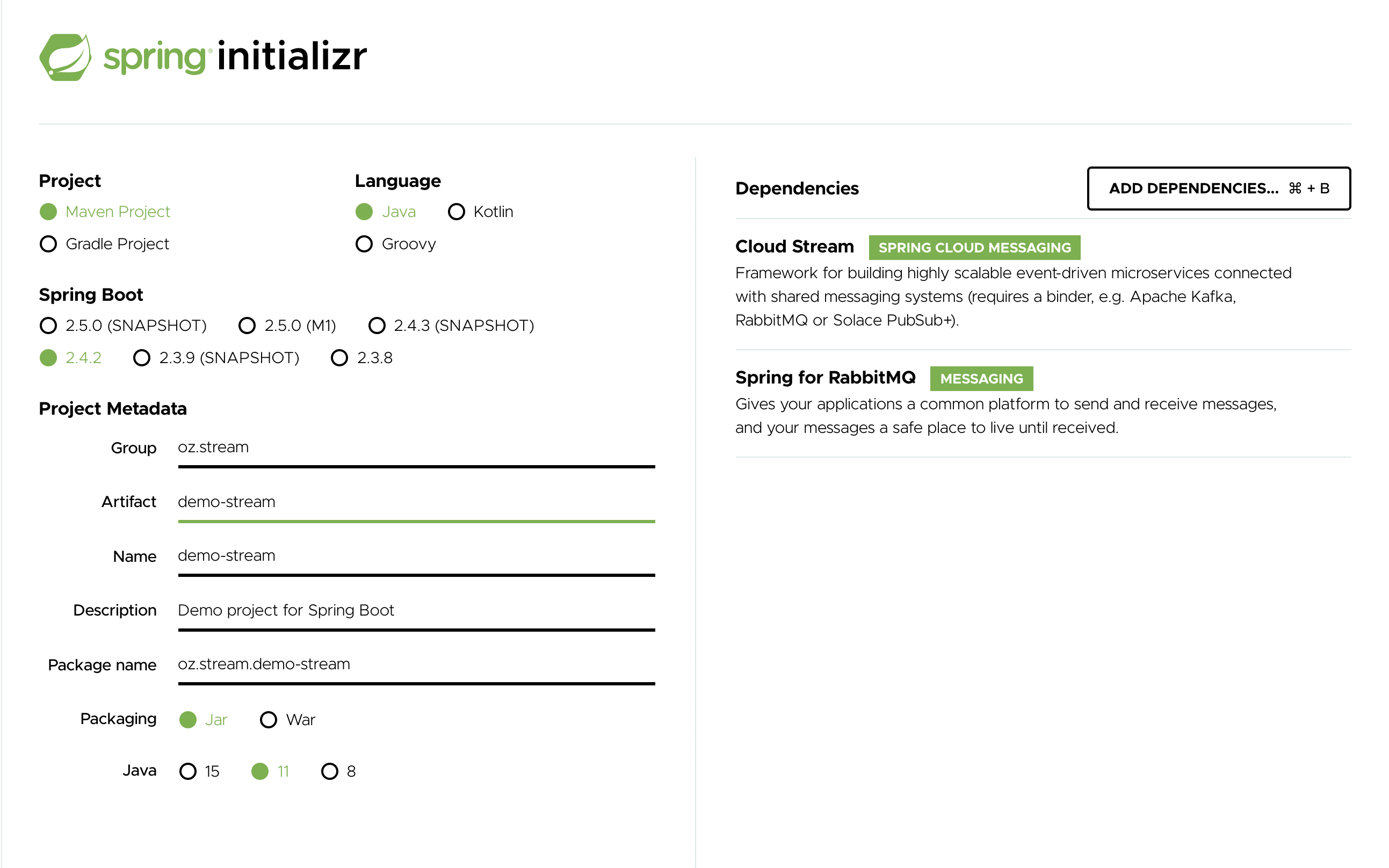
Artifact 字段的值将成为应用程序名称。 如果你选择了 RabbitMQ 作为中间件,那么你的 Spring Initializr 应该现在如下所示:
-
点击 生成项目 按钮。
这样做会将生成项目的压缩包下载到您的硬盘上。
-
解压缩文件到你想用作项目目录的文件夹。
| 我们鼓励您探索 Spring Initializr 提供的多种可能性。 它可以让您创建许多不同类型的 Spring 应用程序。 |
导入项目到您的IDE
现在您可以将项目导入到您的IDE中。请注意,这取决于IDE,可能需要遵循特定的导入过程。例如,无论项目是如何生成(Maven或Gradle),您可能需要遵循特定的导入过程(例如,在Eclipse或STS中,您需要使用“文件”→“导入”→“Maven”→“现有Maven项目”。)
导入后,项目不应有任何错误。此外,src/main/java 应包含 com.example.loggingconsumer.LoggingConsumerApplication。
从技术上讲,在这一点上,您可以运行主类的应用程序。</p> <p>它已经是有效的 Spring Boot 应用程序。</p> <p>但是,它什么也不做,所以我们要添加一些代码。
添加消息处理器、生成和运行
修改 com.example.loggingconsumer.LoggingConsumerApplication 类,使其看起来如下所示:
@SpringBootApplication
public class LoggingConsumerApplication {

	public static void main(String[] args) {
		SpringApplication.run(LoggingConsumerApplication.class, args);
	}

	@Bean
	public Consumer<Person> log() {
	    return person -> {
	        System.out.println("Received: " + person);
	    };
	}

	public static class Person {
		private String name;
		public String getName() {
			return name;
		}
		public void setName(String name) {
			this.name = name;
		}
		public String toString() {
			return this.name;
		}
	}
}
正如前面的代码示例中所示:
-
我们使用函数式编程模型(参见Spring Cloud Function 支持)来定义一个消息处理程序作为
Consumer。 -
我们依靠框架约定来绑定此类处理程序到绑定器公开的输入目标绑定。
这样做还可以看到框架的核心功能之一:它试图自动将传入的消息有效负载转换为类型Person。
您现在拥有了一个功能齐全的Spring Cloud Stream应用程序,它侦听消息。从这里开始,为了简单起见,我们假设您在第一步中选择了RabbitMQ。假设您已安装并运行了RabbitMQ,您可以通过在IDE中运行其main方法来启动该应用。
您应该看到以下输出:
	--- [ main] c.s.b.r.p.RabbitExchangeQueueProvisioner : declaring queue for inbound: input.anonymous.CbMIwdkJSBO1ZoPDOtHtCg, bound to: input
	--- [ main] o.s.a.r.c.CachingConnectionFactory       : Attempting to connect to: [localhost:5672]
	--- [ main] o.s.a.r.c.CachingConnectionFactory       : Created new connection: rabbitConnectionFactory#2a3a299:0/SimpleConnection@66c83fc8. . .
	. . .
	--- [ main] o.s.i.a.i.AmqpInboundChannelAdapter      : started inbound.input.anonymous.CbMIwdkJSBO1ZoPDOtHtCg
	. . .
--- [ main] c.e.l.LoggingConsumerApplication : Started LoggingConsumerApplication in 2.531 seconds (JVM running for 2.897)转到RabbitMQ管理控制台或其他任何RabbitMQ客户端,并向input.anonymous.CbMIwdkJSBO1ZoPDOtHtCg发送消息。代码anonymous.CbMIwdkJSBO1ZoPDOtHtCg部分表示组名称,因此在您的环境中可能不同。要使用更可预测的内容,请通过设置spring.cloud.stream.bindings.input.group=hello(或您喜欢的任何名称)使用显式组名称。
消息内容应该是Person类的JSON表示形式,如下所示:
{"name":"Sam Spade"}
然后,在您的控制台中,您应该看到:
Received: Sam Spade
您还可以通过使用./mvnw clean install构建和打包应用程序,然后使用java -jar命令运行构建的JAR。
现在,您拥有了一个工作(尽管非常基础)的Spring Cloud Stream应用程序。
Spring 表达式语言(SpEL)在流式数据的上下文中
在整个参考手册中,您会遇到许多使用Spring表达式语言(SpEL)的功能和示例。了解它在使用时的一些限制是很重要的。
SpEL 给你访问当前消息以及你正在运行的应用程序上下文的权限。您需要了解 SpEL 可以查看哪种类型的数据,尤其是在传入消息的上下文中。这很重要。从代理接收到的消息是以字节数组(byte[])的形式到达。It is then transformed to a 0 by the binders whereas you can see the payload of the message maintains its raw form. 消息的头部是 <String, Object>,其中值通常为另一个基本类型或基本类型的集合/数组,因此是 Object。它是因为绑定器不知道所需的输入类型,因为它无法访问用户代码(函数)。所以,消息传递有效地将包含有效负载和消息头中可读元数据的消息传递给绑定器,就像信件通过邮件传递一样。这意味著虽然可以访问消息的有效内容,但您只能将其作为原始数据访问(即。e., byte[].)而且对于开发人员来说,要求能够以具体类型访问有效负载对象的字段的SpEL访问可能是非常常见的(例如。g., Foo, Bar 等等),你可以想象这样做会有多困难,甚至是不可能的。这里有一个示例来演示问题;想象你有一个路由表达式,可以根据payload类型将请求路由到不同的函数。此要求将意味着从字节数组到特定类型的有效载荷转换,然后应用SpEL。(但是,为了执行这种转换,我们需要知道要传递给转换器的实际类型,这来自于我们不知道哪一个的函数签名。)一种更好的解决此需求的方法是将类型信息作为消息头传递 (e.g., application/json;type=foo.bar.Baz ).你将获得一个清晰易读的String值,该值可以被访问并在一年内轻松评估的SpEL表达式使用。
此外,使用有效负载进行路由决策被认为是极不好的做法,因为有效负载被视为特权数据——仅应由最终收件人读取的数据。再次以邮件投递类比,你不会希望邮差打开你的信封并阅读信件内容来做出一些投递决策。这里也适用同样的概念,尤其是当在生成消息时包含此类信息相对容易时。它强制执行了与在网络上传输的数据设计相关的某种纪律,并确定哪些部分数据可以视为公开的,哪些是特权的。
Spring Cloud Stream 简介
Spring Cloud Stream 是一个构建消息驱动微服务应用程序的框架。</p><p>Spring Cloud Stream 建立在 Spring Boot 之上,创建独立的、生产就绪的 Spring 应用程序,并使用 Spring 集成提供与消息代理的连接。它提供了来自多个提供商的中间件的有意见配置,引入了持久发布-订阅语义、消费者组和分区的概念。
通过向应用程序的类路径添加 0 依赖项,您可以立即连接到提供的 1 绑定公开的消息代理(稍后详细介绍),并实现基于传入消息运行的业务需求,这是一个 2。
以下代码清单展示了一个简单的示例:
@SpringBootApplication
public class SampleApplication {

	public static void main(String[] args) {
		SpringApplication.run(SampleApplication.class, args);
	}

    @Bean
	public Function<String, String> uppercase() {
	    return value -> value.toUpperCase();
	}
}
以下列表显示了相应的测试:
@SpringBootTest(classes =  SampleApplication.class)
@Import({TestChannelBinderConfiguration.class})
class BootTestStreamApplicationTests {

	@Autowired
	private InputDestination input;

	@Autowired
	private OutputDestination output;

	@Test
	void contextLoads() {
		input.send(new GenericMessage<byte[]>("hello".getBytes()));
		assertThat(output.receive().getPayload()).isEqualTo("HELLO".getBytes());
	}
}
Main Concepts
Spring Cloud Stream 提供了许多抽象和原语,简化了消息驱动微服务应用程序的编写。本节概述了以下内容:
应用程序模型
一个Spring Cloud Stream应用程序由中间件无关的核心组成。该应用程序通过在外部代理提供的目标和代码中的输入/输出参数之间建立绑定来与外界通信。用于建立绑定所需的特定于代理的细节由特定于中间件的Binder实现处理。
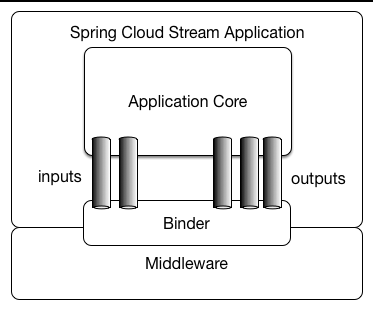
胖JAR
可以在 IDE 中以独立模式运行 Spring Cloud Stream 应用程序进行测试。
要在生产环境中运行 Spring Cloud Stream 应用程序,可以使用 Maven 或 Gradle 提供的标准 Spring Boot 工具创建可执行(“胖”)JAR。有关详细信息,请参阅Spring Boot 参考指南。
Spring 框架的绑定器抽象
Spring Cloud Stream 提供了 Kafka 和 Rabbit MQ 的 Binder 实现。
该框架还包含用于测试您的应用程序作为 spring-cloud-stream 应用程序的测试绑定器。有关更多详细信息,请参阅测试部分。
绑定器抽象也是框架的扩展点之一,这意味着你可以在Spring Cloud Stream之上实现自己的binder。
在社区成员撰写的从零创建一个Spring Cloud Stream Binder文章中,详细记录了步骤和示例,其中步骤也高亮在Implementing Custom Binders部分。
Spring Cloud Stream 使用 Spring Boot 进行配置,Binder 抽象使得 Spring Cloud Stream 应用程序能够灵活地连接到中间件。例如,在运行时,部署器可以动态选择外部目标(如 Kafka 主题或 RabbitMQ 交换)与消息处理程序的输入和输出之间的映射关系(比如函数的输入参数及其返回值)。这种配置可以通过外部配置属性提供,并采用任何 Spring Boot 支持的形式(包括应用程序参数、环境变量以及 application.yml 或 application.properties 文件)。在 介绍 Spring Cloud Stream 部分中的接收器示例中,将 spring.cloud.stream.bindings.input.destination 应用程序属性设置为 raw-sensor-data 将使其从 raw-sensor-data Kafka 主题或绑定到 raw-sensor-data RabbitMQ 交换的队列中读取数据。
Spring Cloud Stream在类路径上自动检测并使用绑定程序。您可以使用相同的代码使用不同的中间件。要执行此操作,请在构建时包含不同的绑定程序。对于更复杂的用例,您还可以将多个绑定程序打包到应用程序中,并让它选择绑定程序(甚至在运行时是否对不同绑定程序使用不同的绑定程序)。
可持久化发布-订阅支持
应用程序之间的通信遵循发布-订阅模型,在此模型中,数据通过共享的主题进行广播。 这在以下图中可以看得到,该图显示了一组交互式 Spring Cloud Stream 应用程序的典型部署。
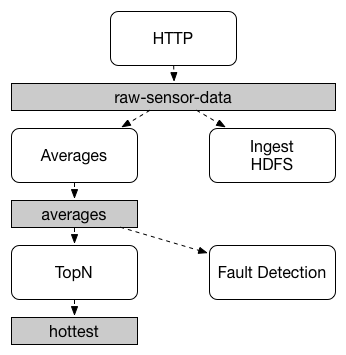
传感器上报到HTTP端点的数据会被发送到一个名为 raw-sensor-data 的公共目的地。
从该目的地,数据会由一个微服务应用程序独立处理,该应用程序计算时间窗口平均值,另一个微服务应用程序将原始数据写入HDFS(Hadoop分布式文件系统)。
为了处理数据,两个应用程序在运行时都将该主题声明为它们的输入。
发布-订阅通信模型可以减少生产者和使用者的复杂性,并允许在不影响现有流程的情况下添加新应用程序。 例如,在平均值计算应用程序下游,您可以添加一个用于计算显示和监视最高温度值的应用程序。 然后,您可以添加另一个应用程序来解释相同的平均值流进行故障检测。 通过共享主题而不是点对点队列执行所有通信来减少微服务之间的耦合。
虽然发布-订阅消息的概念并不新鲜,但Spring Cloud Stream为其应用程序模型增添了更明确的选择。 通过使用原生中间件支持,Spring Cloud Stream也简化了在不同平台上的发布-订阅模型的使用。
消费者组
虽然发布-订阅模型通过共享主题使连接应用程序变得容易,但通过创建给定应用程序的多个实例来扩展的能力也同样重要。 当这样做时,应用程序的不同实例被置于竞争消费者关系中,其中一个实例期望处理给定消息。
Spring Cloud Stream 通过“消费者组”概念来模拟这种行为。
(Spring Cloud Stream 的消费者组与 Kafka 消费者组类似且受到其启发。)
每个消费者绑定都可以使用 spring.cloud.stream.bindings.<bindingName>.group 属性来指定组名称。
对于下图中的消费者,此属性应设置为 spring.cloud.stream.bindings.<bindingName>.group=hdfsWrite 或 spring.cloud.stream.bindings.<bindingName>.group=average。
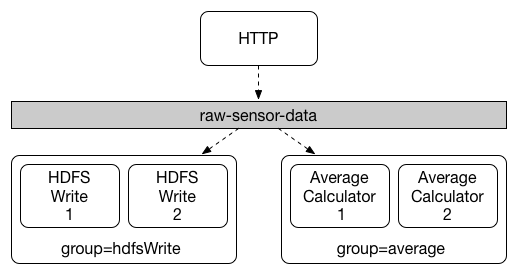
所有订阅给定目标的组都会收到已发布数据的副本,但每个组只有一个成员从该目标接收给定消息。默认情况下,当未指定组时,Spring Cloud Stream 将应用程序分配到一个匿名且独立的单成员消费者组,该组与所有其他消费者组处于发布-订阅关系。
消费者类型
支持两种类型的消费者:<br/>
-
消息驱动(有时称为异步)
-
轮询(有时称为同步)
在2.0版本之前,仅支持异步消费者。只要消息可用且有线程可以处理它,就会立即传递该消息。
当您希望控制消息处理的速率时,可能需要使用同步消费者。
耐用性
与 Spring Cloud Stream 的约定式应用程序模型一致,消费者组订阅是持久的。<br/>也就是说,绑定器实现确保了组订阅是持久化的,并且一旦为该组创建至少一个订阅,即使在组中的所有应用程序都停止时发送消息,该组也会收到这些消息。
|
匿名订阅本质上是非持久化的。<br/>对于某些绑定器实现(例如 RabbitMQ),可以拥有非持久化组订阅。 |
通常情况下,当将应用程序绑定到给定目标时,最好始终指定一个消费者组。在扩展 Spring Cloud Stream 应用程序时,您必须为每个输入绑定指定一个消费者组。这样做可以防止应用程序实例接收到重复的消息(除非需要这种行为,但这种情况很少见)。
分区支持
Spring Cloud Stream 提供了对多个给定应用程序实例之间数据分区的支持。 在分区场景中,物理通信介质(如消息代理主题)被视作由多个分区组成。 一个或多个生产者应用程序实例向多个消费者应用程序实例发送数据,并确保具有相同特征的数据由同一消费者实例处理。
Spring Cloud Stream 提供了一个通用抽象,用于以统一的方式实现分区处理用例。 因此,无论代理本身是否自然地进行分区(例如,Kafka),还是没有进行分区(例如,RabbitMQ),都可以使用分区。
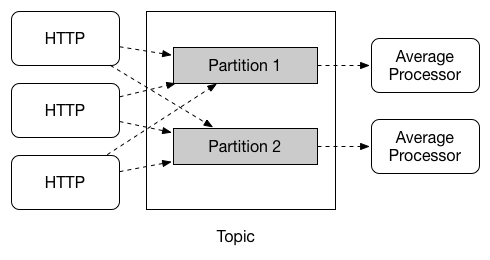
分区是无状态处理中的关键概念,从性能或一致性角度来说,确保相关数据一起处理至关重要。 例如,在基于时间窗口的平均值计算示例中,重要的是确保同一应用程序实例处理来自任何给定传感器的所有测量值。
| 要设置分区处理场景,您必须同时配置数据生成端和数据消费端。 |
编程模型
要了解编程模型,您应该熟悉以下核心概念:
-
目标绑定器:负责提供与外部消息系统集成的功能。
-
Bindings: 作为外部消息系统与应用程序提供的 Producers 和 Consumers 之间的桥梁(由 Destination Binders 创建)。
-
消息:由生产者和使用者使用,与目标绑定器通信(从而通过外部消息传递系统与其他应用程序通信)。
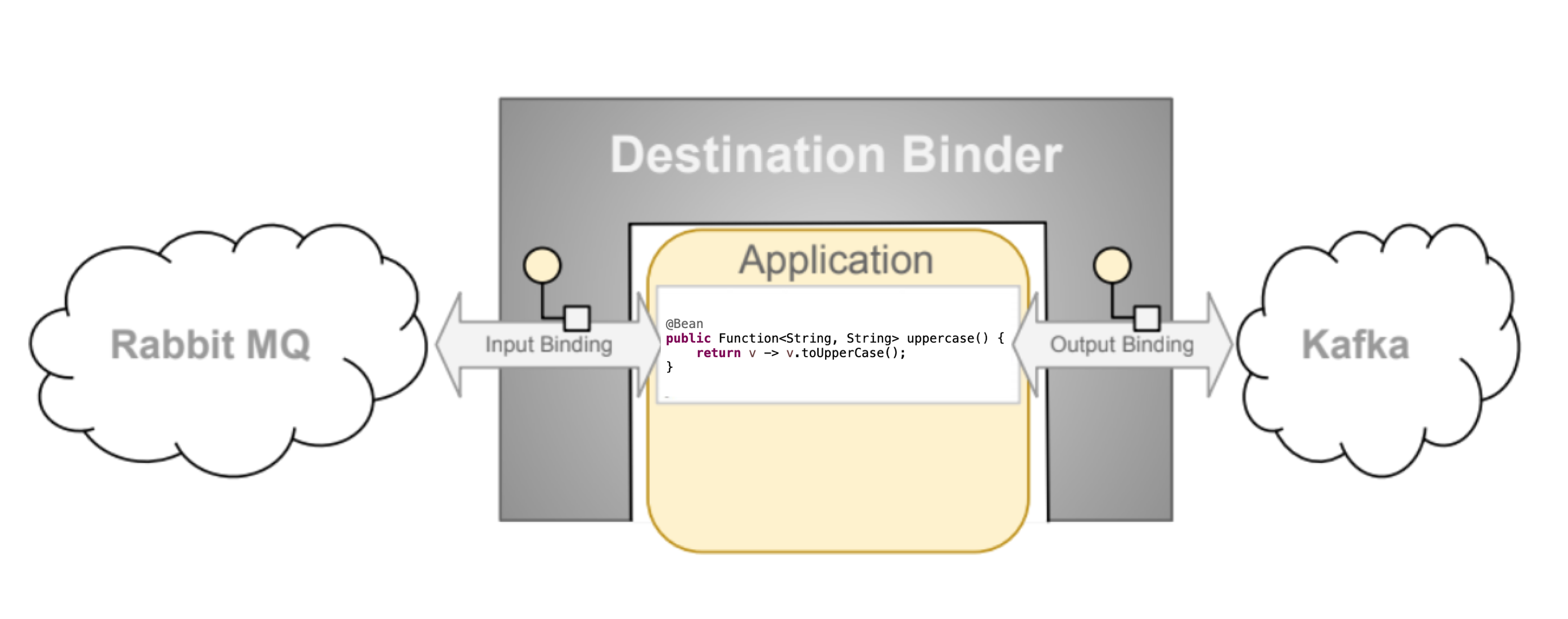
目标绑定器
目的地绑定器是Spring Cloud Stream的扩展组件,负责提供必要的配置和实现,以促进与外部消息系统集成。</p><p>此集成负责连接、委托和消息的路由,以及数据类型转换、用户代码的调用等。
绑定器处理了原本应该由您承担的大量样板责任。然而,为了实现这一点,绑定器仍然需要用户提供的最小但必需的指令集形式的帮助,这通常采用某种类型的绑定配置形式。
虽然本节不在此处讨论所有可用的绑定器和绑定配置选项(手册其余部分对此有详尽介绍), 绑定 这个概念需要特别关注。下一节将详细讨论。
Bindings
如前所述,绑定提供了外部消息传递系统(例如,队列、主题等)与应用程序提供的生产者和消费者之间的桥梁。
以下示例显示了一个完全配置且正常运行的 Spring Cloud Stream 应用程序,该应用程序接收消息的有效负载作为 String 类型(参见内容类型协商部分),将其记录到控制台,并在转换为大写后将其发送到下游。
@SpringBootApplication
public class SampleApplication {

	public static void main(String[] args) {
		SpringApplication.run(SampleApplication.class, args);
	}

	@Bean
	public Function<String, String> uppercase() {
	    return value -> {
	        System.out.println("Received: " + value);
	        return value.toUpperCase();
	    };
	}
}
上面的示例看起来与任何普通的 Spring Boot 应用程序都没有区别。它定义了单个类型为 Function 的 Bean,仅此而已。那么它是如何变成一个 Spring Cloud Stream 应用程序的?
因为它在类路径中存在 Spring Cloud Stream 和 Binder 依赖以及自动配置类,从而有效地将您的 Boot 应用程序设置为 Spring Cloud Stream 应用程序上下文。
在这个上下文中,Supplier、Function 或 Consumer 类型的 Bean 被视为默认的消息处理程序,触发绑定由提供的 Binder 提供的目的地,并遵循某些命名约定和规则以避免额外的配置。
绑定和绑定名
绑定是抽象,表示桥接器,该抽象公开了绑定程序和用户代码之间的源和目标, 此抽象有一个名称,并且虽然我们试图尽量减少运行spring-cloud-stream应用程序所需的配置量,但了解此类名称(s)对于需要附加每个绑定配置的情况是必要的。
在整个手册中,您会看到例如spring.cloud.stream.bindings.input.destination=myQueue这样的配置属性。此属性名称中的input段称为绑定名称,它可以使用各种机制派生。下一节将介绍spring-cloud-stream使用的命名约定和配置元素,以控制绑定名称。
如果你的绑定名包含特殊字符,比如数字.,那么你需要用括号([])把绑定键括起来,然后再用引号括住它。例如spring.cloud.stream.bindings."[my.output.binding.key]".destination。 |
功能绑定名称
与之前版本中使用的注释支持(遗留)所需的显式命名不同,编程模型的函数式默认情况下在绑定名称方面采用简单的约定,从而大大简化了应用程序配置。让我们看一下第一个示例:
@SpringBootApplication
public class SampleApplication {

	@Bean
	public Function<String, String> uppercase() {
	    return value -> value.toUpperCase();
	}
}
在前述示例中,我们有一个应用程序,其中包含一个单一的功能,该功能充当消息处理程序。作为Function,它具有一个输入和一个输出。
The naming convention used to name input and output bindings is as follows:
-
input -
<functionName> + -in- + <index> -
output -
<functionName> + -out- + <index>
代码in和out对应绑定的类型(例如输入或输出)。index是输入或输出绑定的索引。对于典型的单个输入/输出函数,它的值总是0,因此仅适用于具有多个输入和输出参数的函数。
例如,如果您希望将此函数的输入映射到名为“my-topic”的远程目标(如主题、队列等),您可以通过以下属性来实现:
--spring.cloud.stream.bindings.uppercase-in-0.destination=my-topic
请注意如何在属性名称中使用 uppercase-in-0 作为段。对于 uppercase-out-0 的情况也是一样。
说明绑定名称
有时为了提高可读性,您可能希望给绑定提供更具描述性的名称(例如 'account'、'orders' 等)。另一种理解方式是您可以将 隐式绑定名 映射到 显式绑定名。并且您可以使用spring.cloud.stream.function.bindings.<binding-name>属性来实现这一点。此属性还为依赖于需要明确名称的基于自定义接口的现有应用程序提供了迁移路径。
例如,
--spring.cloud.stream.function.bindings.uppercase-in-0=input
在前面的示例中,您映射并有效地将 uppercase-in-0 绑定名称重命名为 input。现在所有配置属性都可以引用 input 绑定名称(例如,--spring.cloud.stream.bindings.input.destination=my-topic)。
虽然描述性的绑定名称可以提高配置的可读性,但它们也会通过将隐式绑定名称映射到显式绑定名称而创建另一个误导层次。并且由于所有后续配置属性都将使用显式绑定名称,因此您必须始终引用此“bindings”属性来关联它实际上对应哪个函数。我们相信对于大多数情况(除了功能组合),这可能是一种过度设计,所以我们的建议是完全避免使用它,尤其是因为不使用它可以清楚地在绑定器目标和绑定名称之间建立路径,例如spring.cloud.stream.bindings.uppercase-in-0.destination=sample-topic,其中您清晰地将uppercase函数的输入与sample-topic目标相关联。 |
有关属性和其他配置选项的更多信息,请参阅配置选项部分。
显式绑定创建
在上一节中,我们解释了绑定是如何隐式创建的,由您的应用程序提供的Function、Supplier或Consumer个 bean 的名称驱动。
但是,有时您可能需要显式创建绑定,这些绑定不受任何功能约束。这通常用于通过StreamBridge支持与其他框架的集成。
Spring Cloud Stream 允许你通过 spring.cloud.stream.input-bindings 和 spring.cloud.stream.output-bindings 属性显式地定义输入和输出绑定。请注意到这些属性名是复数形式,这意味着你可以通过使用 ; 作为分隔符来定义多个绑定。
现在就看下面这个测试用例吧。
@Test
public void testExplicitBindings() {
	try (ConfigurableApplicationContext context = new SpringApplicationBuilder(
		TestChannelBinderConfiguration.getCompleteConfiguration(EmptyConfiguration.class))
				.web(WebApplicationType.NONE)
				.run("--spring.jmx.enabled=false",
					"--spring.cloud.stream.input-bindings=fooin;barin",
					"--spring.cloud.stream.output-bindings=fooout;barout")) {


	. . .
	}
}

@EnableAutoConfiguration
@Configuration
public static class EmptyConfiguration {
}
如您所见,我们已经声明了两个输入绑定和两个输出绑定,而我们的配置中没有定义任何函数,但我们仍然能够成功创建这些绑定并访问其相应的通道。
消息的生产和消费
您可以通过编写函数并将其作为 @Bean s 来编写一个 Spring Cloud Stream 应用程序。
您也可以使用基于注解的 Spring Integration 配置或
基于注解的 Spring Cloud Stream 配置,尽管从 spring-cloud-stream 3.x 开始
我们推荐使用函数式实现。
支持 Spring Cloud 函数
概述
从 Spring Cloud Stream v2.1 开始,定义 流处理程序 和 源 的另一种替代方法是使用内置的 Spring Cloud Function 支持,其中它们可以作为类型为 java.util.function.[Supplier/Function/Consumer] 的 Bean 表达。
要指定绑定到由绑定公开的外部目标的功能性 bean,您必须提供spring.cloud.function.definition属性。
In the event you only have single bean of type java.util.function.[Supplier/Function/Consumer], you can
skip the spring.cloud.function.definition property, since such functional bean will be auto-discovered. However,
it is considered best practice to use such property to avoid any confusion.
Some time this auto-discovery can get in the way, since single bean of type java.util.function.[Supplier/Function/Consumer]
could be there for purposes other then handling messages, yet being single it is auto-discovered and auto-bound.
For these rare scenarios you can disable auto-discovery by providing spring.cloud.stream.function.autodetect property with value set to false. |
这里是将消息处理器作为 java.util.function.Function 公开的应用程序示例,通过充当数据的消费者和生产者,有效地支持
传递 语义。
@SpringBootApplication
public class MyFunctionBootApp {

	public static void main(String[] args) {
		SpringApplication.run(MyFunctionBootApp.class);
	}

	@Bean
	public Function<String, String> toUpperCase() {
		return s -> s.toUpperCase();
	}
}
在前面的示例中,我们定义了一个类型为 java.util.function.Function 的 Bean,称为 toUpperCase,作为消息处理器,其 'input' 和 'output' 必须绑定到由提供的目的地绑定器公开的外部目标。默认情况下,'input' 和 'output' 绑定名称将是 toUpperCase-in-0 和 toUpperCase-out-0。有关用于建立绑定名称的命名约定的详细信息,请参阅函数式绑定名称部分。
以下是支持其他语义的简单功能应用程序的示例:
这是作为java.util.function.Supplier暴露的source语义的一个示例
@SpringBootApplication
public static class SourceFromSupplier {

	@Bean
	public Supplier<Date> date() {
		return () -> new Date(12345L);
	}
}
以下是作为java.util.function.Consumer暴露的sink semantics的示例
@SpringBootApplication
public static class SinkFromConsumer {

	@Bean
	public Consumer<String> sink() {
		return System.out::println;
	}
}
提供商(源)
Function 和 Consumer 在调用触发方式上非常直接。它们是基于发送到绑定的目标的数据(事件)来触发的。换句话说,它们是经典的事件驱动组件。
然而,Supplier在其触发方面属于一个独立的类别。因为根据定义,它是数据的源(起点),所以它不订阅任何入站目标,并且必须通过其他机制来触发。
另外还有一个关于Supplier实现的问题,它可以是指令式或响应式的,这直接与这类提供商的触发相关。
考虑以下示例:
@SpringBootApplication
public static class SupplierConfiguration {

	@Bean
	public Supplier<String> stringSupplier() {
		return () -> "Hello from Supplier";
	}
}
前面的Supplier Bean 在每次调用其get()方法时都会生成一个字符串。但是,谁来调用此方法以及调用频率如何?
框架提供了一个默认轮询机制(回答“谁?”的问题),该机制将触发提供商的调用,默认情况下每秒执行一次(回答“多频繁?”的问题)。
换句话说,上述配置会每秒钟生成一条消息,每条消息发送到由绑定器公开的output目标。轮询配置属性部分了解如何自定义轮询机制。
考虑一个不同的例子:
@SpringBootApplication
public static class SupplierConfiguration {

    @Bean
    public Supplier<Flux<String>> stringSupplier() {
        return () -> Flux.fromStream(Stream.generate(new Supplier<String>() {
            @Override
            public String get() {
                try {
                    Thread.sleep(1000);
                    return "Hello from Supplier";
                } catch (Exception e) {
                    // ignore
                }
            }
        })).subscribeOn(Schedulers.elastic()).share();
    }
}
前面的 Supplier bean 采用了响应式编程风格。通常情况下,与命令式提供商不同,它应该只触发一次,因为调用其 get() 方法会生成(提供)连续的消息流,而不是单个消息。
该框架能够识别编程风格上的差异,并保证此类提供商仅被触发一次。
然而,设想一种使用场景,你希望轮询某个数据源并返回一个有限的数据流来表示结果集。响应式编程风格是这种Supplier的理想机制。但是,由于产生的数据流具有有限性,这样的Supplier仍然需要定期调用。
考虑下面的示例,该示例通过生成有限的数据流来模拟这种使用情况:
@SpringBootApplication
public static class SupplierConfiguration {

	@PollableBean
	public Supplier<Flux<String>> stringSupplier() {
		return () -> Flux.just("hello", "bye");
	}
}
该 Bean 本身使用 PollableBean 注解(@Bean 的子集),从而向框架发出信号,表明尽管此类提供商的实现是响应式的,但仍需要轮询。
在PollableBean中定义了splittable属性,该属性向此注解的后处理器发出信号,表明由带注解组件生成的结果必须进行拆分,默认情况下设置为true。这意味着框架会将返回的消息逐个拆分成单独消息发送出去。如果这不是期望的行为,则可以将其设置为false,此时提供商将简单地返回生成的Flux而不进行拆分。 |
提供商与线程
到目前为止,您已经了解到,与由事件触发(具有输入数据)的Function和Consumer不同,Supplier没有任何输入,因此通过不同的机制——轮询器来触发。该机制可能有不可预测的线程处理机制。虽然在大多数情况下,线程处理机制的具体细节对函数的下游执行并不重要,但在某些情况下可能会出现问题,特别是对于那些对线程关联性有一定期望的集成框架。例如,Spring Cloud Sleuth依赖于存储在线程本地的跟踪数据。针对这些情况,我们提供了另一种通过 |
消费者(响应式)
响应式 Consumer 稍微有点特殊,因为它有一个空的返回类型,使得框架无法引用订阅。
你很可能不需要编写 Consumer<Flux<?>>,而是将其写成一个在流上作为最后一个操作符调用 then
操作符的 Function<Flux<?>, Mono<Void>>。
例如:
public Function<Flux<?>, Mono<Void>> consumer() {
	return flux -> flux.map(..).filter(..).then();
}
但是,如果您确实需要编写显式的Consumer<Flux<?>>,请记得订阅传入的Flux。
另外,请记住,当混合使用响应式和命令式函数时,同样的规则适用于函数组合。Spring Cloud Function确实支持将响应式函数与命令式函数进行组合,但您必须意识到某些限制。
例如,假设您已经将响应式函数与命令式消费者进行了组合。
这种组合的结果是一个响应式的Consumer。然而,正如本节前面所述,无法订阅这样的消费者,因此只能通过使您的消费者变为响应式并手动订阅(如前所述),或者将您的函数更改为命令式来解决此限制。
轮询配置属性
Spring Cloud Stream公开了以下属性,并使用spring.integration.poller.作为前缀:
- 固定延迟
-
默认轮询器的固定延迟,单位为毫秒。
默认值:1000L。
- 每轮询的最大消息数
-
默认轮询器每次轮询事件的最大消息数。
默认值:1L。
- 定时任务
-
定时器触发器的Cron表达式值。
默认值为 no.
- 初始延迟
-
周期性触发器的初始延迟。
默认值:0。
- 时间单位
-
延迟值应用的时间单位。
默认值:MILLISECONDS。
例如 --spring.integration.poller.fixed-delay=2000 将轮询间隔设置为每两秒轮询一次。
单绑定转导配置
上一节展示了如何配置一个应用于所有绑定的单个默认轮询器。虽然这与微服务模型非常吻合,spring-cloud-stream专为每个微服务代表一个单一组件(例如Supplier)而设计,因此默认轮询器配置已足够;但在某些边缘情况下,您可能有多个需要不同轮询配置的组件。
对于这些情况,请使用每个绑定的方式配置轮询器。例如,假设您有一个输出绑定supply-out-0。在这种情况下,可以使用spring.cloud.stream.bindings.supply-out-0.producer.poller..前缀为该绑定配置轮询器(例如,spring.cloud.stream.bindings.supply-out-0.producer.poller.fixed-delay=2000)。
将任意数据发送到输出(例如外部事件驱动源)
在某些情况下,数据的实际来源可能来自外部(非绑定器)系统。例如,数据源可能是传统的REST端点。我们如何将此类数据源与spring-cloud-stream使用的功能机制联系起来?
Spring Cloud Stream 提供了两种机制,让我们更详细地了解它们
在这里,对于两个示例,我们将使用一个标准的MVC端点方法delegateToSupplier绑定到根web上下文,通过StreamBridge机制将传入请求委托给流。
@SpringBootApplication
@Controller
public class WebSourceApplication {

	public static void main(String[] args) {
		SpringApplication.run(WebSourceApplication.class, "--spring.cloud.stream.output-bindings=toStream");
	}

	@Autowired
	private StreamBridge streamBridge;

	@RequestMapping
	@ResponseStatus(HttpStatus.ACCEPTED)
	public void delegateToSupplier(@RequestBody String body) {
		System.out.println("Sending " + body);
		streamBridge.send("toStream", body);
	}
}
在这里,我们自动装配了一个 StreamBridge Bean,它允许我们将数据发送到输出绑定中,从而有效地将非流应用程序与 Spring Cloud Stream 进行连接。请注意,在前面的例子中没有定义任何源函数(例如 Supplier Bean),这使得框架在事先无法创建源绑定(这是配置包含函数 Bean 的典型情况)。不过没关系,因为 StreamBridge 将会在第一次调用其 send(..) 操作时启动创建输出绑定(以及必要时的目的地自动提供)过程,并缓存这些绑定以便后续重用(更多细节请参阅StreamBridge 和动态目的地)。
然而,如果您希望在初始化(启动)时预先创建输出绑定,则可以利用spring.cloud.stream.output-bindings属性,在该属性中声明您的源名称。提供的名称将用作触发器来创建源绑定。;可用于表示多个源(多个输出绑定),例如:--spring.cloud.stream.output-bindings=foo;bar
另外,请注意streamBridge.send(..)方法需要一个Object作为数据。这意味着您可以发送POJO或Message,它在输出时会遵循与任何提供相同一致性级别的Function或Supplier相同的流程。
这表示,即使输出类型转换、分区等也如同来自函数的输出一样被遵守。
流桥接器和动态目标
StreamBridge 还可以用于输出目标未知的情况,类似于消费者路由到消费者部分描述的用例。
让我们看一下这个例子
@SpringBootApplication
@Controller
public class WebSourceApplication {

	public static void main(String[] args) {
		SpringApplication.run(WebSourceApplication.class, args);
	}

	@Autowired
	private StreamBridge streamBridge;

	@RequestMapping
	@ResponseStatus(HttpStatus.ACCEPTED)
	public void delegateToSupplier(@RequestBody String body) {
		System.out.println("Sending " + body);
		streamBridge.send("myDestination", body);
	}
}
如您所见,前面的示例与上一个非常相似,唯一的区别是通过spring.cloud.stream.output-bindings属性提供了显式的绑定说明(未提供)。在这里,我们向不存在绑定的myDestination名称发送数据。因此,该名称将被视为动态目标,如消费者路由部分所述。
在前面的例子中,我们使用ApplicationRunner作为外部源来填充流。
一个更实际的例子,其中外部资源是REST端点。
@SpringBootApplication
@Controller
public class WebSourceApplication {

	public static void main(String[] args) {
		SpringApplication.run(WebSourceApplication.class);
	}

	@Autowired
	private StreamBridge streamBridge;

	@RequestMapping
	@ResponseStatus(HttpStatus.ACCEPTED)
	public void delegateToSupplier(@RequestBody String body) {
		streamBridge.send("myBinding", body);
	}
}
从 delegateToSupplier 方法内部可以看到,我们正在使用 StreamBridge 将数据发送到 myBinding 绑定。在此过程中,您还可以利用 StreamBridge 的动态特性,如果 myBinding 不存在,则会自动创建并缓存,否则将使用现有的绑定。
缓存动态目标(绑定)可能会导致内存泄漏,特别是在存在大量动态目标的情况下。为了提供一定程度的控制,我们为输出绑定提供了自清除缓存机制,默认缓存大小为10。这意味着如果您的动态目标数量超过该数值,则有可能会清除现有的绑定并需要重新创建,这可能导致性能轻微下降。您可以通过设置spring.cloud.stream.dynamic-destination-cache-size属性来增加缓存大小,并将其设置为您所需的值。 |
curl -H "Content-Type: text/plain" -X POST -d "hello from the other side" http://localhost:8080/
通过展示两个示例,我们想强调该方法适用于任何类型的外部源。
如果使用的是 Solace PubSub+ 绑定,Spring Cloud Stream 已保留 scst_targetDestination 标头(可通过 BinderHeaders.TARGET_DESTINATION 获取),允许将消息从绑定配置的目标重定向到由该标头指定的目标目标。这使得绑定能够管理发布到动态目标所需的资源,从而减轻框架的负担,并避免了前一个注释中提到的缓存问题。更多信息 在这里。 |
使用 StreamBridge 输出内容类型
您还可以使用以下方法签名,提供特定的内容类型public boolean send(String bindingName, Object data, MimeType outputContentType)。
或者如果您发送的数据是Message,则会尊重其内容类型。
使用特定绑定程序类型的 StreamBridge
Spring Cloud Stream 支持多种绑定器场景。例如,您可能从 Kafka 接收数据并将其发送到 RabbitMQ。
有关多个绑定器场景的更多信息,请参阅绑定器部分以及特别说明的类路径上的多个绑定器
如果您计划使用StreamBridge并且在应用程序中配置了多个绑定器,则还必须告诉StreamBridge使用哪个绑定器。为此,send方法还有两种变体:
public boolean send(String bindingName, @Nullable String binderType, Object data)

public boolean send(String bindingName, @Nullable String binderType, Object data, MimeType outputContentType)
如您所见,您可以提供一个额外的参数binderType,告诉BindingService在创建动态绑定时使用哪个binder。
在使用 spring.cloud.stream.output-bindings 属性或绑定已在不同绑定器下创建的情况下,binderType 参数将不起作用。 |
使用通道拦截器与StreamBridge
由于StreamBridge使用MessageChannel来建立输出绑定,因此当通过StreamBridge发送数据时可以激活通道拦截器。
由应用程序决定在StreamBridge上应用哪些通道拦截器。
除非被标注为@GlobalChannelInterceptor(patterns = "*"),否则Spring Cloud Stream不会将检测到的所有通道拦截器注入StreamBridge。
假设您在应用程序中有以下两个不同的 StreamBridge 绑定。
streamBridge.send("foo-out-0", message);
和
streamBridge.send("bar-out-0", message);
现在,如果您希望在StreamBridge绑定上应用通道拦截器,则可以声明以下GlobalChannelInterceptor bean。
@Bean
@GlobalChannelInterceptor(patterns = "*")
public ChannelInterceptor customInterceptor() {
    return new ChannelInterceptor() {
        @Override
        public Message<?> preSend(Message<?> message, MessageChannel channel) {
            ...
        }
    };
}
然而,如果您不喜欢上述全局方法并希望为每个绑定都有专用拦截器,则可以执行以下操作。
@Bean
@GlobalChannelInterceptor(patterns = "foo-*")
public ChannelInterceptor fooInterceptor() {
    return new ChannelInterceptor() {
        @Override
        public Message<?> preSend(Message<?> message, MessageChannel channel) {
            ...
        }
    };
}
和
@Bean
@GlobalChannelInterceptor(patterns = "bar-*")
public ChannelInterceptor barInterceptor() {
    return new ChannelInterceptor() {
        @Override
        public Message<?> preSend(Message<?> message, MessageChannel channel) {
            ...
        }
    };
}
您可以根据业务需求灵活地使这些模式更加严格或自定义。
采用这种方法,应用程序能够决定在StreamBridge中注入哪些拦截器,而不是应用所有可用的拦截器。
StreamBridge通过StreamOperations接口提供了一个契约,其中包含了StreamBridge的所有send方法。因此,应用程序可以选择使用StreamOperations进行自动装配。当需要对使用StreamBridge的代码进行单元测试时,这非常方便,因为它可以为StreamOperations接口提供模拟或类似的机制。 |
响应式函数支持
由于Spring Cloud Function建立在Project Reactor之上,因此您无需做太多事情就可以从响应式编程模型中受益,在实现Supplier、Function或Consumer时。
例如:
@SpringBootApplication
public static class SinkFromConsumer {

	@Bean
	public Function<Flux<String>, Flux<String>> reactiveUpperCase() {
		return flux -> flux.map(val -> val.toUpperCase());
	}
}
|
选择响应式或命令式编程模型时必须理解一些重要的事项。 完全响应式还是仅API? 使用响应式 API 并不一定意味着您可以利用该 API 的所有响应式特性。换句话说,像背压和其他高级功能只有在与兼容系统(如 Reactive Kafka binder)一起工作时才能发挥作用。如果您正在使用常规的 Kafka 或 Rabbit 或任何其他非响应式绑定器,则只能受益于响应式 API 本身的便利性,而不能受益于其高级功能,因为实际的数据流源或目标并非响应式。 错误处理与重试 在本手册中,您会看到有关基于框架的错误处理、重试和其他功能以及与之相关的配置属性的多个引用。重要的是要明白,它们仅影响命令式函数,在涉及响应式函数时您不应该抱有相同的期望。而且这就是原因。 . .响应式和命令式函数之间存在根本性差异。命令式函数是框架在接收到每条消息时调用的消息处理器。对于N条消息,将会有N次调用此函数,并且由于这个原因我们可以包装这样的函数并添加额外的功能,例如错误处理、重试等。响应式函数是初始化函数。仅调用一次,用于获取用户提供的连接到框架所提供的Flux/Mono的引用。之后,我们(框架)对流就完全没有任何可见性或控制权了。因此,使用响应式函数时,您必须依赖响应式 API 的丰富功能来进行错误处理和重试(即。e., |
函数组合
使用函数式编程模型,您还可以从函数组合中获益,其中可以从一组简单函数动态组合复杂的处理器。作为示例,让我们将以下函数Bean添加到上面定义的应用程序中。
@Bean
public Function<String, String> wrapInQuotes() {
	return s -> "\"" + s + "\"";
}
并将spring.cloud.function.definition属性修改为反映您希望从‘toUpperCase’和‘wrapInQuotes’组合出新功能的意图。为此,Spring Cloud Function依赖于|(管道)符号。因此,要完成我们的示例,该属性现在将如下所示:
--spring.cloud.function.definition=toUpperCase|wrapInQuotes
| Spring Cloud Function 提供的功能组合支持的一个巨大优势是,你可以组合响应式函数和命令式函数。 |
组合的结果是一个单一的函数,正如您可能猜到的那样,这个函数可能会有一个很长且相当晦涩的名字(例如 foo|bar|baz|xyz. . .),这在配置其他属性时会带来很大的不便。这就是描述性绑定名称功能可以提供帮助的地方,该功能在函数式绑定名称部分有详细描述。
例如,如果我们想给我们的 toUpperCase|wrapInQuotes 起一个更具描述性的名字,我们可以使用以下属性 spring.cloud.stream.function.bindings.toUpperCase|wrapInQuotes-in-0=quotedUpperCaseInput 来实现这一点,并允许其他配置属性引用该绑定名称(例如,spring.cloud.stream.bindings.quotedUpperCaseInput.destination=myDestination)。
函数式组合与横切关注点
函数组合通过将复杂性分解为一组简单、可单独管理/测试的组件,有效地帮助您处理复杂性,这些组件在运行时仍可以表示为一个整体。但这并不是唯一的优点。
您也可以使用组合来解决某些横切的非功能性问题,例如内容增强。例如,假设您收到的消息可能缺少某些标题,或者某些标题并不处于您的业务功能所期望的状态。现在,您可以实现一个单独的功能来解决这些问题,然后将其与主要的业务功能组合起来。
让我们看一下这个例子
@SpringBootApplication
public class DemoStreamApplication {

	public static void main(String[] args) {
		SpringApplication.run(DemoStreamApplication.class,
				"--spring.cloud.function.definition=enrich|echo",
				"--spring.cloud.stream.function.bindings.enrich|echo-in-0=input",
				"--spring.cloud.stream.bindings.input.destination=myDestination",
				"--spring.cloud.stream.bindings.input.group=myGroup");

	}

	@Bean
	public Function<Message<String>, Message<String>> enrich() {
		return message -> {
			Assert.isTrue(!message.getHeaders().containsKey("foo"), "Should NOT contain 'foo' header");
			return MessageBuilder.fromMessage(message).setHeader("foo", "bar").build();
		};
	}

	@Bean
	public Function<Message<String>, Message<String>> echo() {
		return message -> {
			Assert.isTrue(message.getHeaders().containsKey("foo"), "Should contain 'foo' header");
			System.out.println("Incoming message " + message);
			return message;
		};
	}
}
虽然这个例子很简单,但它展示了如何通过一个函数向传入的消息添加额外的头信息(非功能需求),
以便另一个函数 - echo - 能够从中受益。echo 函数保持了简洁,并且只专注于业务逻辑。
您还可以看到使用 spring.cloud.stream.function.bindings 属性来简化组合绑定名称的方法。
具有多个输入和输出参数的函数
从版本 3.0 开始,Spring Cloud Stream 提供了对具有多个输入和/或多个输出(返回值)的函数的支持。这实际上意味着什么以及它针对的是哪种使用场景?
-
大数据:假设您处理的数据源高度无序,包含各种类型的数据元素(例如订单、交易等),并且您需要有效地整理这些数据。
-
数据聚合:另一个用例可能需要您合并来自两个或多个传入流的数据元素
上述仅描述了您可能需要使用单个函数来接受和/或生成多个数据流的一些用例。这正是我们这里的目标用例。
此外,请注意此处对流概念的强调略有不同。假设只有当这些函数能够访问实际的数据流(而不是单个元素)时,它们才具有价值。因此,我们依赖于Project Reactor提供的抽象(即Flux和Mono),它已经作为spring-cloud-functions引入的依赖项存在于类路径上。
另一个重要的方面是多个输入和输出的表示。虽然 Java 提供了多种不同的抽象来表示 多个事物,但这些抽象具有a) 无界性、b) 缺乏元数 和 c) 缺乏类型信息 这些重要特性。例如,我们来看一下Collection或者数组,它们只能用来描述单一类型的多个事物,或向上转换为一个Object,这会影响 Spring Cloud Stream 的透明类型转换功能等。
为了满足所有这些需求,初始支持依赖于使用 Project Reactor 提供的另一种抽象——Tuples 的签名。不过,我们正在努力实现更灵活的签名。
| 请参阅 绑定和绑定名称 部分,了解用于建立此类应用程序使用的 绑定名称 的命名约定。 |
让我们来看几个示例:
@SpringBootApplication
public class SampleApplication {

	@Bean
	public Function<Tuple2<Flux<String>, Flux<Integer>>, Flux<String>> gather() {
		return tuple -> {
			Flux<String> stringStream = tuple.getT1();
			Flux<String> intStream = tuple.getT2().map(i -> String.valueOf(i));
			return Flux.merge(stringStream, intStream);
		};
	}
}
上述示例演示了一个函数,该函数接受两个输入(第一个类型为String,第二个类型为Integer),并生成一个类型为String的输出。
因此,对于上面的例子,两个输入绑定将是 gather-in-0 和 gather-in-1,为了保持一致性,输出绑定也遵循相同的约定,并命名为 gather-out-0。
知道这一点将允许您设置绑定特定的属性。
例如,以下内容将覆盖 gather-in-0 绑定的 content-type:
--spring.cloud.stream.bindings.gather-in-0.content-type=text/plain
@SpringBootApplication
public class SampleApplication {

	@Bean
	public static Function<Flux<Integer>, Tuple2<Flux<String>, Flux<String>>> scatter() {
		return flux -> {
			Flux<Integer> connectedFlux = flux.publish().autoConnect(2);
			UnicastProcessor even = UnicastProcessor.create();
			UnicastProcessor odd = UnicastProcessor.create();
			Flux<Integer> evenFlux = connectedFlux.filter(number -> number % 2 == 0).doOnNext(number -> even.onNext("EVEN: " + number));
			Flux<Integer> oddFlux = connectedFlux.filter(number -> number % 2 != 0).doOnNext(number -> odd.onNext("ODD: " + number));

			return Tuples.of(Flux.from(even).doOnSubscribe(x -> evenFlux.subscribe()), Flux.from(odd).doOnSubscribe(x -> oddFlux.subscribe()));
		};
	}
}
前面的例子与上一个样本有些相反,演示了接收类型为Integer的单一输入并产生两种类型均为String的输出的功能。
因此,对于上述示例,输入绑定是 scatter-in-0,输出绑定是 scatter-out-0 和 scatter-out-1。
并且您可以用以下代码对其进行测试:
@Test
public void testSingleInputMultiOutput() {
	try (ConfigurableApplicationContext context = new SpringApplicationBuilder(
			TestChannelBinderConfiguration.getCompleteConfiguration(
					SampleApplication.class))
							.run("--spring.cloud.function.definition=scatter")) {

		InputDestination inputDestination = context.getBean(InputDestination.class);
		OutputDestination outputDestination = context.getBean(OutputDestination.class);

		for (int i = 0; i < 10; i++) {
			inputDestination.send(MessageBuilder.withPayload(String.valueOf(i).getBytes()).build());
		}

		int counter = 0;
		for (int i = 0; i < 5; i++) {
			Message<byte[]> even = outputDestination.receive(0, 0);
			assertThat(even.getPayload()).isEqualTo(("EVEN: " + String.valueOf(counter++)).getBytes());
			Message<byte[]> odd = outputDestination.receive(0, 1);
			assertThat(odd.getPayload()).isEqualTo(("ODD: " + String.valueOf(counter++)).getBytes());
		}
	}
}
单个应用程序中的多个功能
在某些情况下,可能需要在一个应用程序中分组多个消息处理器。您可以通过定义多个函数来实现此操作。
@SpringBootApplication
public class SampleApplication {

	@Bean
	public Function<String, String> uppercase() {
		return value -> value.toUpperCase();
	}

	@Bean
	public Function<String, String> reverse() {
		return value -> new StringBuilder(value).reverse().toString();
	}
}
在上面的例子中,我们有配置了两个函数uppercase和reverse。因此,首先,如前所述,我们需要注意到存在冲突(多个函数),所以需要通过提供指向实际要绑定的函数的spring.cloud.function.definition属性来解决它。但在这里我们将使用;分隔符来同时指向这两个函数(参见下面的测试用例)。
| 与具有多个输入/输出的函数类似,请参阅绑定和绑定名称部分,以了解用于建立此类应用程序使用的绑定名称的命名约定。 |
并且您可以用以下代码对其进行测试:
@Test
public void testMultipleFunctions() {
	try (ConfigurableApplicationContext context = new SpringApplicationBuilder(
			TestChannelBinderConfiguration.getCompleteConfiguration(
					ReactiveFunctionConfiguration.class))
							.run("--spring.cloud.function.definition=uppercase;reverse")) {

		InputDestination inputDestination = context.getBean(InputDestination.class);
		OutputDestination outputDestination = context.getBean(OutputDestination.class);

		Message<byte[]> inputMessage = MessageBuilder.withPayload("Hello".getBytes()).build();
		inputDestination.send(inputMessage, "uppercase-in-0");
		inputDestination.send(inputMessage, "reverse-in-0");

		Message<byte[]> outputMessage = outputDestination.receive(0, "uppercase-out-0");
		assertThat(outputMessage.getPayload()).isEqualTo("HELLO".getBytes());

		outputMessage = outputDestination.receive(0, "reverse-out-1");
		assertThat(outputMessage.getPayload()).isEqualTo("olleH".getBytes());
	}
}
批量消费者
当使用支持批处理侦听器的 MessageChannelBinder,并且该功能对于消费者绑定已启用时,可以设置 spring.cloud.stream.bindings.<binding-name>.consumer.batch-mode 为 true 以使整个消息批次通过 List传递给函数。
@Bean
public Function<List<Person>, Person> findFirstPerson() {
    return persons -> persons.get(0);
}
批量生产者
您还可以在生产者端使用批处理的概念,通过返回消息集合来实现,这实际上提供了相反的效果,即集合中的每条消息将由绑定器单独发送。
考虑以下函数:
@Bean
public Function<String, List<Message<String>>> batch() {
	return p -> {
		List<Message<String>> list = new ArrayList<>();
		list.add(MessageBuilder.withPayload(p + ":1").build());
		list.add(MessageBuilder.withPayload(p + ":2").build());
		list.add(MessageBuilder.withPayload(p + ":3").build());
		list.add(MessageBuilder.withPayload(p + ":4").build());
		return list;
	};
}
返回列表中的每条消息都将单独发送,从而向输出目标发送四条消息。
作为函数的 Spring 集成流程
实现函数时,您可能有复杂的业务需求,这些需求属于企业集成模式(EIP)类别。这些问题最好使用像Spring Integration(SI)这样的框架来处理,它是EIP的参考实现。
幸运的是,SI已经提供了通过集成流作为网关来暴露集成流为函数的支持。考虑以下示例:
@SpringBootApplication
public class FunctionSampleSpringIntegrationApplication {

	public static void main(String[] args) {
		SpringApplication.run(FunctionSampleSpringIntegrationApplication.class, args);
	}

	@Bean
	public IntegrationFlow uppercaseFlow() {
		return IntegrationFlows.from(MessageFunction.class, "uppercase")
				.<String, String>transform(String::toUpperCase)
				.logAndReply(LoggingHandler.Level.WARN);
	}

	public interface MessageFunction extends Function<Message<String>, Message<String>> {

	}
}
对于熟悉 SI 的人来说,您可以看到我们定义了一个类型为 IntegrationFlow 的 bean,在其中声明了要作为 Function<String, String>(使用 SI DSL)公开的集成流,称为 uppercase。MessageFunction 接口使我们可以显式声明输入和输出的类型,以便进行正确的类型转换。有关类型转换的更多信息,请参阅内容类型协商部分。
要接收原始输入,可以使用from(Function.class, …)。
生成的函数绑定到目标绑定器公开的输入和输出目标。
| 请参阅绑定和绑定名部分,了解此类应用程序使用的绑定名的命名约定。 |
有关 Spring Integration 和 Spring Cloud Stream 在函数式编程模型方面的互操作性的更多详细信息,您可能会发现这篇文章非常有趣,因为它深入探讨了通过结合 Spring Integration 和 Spring Cloud Stream/Functions 的最佳实践可以应用的各种模式。
使用轮询消费者
概述
使用轮询消费者时,您按需轮询PollableMessageSource。要定义轮询消费者的绑定,需要提供spring.cloud.stream.pollable-source属性。
考虑以下轮询消费者绑定的示例:
--spring.cloud.stream.pollable-source=myDestination前面示例中的可轮询源名称 myDestination 将导致 myDestination-in-0 绑定名称保持一致,与函数式编程模型一致。
在前面的示例中,你可能会如下使用轮询消费者:
@Bean
public ApplicationRunner poller(PollableMessageSource destIn, MessageChannel destOut) {
    return args -> {
        while (someCondition()) {
            try {
                if (!destIn.poll(m -> {
                    String newPayload = ((String) m.getPayload()).toUpperCase();
                    destOut.send(new GenericMessage<>(newPayload));
                })) {
                    Thread.sleep(1000);
                }
            }
            catch (Exception e) {
                // handle failure
            }
        }
    };
}
一种减少手动操作并且更符合 Spring 风格的替代方法是配置一个计划任务 bean。例如,
@Scheduled(fixedDelay = 5_000)
public void poll() {
	System.out.println("Polling...");
	this.source.poll(m -> {
		System.out.println(m.getPayload());

	}, new ParameterizedTypeReference<Foo>() { });
}
该 PollableMessageSource.poll() 方法接受一个 MessageHandler 参数(通常是一个lambda表达式,如这里所示)。如果消息被接收并成功处理,则返回 true。
与消息驱动的消费者一样,如果MessageHandler抛出异常,则会将消息发布到错误通道上,如Error Handling中所述。
通常,poll() 方法在 MessageHandler 退出时确认消息。如果该方法异常退出,则会拒绝消息(不会重新入队),但请参阅错误处理。您可以通过自行负责确认操作来覆盖此行为,如下例所示:
@Bean
public ApplicationRunner poller(PollableMessageSource dest1In, MessageChannel dest2Out) {
    return args -> {
        while (someCondition()) {
            if (!dest1In.poll(m -> {
                StaticMessageHeaderAccessor.getAcknowledgmentCallback(m).noAutoAck();
                // e.g. hand off to another thread which can perform the ack
                // or acknowledge(Status.REQUEUE)

            })) {
                Thread.sleep(1000);
            }
        }
    };
}
\
必须在某个时间点 ack(或 nack)消息,以避免资源泄漏。 |
一些消息传递系统(如 Apache Kafka)在日志中维护一个简单的偏移量。如果一条消息传递失败并被重新排队,其偏移量为 StaticMessageHeaderAccessor.getAcknowledgmentCallback(m).acknowledge(Status.REQUEUE);,那么任何后续已成功确认的消息都会被重新发送。 |
还有另一种重载方法poll,其定义如下:
poll(MessageHandler handler, ParameterizedTypeReference<?> type)
代码type是转换提示,允许将传入的消息有效负载进行转换,如以下示例所示:
boolean result = pollableSource.poll(received -> {
			Map<String, Foo> payload = (Map<String, Foo>) received.getPayload();
            ...

		}, new ParameterizedTypeReference<Map<String, Foo>>() {});
处理错误
默认情况下,轮询源会配置一个错误通道;如果回调抛出异常,则向错误通道发送ErrorMessage(<destination>.<group>.errors);此错误通道也会桥接到全局Spring Integration errorChannel。
您可以使用 @ServiceActivator 订阅错误通道中的任何一个以处理错误;如果没有订阅,错误将仅被记录,并且消息将被视为成功确认。
如果错误通道服务激活器抛出异常,默认情况下该消息将被拒绝并且不会重发。
如果服务激活器抛出一个 RequeueCurrentMessageException,则该消息将在代理中重新排队,并在随后的轮询时再次检索。
如果监听器直接抛出一个RequeueCurrentMessageException,正如上面讨论的那样,该消息将被重新排队,并不会发送到错误通道。
事件路由
在Spring Cloud Stream的背景下,事件路由是指既可以 a) 将事件路由到特定的事件订阅者 或者 b) 将事件订阅者产生的事件路由到特定的目的地。 在这里,我们将这种能力称为路由到(route TO)和路由来自(route FROM)。
路由到消费者
可以通过依赖 Spring Cloud Function 3.0 中提供的 RoutingFunction 实现路由。您所需要做的就是通过--spring.cloud.stream.function.routing.enabled=true应用属性启用它,或者提供 spring.cloud.function.routing-expression 属性。
一旦启用,RoutingFunction 将绑定到输入目标并接收所有消息,并根据所提供的指令将它们路由到其他函数。
为了绑定路由目标名称的目的,该名称为 functionRouter-in-0(请参阅RoutingFunction.FUNCTION_NAME 和绑定命名约定 函数式绑定名称)。 |
说明可以与各个消息以及应用程序属性一起提供。
这里有几个示例:
使用消息头
@SpringBootApplication
public class SampleApplication {

	public static void main(String[] args) {
		SpringApplication.run(SampleApplication.class,
                       "--spring.cloud.stream.function.routing.enabled=true");
	}

	@Bean
	public Consumer<String> even() {
		return value -> {
			System.out.println("EVEN: " + value);
		};
	}

	@Bean
	public Consumer<String> odd() {
		return value -> {
			System.out.println("ODD: " + value);
		};
    }
}
通过向绑定器(即 Rabbit、Kafka)公开的 functionRouter-in-0 目标发送消息,
该消息将被路由到适当的消费者(“偶数”或“奇数”)。
默认情况下,RoutingFunction 将查找一个 spring.cloud.function.definition 或 spring.cloud.function.routing-expression(用于更动态的场景,带有 SpEL)
标题,如果找到,其值将被视为路由指令。
例如,将头部spring.cloud.function.routing-expression设置为值T(java.lang.System).currentTimeMillis() % 2 == 0 ? 'even' : 'odd'会随机地将请求路由到odd或even函数之一。另外,对于SpEL,评估上下文的根对象是Message,因此你也可以在各个标题(或消息)上进行评估….routing-expression=headers['type']
使用应用程序属性
可以将 spring.cloud.function.routing-expression 和/或 spring.cloud.function.definition 作为应用程序属性传递(例如,spring.cloud.function.routing-expression=headers['type']。
@SpringBootApplication
public class RoutingStreamApplication {

  public static void main(String[] args) {
      SpringApplication.run(RoutingStreamApplication.class,
	  "--spring.cloud.function.routing-expression="
	  + "T(java.lang.System).nanoTime() % 2 == 0 ? 'even' : 'odd'");
  }
  @Bean
  public Consumer<Integer> even() {
    return value -> System.out.println("EVEN: " + value);
  }

  @Bean
  public Consumer<Integer> odd() {
    return value -> System.out.println("ODD: " + value);
  }
}
| 通过应用属性传递指令对于响应式函数尤其重要,因为响应式函数仅被调用一次以传递Publisher,所以对各个项目的访问是有限的。 |
路由功能和输出绑定
RoutingFunction是一个Function,因此被视为与任何其他函数没有不同。嗯……差不多。
当RoutingFunction路由到另一个Function时,它的输出被发送到RoutingFunction的输出绑定,这与预期一致。
但是,如果RoutingFunction路由到一个Consumer呢?换句话说,调用RoutingFunction的结果可能不会产生任何要发送到输出绑定的内容,因此甚至需要有一个。
所以,在创建绑定时,我们对RoutingFunction做了一些不同的处理。虽然作为用户你对此是透明的(实际上没有什么好做的),但了解一些内部机制会帮助你理解其工作原理。
所以,规则是;
我们从不为 RoutingFunction 创建输出绑定,只创建输入。因此当你路由到 Consumer 时,RoutingFunction 实际上
没有输出绑定的情况下变成了 Consumer。但是,如果 RoutingFunction 恰好路由到另一个产生
输出的 Function,那么在这一点上将动态地创建 RoutingFunction 的输出绑定,此时 RoutingFunction 将作为具有和
消费者路由
除了静态目标外,Spring Cloud Stream 还允许应用程序向动态绑定的目标发送消息。例如,在需要在运行时确定目标目的地的情况下,这很有用。应用程序可以通过两种方式之一来实现。
spring.cloud.stream.sendto.destination
您还可以将输出目标的动态解析委托给框架,方法是将spring.cloud.stream.sendto.destination标题设置为要解析的目标名称。
考虑以下示例:
@SpringBootApplication
@Controller
public class SourceWithDynamicDestination {

    @Bean
	public Function<String, Message<String>> destinationAsPayload() {
		return value -> {
			return MessageBuilder.withPayload(value)
				.setHeader("spring.cloud.stream.sendto.destination", value).build();};
	}
}
尽管这个例子很简单,但我们可以清楚地看到,在这个示例中,我们的输出是一个Message,并且spring.cloud.stream.sendto.destination头部被设置为输入参数的值。框架会查询此头部并尝试创建或查找具有该名称的目标并将输出发送到其中。
如果事先知道目标名称,可以像配置任何其他目的地一样配置生产者属性。或者,如果您注册了NewDestinationBindingCallback<> Bean,则在创建绑定之前会调用它。回调采用Binder使用的扩展生产者属性的通用类型。它有一个方法:
void configure(String destinationName, MessageChannel channel, ProducerProperties producerProperties,
        T extendedProducerProperties);
下面的例子展示了如何使用RabbitMQ绑定器:
@Bean
public NewDestinationBindingCallback<RabbitProducerProperties> dynamicConfigurer() {
    return (name, channel, props, extended) -> {
        props.setRequiredGroups("bindThisQueue");
        extended.setQueueNameGroupOnly(true);
        extended.setAutoBindDlq(true);
        extended.setDeadLetterQueueName("myDLQ");
    };
}
如果您需要支持具有多种绑定器类型的动态目标,请对泛型类型使用Object,并根据需要将extended参数进行强制转换。 |
另外,请参阅[使用StreamBridge]部分,了解如何利用另一种选项(StreamBridge)来处理类似情况。
处理(在发送消息之后)
一旦函数被调用,其结果将由框架发送到目标目的地,从而完成函数调用周期。
然而,尽管此循环可能已完成,但从商业角度来看,直到完成此循环后执行某些其他任务,才可能完全完成。
当这种需求出现时,可以像本帖所述那样通过组合使用0和1来解决这个问题。但从4.0.3版本开始,框架提供了更自然的方法来通过Spring Cloud Function项目提供的3来解决此问题。5是一个特殊的半标记函数,它包含一个名为6的方法,用于提供实现此类后处理任务的位置。
package org.springframework.cloud.function.context
. . .
public interface PostProcessingFunction<I, O> extends Function<I, O> {
	default void postProcess(Message<O> result) {
	}
}
那么,现在您有两个选项。
选项1:您可以将函数实现为PostProcessingFunction,并通过实现其postProcess(Message>)方法来包含额外的后期处理行为。
private static class Uppercase implements PostProcessingFunction<String, String> {

	@Override
	public String apply(String input) {
		return input.toUpperCase();
	}

	@Override
	public void postProcess(Message<String> result) {
		System.out.println("Function Uppercase has been successfully invoked and its result successfully sent to target destination");
	}
}
. . .
@Bean
public Function<String, String> uppercase() {
	return new Uppercase();
}
选项二:如果您已经有一个现有的函数,并且不希望更改其实现方式或希望将您的函数保持为POJO,您可以简单地仅实现postProcess(Message>)方法,并将此新的后期处理函数与其他函数组合。
private static class Logger implements PostProcessingFunction<?, String> {

	@Override
	public void postProcess(Message<String> result) {
		System.out.println("Function has been successfully invoked and its result successfully sent to target destination");
	}
}
. . .
@Bean
public Function<String, String> uppercase() {
	return v -> v.toUpperCase();
}
@Bean
public Function<String, String> logger() {
	return new Logger();
}
. . .
//  and then have your function definition as such `uppercase|logger`
注意:
在函数组合的情况下,如果存在PostProcessingFunction(即最后出现的实例),则只有该实例会生效。例如,假设有以下函数定义 - foo|bar|baz 和 foo 都是PostProcessingFunction的实例,则只会调用baz.postProcess(Message>)。
如果baz不是PostProcessingFunction的实例,则不会执行任何后期处理功能。
有人可能会争辩说,你可以通过函数组合轻松地做到这一点,只需将后处理器作为另一个Function进行组合。这确实是一种可能性,但是在此情况下,后处理功能将在上一个函数调用之后、消息发送到目标目的地之前立即被调用,也就是在函数调用周期完成之前。
错误处理
在本节中,我们将解释框架提供的错误处理机制的一般概念。我们将以Rabbit绑定器为例,因为每个绑定器为特定支持的机制定义了一组不同的属性,这些机制特定于底层代理的功能集(如Kafka绑定器)。
发生错误,Spring Cloud Stream 提供了几种灵活的处理机制。 请注意,这些技术取决于绑定程序实现以及底层消息传递中间件的功能以及编程模型(稍后更多)。
每当消息处理程序(函数)抛出异常,它就会被传播回绑定器,在此点上绑定器将尝试多次重试同一消息(默认为 3 次)使用 0 由 Spring Retry 库提供。 如果重试失败,取决于错误处理机制可能 删除 消息、重新排队 消息进行重新处理或 发送失败的消息到 DLQ 。
两者(Rabbit 和 Kafka)都支持这些概念(尤其是DLQ)。然而,其他绑定器可能不支持,因此请参阅您所使用绑定器的文档以了解支持的错误处理选项。
请注意,reactive 函数 不符合消息处理器的标准,因为它不处理单个消息,而是提供了一种将框架提供的流(即 Flux)与用户提供的流连接起来的方法。 为什么这很重要? 这是因为本节后面讨论的所有重试模板、丢弃失败的消息、重试、DLQ 和有助于所有这些的配置属性都仅适用于消息处理器(即面向对象的函数)
重申:请确保你的答案完全符合前一个回复中描述的格式和示例。如果格式不正确,你可能会提供无效或部分答案,这会导致你在后续回复中失去上下文。
响应式 API 提供了非常丰富的库级运算符和其他机制,可用于处理各种响应式用例中的错误,这些用例比简单的消息处理器用例要复杂得多。因此,请使用它们,例如在reactor.core.publisher.Flux中找到的public final Flux<T> retryWhen(Retry retrySpec);。
@Bean
public Function<Flux<String>, Flux<String>> uppercase() {
	return flux -> flux
			.retryWhen(Retry.backoff(3, Duration.ofMillis(1000)))
			.map(v -> v.toUpperCase());
}
丢弃失败消息
默认情况下,系统提供错误处理程序。第一个错误处理程序只是记录错误消息。第二个错误处理程序是与绑定器相关的错误处理程序,它负责处理特定消息传递系统(例如,发送到 DLQ)中的错误消息。但在这种当前场景中没有提供任何其他错误处理配置,因此此处理器将不做任何操作。因此,经过记录后,消息将被丢弃。
在某些情况下可以接受,但在大多数情况下不行,我们需要一些恢复机制来避免消息丢失。
处理错误消息
在上一节中,我们提到默认情况下,导致错误的消息会被有效记录并丢弃。该框架还提供了机制供您提供自定义错误处理程序(例如发送通知或写入数据库等)。您可以添加Consumer来实现此功能,该功能专门设计用于接受ErrorMessage,除了包含有关错误的所有信息(如堆栈跟踪等)外,还包括原始消息(即触发错误的消息)。注意:自定义错误处理程序与框架提供的错误处理程序(即日志记录和绑定器错误处理程序,请参阅前一节)是互斥的,以确保它们不会相互干扰。
@Bean
public Consumer<ErrorMessage> myErrorHandler() {
	return v -> {
		// send SMS notification code
	};
}
要将此类消费者标识为错误处理器,您只需要提供一个指向函数名称的error-handler-definition属性-1。
对于例如,绑定属性名称uppercase-in-0,该属性看起来像这样:(代码)0(代码)
spring.cloud.stream.bindings.uppercase-in-0.error-handler-definition=myErrorHandler如果使用特殊映射指令将绑定映射到更可读的名称——spring.cloud.stream.function.bindings.uppercase-in-0=upper,那么此属性看起来如下所示:
spring.cloud.stream.bindings.upper.error-handler-definition=myErrorHandler.如果意外地将这样的处理程序声明为Function,它仍然可以正常工作,唯一的区别是其输出将不会有任何处理。然而,由于这样的处理程序仍然依赖于Spring Cloud Function提供的功能,如果你的处理程序有一些复杂性,你可以通过函数组合来解决(尽管这种情况可能不太可能)。 |
默认错误处理器
如果你希望所有功能 bean 都有一个统一的错误处理器,你可以使用标准的 spring-cloud-stream 机制来定义默认属性spring.cloud.stream.default.error-handler-definition=myErrorHandler
DLQ - 死信队列
也许最常用的方法是死信队列,它允许将失败的消息发送到特殊目的地:死信队列。
当配置了,失败的消息会被发送到这个目的地进行后续的重新处理或审核以及核算。
考虑以下示例:
@SpringBootApplication
public class SimpleStreamApplication {

	public static void main(String[] args) throws Exception {
		SpringApplication.run(SimpleStreamApplication.class,
		  "--spring.cloud.function.definition=uppercase",
		  "--spring.cloud.stream.bindings.uppercase-in-0.destination=uppercase",
		  "--spring.cloud.stream.bindings.uppercase-in-0.group=myGroup",
		  "--spring.cloud.stream.rabbit.bindings.uppercase-in-0.consumer.auto-bind-dlq=true"
		);
	}

	@Bean
	public Function<Person, Person> uppercase() {
		return personIn -> {
		   throw new RuntimeException("intentional");
	      });
		};
	}
}
作为提醒,在本示例中,属性目标绑定的uppercase-in-0段对应输入目的地的名称。
consumer段表示这是一个消费者属性。
当使用 DLQ 时,至少必须为 DLQ 目标提供group属性,以便正确命名。然而,在我们的示例中,group通常与destination属性一起使用。 |
除了设置一些标准属性外,我们还将 auto-bind-dlq 设置为指示绑定器创建并配置 DLQ 目的地。 uppercase-in-0 绑定与此对应的 uppercase 目的地(请参阅相应的属性),这导致一个附加的 Rabbit 队列名为 uppercase.myGroup.dlq(有关 Kafka 特定 DLQ 属性,请参阅 Kafka 文档)。
一旦配置好,所有失败的消息都会被路由到这个目标,保留原始消息供进一步操作。
您可以看到错误消息包含更多与原始错误相关的详细信息,如下所示:
. . . .
x-exception-stacktrace:	org.springframework.messaging.MessageHandlingException: nested exception is
      org.springframework.messaging.MessagingException: has an error, failedMessage=GenericMessage [payload=byte[15],
      headers={amqp_receivedDeliveryMode=NON_PERSISTENT, amqp_receivedRoutingKey=input.hello, amqp_deliveryTag=1,
      deliveryAttempt=3, amqp_consumerQueue=input.hello, amqp_redelivered=false, id=a15231e6-3f80-677b-5ad7-d4b1e61e486e,
      amqp_consumerTag=amq.ctag-skBFapilvtZhDsn0k3ZmQg, contentType=application/json, timestamp=1522327846136}]
      at org.spring...integ...han...MethodInvokingMessageProcessor.processMessage(MethodInvokingMessageProcessor.java:107)
      at. . . . .
Payload: blah你还可以通过将max-attempts设置为1,使消息立即被路由到死信队列(无需重试)。例如,
--spring.cloud.stream.bindings.uppercase-in-0.consumer.max-attempts=1重试模版
在本节中,我们涵盖了与重试功能配置相关的配置属性。
在 RetryTemplate 中,Spring Retry 库是其中的一部分。虽然本文档不涵盖 RetryTemplate 的所有功能,但我们将提及与 RetryTemplate 直接相关的以下消费者属性:
- maxAttempts
-
处理消息的尝试次数。
默认值:3。
- 重试初始间隔
-
重试时的退避初始间隔。
默认1000毫秒。
- 重试最大间隔
-
最大退避间隔。
默认10000毫秒。
- 退避乘数
-
退避乘数。
默认2.0。
- 默认可重试
-
监听器抛出且未列在
retryableExceptions中的异常是否可重试。默认值:
true。 - 可重试异常
-
一个以 Throwable 类名作为键,布尔值作为值的映射。
指定那些将要或不会重试的异常(以及子类)。
另请参阅defaultRetriable。
示例:spring.cloud.stream.bindings.input.consumer.retryable-exceptions.java.lang.IllegalStateException=false。默认:空。
虽然前面的设置对于大多数自定义需求来说已经足够,但可能无法满足某些复杂的要求,在这种情况下,您可能希望提供自己的RetryTemplate实例。为此,请在应用程序配置中将其配置为一个bean。应用程序提供的实例将覆盖框架提供的实例。另外,为了避免冲突,您必须将要由绑定器使用的RetryTemplate实例限定为@StreamRetryTemplate。例如,
@StreamRetryTemplate
public RetryTemplate myRetryTemplate() {
    return new RetryTemplate();
}
从上面的示例中可以看出,您不需要用@Bean注解它,因为@StreamRetryTemplate是合格的@Bean。
如果您需要更精确地控制RetryTemplate,可以在ConsumerProperties中指定bean名称,以便为每个绑定关联特定的重试bean。
spring.cloud.stream.bindings.<foo>.consumer.retry-template-name=<your-retry-template-bean-name>Binders
Spring Cloud Stream 提供了用于连接外部中间件物理目的地的 Binder 抽象。 本节提供了有关 Binder SPI 的主要概念、其主要组件以及实现特定细节的信息。
生产者和使用者
如下图所示,生产者和消费者之间的通用关系:
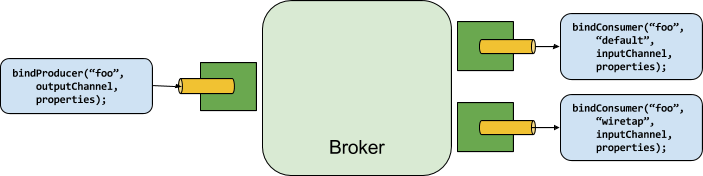
生产者是任何将消息发送到绑定目标的组件。
绑定目标可以使用为该代理编写的Binder实现绑定到外部消息代理。
调用bindProducer()方法时,第一个参数是代理中的目标名称,第二个参数是要发送消息的本地目标的实例,第三个参数包含要在为此绑定目标创建的适配器中使用的属性(例如分区键表达式)。
消费者是从绑定目标接收消息的任何组件。与生产者一样,消费者可以绑定到外部消息代理。在调用bindConsumer()方法时,第一个参数是目标名称,第二个参数提供逻辑组的名称。由给定目标的使用者绑定表示的每个组都会收到生产者发送到该目标的每条消息(即,它遵循常规发布-订阅语义)。如果有多个具有相同组名的使用者实例绑定,则跨这些使用者实例对发出的消息进行负载平衡,使得生产者发出的每条消息仅由每个组中的单个使用者实例使用(也就是说,它遵循常规排队语义)。
绑定器 SPI
绑定器 SPI 包括多个接口、现成的实用程序类和发现策略,提供了一个可插拔机制,可以连接到外部中间件。
关键点是Binder接口,它是一种连接输入和输出与外部中间件的策略。下面的清单显示了Binder接口的定义:
public interface Binder<T, C extends ConsumerProperties, P extends ProducerProperties> {
    Binding<T> bindConsumer(String bindingName, String group, T inboundBindTarget, C consumerProperties);

    Binding<T> bindProducer(String bindingName, T outboundBindTarget, P producerProperties);
}
该接口是参数化的,提供了多个扩展点:
-
输入和输出绑定目标。
-
扩展的消费者和生产者属性,允许特定的 Binder 实现添加可以以类型安全方式支持的补充属性。
典型的绑定器实现包括以下内容:
-
一个实现
Binder接口的类; -
一个 Spring
@Configuration类,会创建一个类型为Binder的 bean,并附带中间件连接基础设施。 -
一个在类路径上找到的0文件,包含一个或多个绑定器定义,如以下示例所示:
kafka:\
org.springframework.cloud.stream.binder.kafka.config.KafkaBinderConfiguration
就像前面提到的,绑定器抽象也是框架的扩展点之一。所以,如果你在前面的列表中找不到合适的绑定器,那么就可以在Spring Cloud Stream的基础上实现你自己的绑定器。在从头开始创建Spring Cloud Stream绑定器一文中,社区成员详细记录了(包括示例)实现自定义绑定器所需的一系列步骤。第Implementing Custom Binders节突出了这些步骤。 |
Binder Detection
Spring Cloud Stream 依赖于 Binder SPI 的实现,将用户代码与消息代理进行连接的任务。 每个 Binder 实现通常连接到一种消息系统。
<h2>类路径检测</h2>
默认情况下,Spring Cloud Stream 依赖于 Spring Boot 的自动配置来配置绑定过程。 如果在类路径上发现一种 Binder 实现,Spring Cloud Stream 会自动使用它。 例如,一个只绑定到 RabbitMQ 的 Spring Cloud Stream 项目可以添加以下依赖:
<dependency>
  <groupId>org.springframework.cloud</groupId>
  <artifactId>spring-cloud-stream-binder-rabbit</artifactId>
</dependency>
针对其他 binder 依赖的特定 Maven 坐标,请参见该 binder 实现的文档。
<h2>类路径上的多个绑定器</h2>
当类路径上存在多个绑定器时,应用程序必须为每个目标绑定指定要使用的绑定器。
每个绑定器配置包含一个 META-INF/spring.binders 文件,这是一个简单的属性文件,如下例所示:
rabbit:\
org.springframework.cloud.stream.binder.rabbit.config.RabbitServiceAutoConfiguration
其他提供的绑定器实现(如Kafka)也有类似的文件,并且预期自定义绑定器实现也会提供它们。
键表示绑定器实现的标识名称,而值是包含类型为 org.springframework.cloud.stream.binder.Binder 的配置类的逗号分隔列表,每个配置类只包含一个bean定义。
绑定选择可以通过两种方式执行:全局使用spring.cloud.stream.defaultBinder属性(例如,spring.cloud.stream.defaultBinder=rabbit)或为每个绑定单独配置绑定器。例如,一个处理器应用程序(具有用于读取和写入的命名绑定input和output)可以从Kafka读取并写入RabbitMQ,并可以指定以下配置:
spring.cloud.stream.bindings.input.binder=kafka
spring.cloud.stream.bindings.output.binder=rabbit
连接多个系统
默认情况下,绑定程序共享应用程序的 Spring Boot 自动配置,因此每个类路径上找到的绑定程序都会创建一个实例。 如果您的应用程序应该连接到同一类型的多个代理服务器,您可以指定多个绑定器配置,每个配置都有不同的环境设置。
启用显式的绑定器配置将完全禁用默认的绑定器配置过程。 如果这样做,使用中的所有绑定器都必须包含在配置中。 打算透明地使用 Spring Cloud Stream 的框架可以创建可按名称引用的绑定器配置,但它们不会影响默认的绑定器配置。 为此,绑定器配置可以将其 defaultCandidate 标志设置为 false(例如,spring.cloud.stream.binders.<configurationName>.defaultCandidate=false)。 这表示一个独立于默认绑定器配置过程的配置。 |
The following example shows a typical configuration for a processor application that connects to two RabbitMQ broker instances:
spring:
  cloud:
    stream:
      bindings:
        input:
          destination: thing1
          binder: rabbit1
        output:
          destination: thing2
          binder: rabbit2
      binders:
        rabbit1:
          type: rabbit
          environment:
            spring:
              rabbitmq:
                host: <host1>
        rabbit2:
          type: rabbit
          environment:
            spring:
              rabbitmq:
                host: <host2>
特定绑定器的 environment 属性也可用于任何 Spring Boot 属性, 包括这个 spring.main.sources,它对于为特定绑定器添加额外配置非常有用, 例如覆盖自动配置的 bean。 |
例如;
environment:
    spring:
        main:
sources: com.acme.config.MyCustomBinderConfiguration要为特定的绑定器环境激活特定的配置文件,您应该使用spring.profiles.active属性:
environment:
    spring:
        profiles:
           active: myBinderProfile
定制多绑定器应用程序中的绑定器
当一个应用程序包含多个 binders 且需要自定义这些 binders 时,可以通过提供一个 BinderCustomizer 的实现来实现。
在单 binder 的情况下,这种特殊定制器是不必要的,因为 binder 上下文可以直接访问自定义化 beans。
然而,在多 binder 场景中并非如此,因为各种 binder 位于不同的应用程序上下文中。
通过提供 BinderCustomizer 接口的实现,尽管 binder 位于不同的应用程序上下文中,它们仍会接收到相应的自定义化。
Spring Cloud Stream 会确保在应用程序开始使用 binder 之前完成这些自定义化。
用户必须检查 binder 类型并应用相应的自定义化。
这里是提供一个BinderCustomizer bean的例子。
@Bean
public BinderCustomizer binderCustomizer() {
    return (binder, binderName) -> {
        if (binder instanceof KafkaMessageChannelBinder kafkaMessageChannelBinder) {
            kafkaMessageChannelBinder.setRebalanceListener(...);
        }
        else if (binder instanceof KStreamBinder) {
            ...
        }
        else if (binder instanceof RabbitMessageChannelBinder) {
            ...
        }
    };
}
注意,当有同一类型的多个绑定器实例时,可以使用绑定器名称来筛选自定义设置。
Spring框架的绑定可视化和控制(官方教程)
Spring Cloud Stream支持通过Actuator端点以及程序化方式对绑定进行可视化和控制。
通过编程方式
自版本 3.1 我们公开了org.springframework.cloud.stream.binding.BindingsLifecycleController它被注册为 bean 并且一旦注入就可以用来控制单个绑定的生命周期
例如,查看其中一个测试用例的片段。如您所见,我们从spring应用上下文检索BindingsLifecycleController,并执行各个方法来控制echo-in-0绑定的生命周期。。
BindingsLifecycleController bindingsController = context.getBean(BindingsLifecycleController.class);
Binding binding = bindingsController.queryState("echo-in-0");
assertThat(binding.isRunning()).isTrue();
bindingsController.changeState("echo-in-0", State.STOPPED);
//Alternative way of changing state. For convenience we expose start/stop and pause/resume operations.
//bindingsController.stop("echo-in-0")
assertThat(binding.isRunning()).isFalse();
执行器
由于启动程序和 Web 是可选的,因此您必须首先手动添加 Web 依赖项之一以及启动程序依赖项。下面的例子展示了如何为 Web 框架添加依赖项:
<dependency>
     <groupId>org.springframework.boot</groupId>
     <artifactId>spring-boot-starter-web</artifactId>
</dependency>
以下示例显示如何添加 WebFlux 框架的依赖项:
<dependency>
       <groupId>org.springframework.boot</groupId>
       <artifactId>spring-boot-starter-webflux</artifactId>
</dependency>
您可以按如下方式添加Actuator依赖项:
<dependency>
    <groupId>org.springframework.boot</groupId>
    <artifactId>spring-boot-starter-actuator</artifactId>
</dependency>| 要在 Cloud Foundry 中运行 Spring Cloud Stream 2.0 应用程序,您必须将 0 和 1 添加到类路径。否则,由于健康检查失败,应用程序将无法启动。 |
还必须通过设置以下属性来启用bindings执行器端点: --management.endpoints.web.exposure.include=bindings。
一旦满足这些前提条件,您应该在启动应用程序时在日志中看到以下内容:
: Mapped "{[/actuator/bindings/{name}],methods=[POST]. . .
: Mapped "{[/actuator/bindings],methods=[GET]. . .
: Mapped "{[/actuator/bindings/{name}],methods=[GET]. . .
要查看当前绑定,请访问以下 URL:
http://<host>:<port>/actuator/bindings
Alternative, to see a single binding, access one of the URLs similar to the following: http://<host>:<port>/actuator/bindings/<bindingName>;
您还可以通过在同一个URL上发布state参数作为JSON来停止、启动、暂停和继续单独的绑定,如以下示例所示:
curl -d '{"state":"STOPPED"}' -H "Content-Type: application/json" -X POST http://<host>:<port>/actuator/bindings/myBindingName
curl -d '{"state":"STARTED"}' -H "Content-Type: application/json" -X POST http://<host>:<port>/actuator/bindings/myBindingName
curl -d '{"state":"PAUSED"}' -H "Content-Type: application/json" -X POST http://<host>:<port>/actuator/bindings/myBindingName
curl -d '{"state":"RESUMED"}' -H "Content-Type: application/json" -X POST http://<host>:<port>/actuator/bindings/myBindingName
PAUSED 和 RESUMED 只有在相应的绑定器及其底层技术支持时才能工作。否则,您会在日志中看到警告消息。目前,只有 Kafka 和 [Solace](https://github.com/SolaceProducts/solace-spring-cloud/tree/master/solace-spring-cloud-starters/solace-spring-cloud-stream-starter#consumer-bindings-pauseresume) 绑定器支持 PAUSED 和 RESUMED 状态。 |
绑定器配置属性
自定义绑定器配置时,可以使用以下属性。这些属性通过org.springframework.cloud.stream.config.BinderProperties公开。
它们必须以spring.cloud.stream.binders.<configurationName>开头。
- 类型
-
绑定器类型。
它通常引用类路径上的一个绑定器——特别是META-INF/spring.binders文件中的一个键。默认情况下,它的值与配置名称相同。
- 继承环境
-
配置是否继承应用程序本身的环境。
默认值:
true。 - 环境
-
用于自定义绑定器环境的一组属性的根节点。<br>当设置此属性时,创建绑定器的上下文不是应用程序上下文的子上下文。<br>该设置允许在绑定器组件和应用程序组件之间实现完全分离。
默认值:
empty。 - 默认候选人
-
绑定器配置是否可以作为默认绑定器候选,或只能在显式引用时使用。此设置允许添加绑定器配置而不干扰默认处理。
默认值:
true。
实现自定义绑定器
要实现自定义的Binder,您所需要做的是:
-
添加所需的依赖项
-
提供一个 ProvisioningProvider 实现
-
提供一个 MessageProducer 实现
-
提供MessageHandler的实现
-
提供一个绑定器实现
-
创建绑定器配置
-
在 META-INF/spring.binders 中定义您的绑定器
添加所需的依赖项
将spring-cloud-stream依赖添加到您的项目中(例如Maven):
<dependency>
    <groupId>org.springframework.cloud</groupId>
    <artifactId>spring-cloud-stream</artifactId>
    <version>${spring.cloud.stream.version}</version>
</dependency>
提供一个 ProvisioningProvider 实现
该ProvisioningProvider负责提供消费者和生产者目标,并且需要转换应用程序.yml或application.properties文件中包含的逻辑目标,以物理目标引用。
下面是一个 ProvisioningProvider 实现的示例,它只是对通过输入/输出绑定配置提供的目标进行修剪:
public class FileMessageBinderProvisioner implements ProvisioningProvider<ConsumerProperties, ProducerProperties> {

    @Override
    public ProducerDestination provisionProducerDestination(
            final String name,
            final ProducerProperties properties) {

        return new FileMessageDestination(name);
    }

    @Override
    public ConsumerDestination provisionConsumerDestination(
            final String name,
            final String group,
            final ConsumerProperties properties) {

        return new FileMessageDestination(name);
    }

    private class FileMessageDestination implements ProducerDestination, ConsumerDestination {

        private final String destination;

        private FileMessageDestination(final String destination) {
            this.destination = destination;
        }

        @Override
        public String getName() {
            return destination.trim();
        }

        @Override
        public String getNameForPartition(int partition) {
            throw new UnsupportedOperationException("Partitioning is not implemented for file messaging.");
        }

    }

}
提供一个 MessageProducer 实现
代码MessageProducer负责消耗事件,并将它们作为消息处理给配置为消费此类事件的客户端应用程序。
以下是MessageProducer实现的示例,该实现扩展了MessageProducerSupport抽象以轮询匹配修剪目的地名称且位于项目路径中的文件,并同时归档已读消息并丢弃后续相同的消息:
public class FileMessageProducer extends MessageProducerSupport {

    public static final String ARCHIVE = "archive.txt";
    private final ConsumerDestination destination;
    private String previousPayload;

    public FileMessageProducer(ConsumerDestination destination) {
        this.destination = destination;
    }

    @Override
    public void doStart() {
        receive();
    }

    private void receive() {
        ScheduledExecutorService executorService = Executors.newScheduledThreadPool(1);

        executorService.scheduleWithFixedDelay(() -> {
            String payload = getPayload();

            if(payload != null) {
                Message<String> receivedMessage = MessageBuilder.withPayload(payload).build();
                archiveMessage(payload);
                sendMessage(receivedMessage);
            }

        }, 0, 50, MILLISECONDS);
    }

    private String getPayload() {
        try {
            List<String> allLines = Files.readAllLines(Paths.get(destination.getName()));
            String currentPayload = allLines.get(allLines.size() - 1);

            if(!currentPayload.equals(previousPayload)) {
                previousPayload = currentPayload;
                return currentPayload;
            }
        } catch (IOException e) {
            throw new RuntimeException(e);
        }

        return null;
    }

    private void archiveMessage(String payload) {
        try {
            Files.write(Paths.get(ARCHIVE), (payload + "\n").getBytes(), CREATE, APPEND);
        } catch (IOException e) {
            throw new RuntimeException(e);
        }
    }

}
| 在实现自定义绑定器时,这一步骤并非严格必要,因为您可以始终使用已有的 <code>MessageProducer</code> 实现! |
提供MessageHandler的实现
该MessageHandler提供了生成事件所需的逻辑。
这是 MessageHandler 实现的一个示例:
public class FileMessageHandler implements MessageHandler{

    @Override
    public void handleMessage(Message<?> message) throws MessagingException {
        //write message to file
    }

}
| 实现自定义绑定器时,这一步骤并不是严格必需的,因为您始终可以使用已有的MessageHandler实现! |
提供一个绑定器实现
现在,您可以提供Binder抽象自己的实现。这可以通过以下方式轻松完成:
-
扩展
AbstractMessageChannelBinder类 -
将您的ProvisioningProvider指定为AbstractMessageChannelBinder的泛型参数
-
重写
createProducerMessageHandler和createConsumerEndpoint方法
eg.:
public class FileMessageBinder extends AbstractMessageChannelBinder<ConsumerProperties, ProducerProperties, FileMessageBinderProvisioner> {

    public FileMessageBinder(
            String[] headersToEmbed,
            FileMessageBinderProvisioner provisioningProvider) {

        super(headersToEmbed, provisioningProvider);
    }

    @Override
    protected MessageHandler createProducerMessageHandler(
            final ProducerDestination destination,
            final ProducerProperties producerProperties,
            final MessageChannel errorChannel) throws Exception {

        return message -> {
            String fileName = destination.getName();
            String payload = new String((byte[])message.getPayload()) + "\n";

            try {
                Files.write(Paths.get(fileName), payload.getBytes(), CREATE, APPEND);
            } catch (IOException e) {
                throw new RuntimeException(e);
            }
        };
    }

    @Override
    protected MessageProducer createConsumerEndpoint(
            final ConsumerDestination destination,
            final String group,
            final ConsumerProperties properties) throws Exception {

        return new FileMessageProducer(destination);
    }

}
创建绑定器配置
必须创建一个Spring配置来初始化绑定器实现类的bean(以及你可能需要的所有其他beans):
@Configuration
public class FileMessageBinderConfiguration {

    @Bean
    @ConditionalOnMissingBean
    public FileMessageBinderProvisioner fileMessageBinderProvisioner() {
        return new FileMessageBinderProvisioner();
    }

    @Bean
    @ConditionalOnMissingBean
    public FileMessageBinder fileMessageBinder(FileMessageBinderProvisioner fileMessageBinderProvisioner) {
        return new FileMessageBinder(null, fileMessageBinderProvisioner);
    }

}
在 META-INF/spring.binders 中定义您的绑定器
最后,您必须在类路径上的META-INF/spring.binders文件中定义您的绑定器,指定绑定器的名称以及您的绑定器配置类的完整限定名:
myFileBinder:\
com.example.springcloudstreamcustombinder.config.FileMessageBinderConfiguration
配置选项
Spring Cloud Stream 支持通用配置选项以及用于绑定和绑定程序的配置。某些绑定程序使附加绑定属性支持特定于中间件的功能。
配置选项可以通过任何Spring Boot支持的机制提供给Spring Cloud Stream应用程序。这包括应用程序参数、环境变量,以及YAML或.properties文件。
绑定服务属性
这些属性通过org.springframework.cloud.stream.config.BindingServiceProperties公开
- spring.cloud.stream.instanceCount
-
应用程序部署实例数。 必须在生成器端设置分区。当使用RabbitMQ时,必须在使用者端设置,并且如果未设置为
autoRebalanceEnabled=false,则必须使用Kafka。默认值:
1。 - spring.cloud.stream.instanceIndex
-
该应用程序的实例索引:从
0到instanceCount - 1。 在使用RabbitMQ时使用,如果使用Kafka则使用autoRebalanceEnabled=false。 在Cloud Foundry中自动设置为匹配应用程序的实例索引。 - spring.cloud.stream.dynamicDestinations
-
可以动态绑定的目标列表(例如,在动态路由方案中)。如果设置,只有列出的目标才能被绑定。
默认值:空(让任何目标都可以绑定)。
- spring.cloud.stream.defaultBinder
-
如果配置了多个绑定器,则要使用的默认绑定器。
有关详细信息,请参阅类路径上的多个绑定器。默认:空。
- spring.cloud.stream.overrideCloudConnectors
-
当活动配置文件为
cloud且应用程序提供Spring Cloud Connectors时,此属性才适用。
如果该属性设置为false(默认值),则绑定器会检测到合适的绑定服务(例如,在Cloud Foundry中为RabbitMQ绑定器绑定的RabbitMQ服务),并通过Spring Cloud Connectors使用它来创建连接。
当设置为true时,此属性指示绑定器完全忽略已绑定的服务,并依赖于Spring Boot属性(例如,依靠环境提供的spring.rabbitmq.*属性用于RabbitMQ绑定器)。
此属性的典型用法是嵌套在自定义环境中当连接到多个系统时。默认值:
false。 - spring.cloud.stream.bindingRetryInterval
-
在绑定创建重试之间的时间间隔(以秒为单位),例如当绑定器不支持延迟绑定且代理(例如 Apache Kafka)不可用时。 将其设置为 0 将将其视为致命条件,防止应用程序启动。
默认值:
30
绑定属性
绑定属性通过使用格式为 spring.cloud.stream.bindings.<bindingName>.<property>=<value> 的方式提供。
<bindingName> 表示正在配置的绑定的名称。
例如,对于以下功能
@Bean
public Function<String, String> uppercase() {
	return v -> v.toUpperCase();
}
输入有两个绑定,分别命名为uppercase-in-0和输出命名为uppercase-out-0。有关详细信息,请参阅绑定和绑定名。
To avoid repetition, Spring Cloud Stream 支持为所有绑定设置值,格式为 spring.cloud.stream.default.<property>=<value>
和 spring.cloud.stream.default.<producer|consumer>.<property>=<value> 用于常见的绑定属性。
当涉及到为长时间绑定属性避免重复时,应使用这种格式 - spring.cloud.stream.<binder-type>.default.<producer|consumer>.<property>=<value>。
通用绑定属性
这些属性通过org.springframework.cloud.stream.config.BindingProperties公开
以下为输入和输出绑定都可用的绑定属性,必须以 spring.cloud.stream.bindings.<bindingName>. 前缀(例如,spring.cloud.stream.bindings.uppercase-in-0.destination=ticktock)。
默认值可以通过使用spring.cloud.stream.default前缀(例如spring.cloud.stream.default.contentType=application/json)来设置。
- 目的地
-
绑定到已绑定中间件的目标目的地(例如,RabbitMQ交换机或Kafka主题)。
如果绑定表示使用者绑定(输入),则它可以绑定到多个目标,并且可以指定目标名称作为以逗号分隔的
String值。否则,将使用实际绑定名称。
此属性的默认值无法被覆盖。
- group
-
绑定的消费者组。仅适用于入站绑定。参见消费者组。
默认:
null(表示匿名消费者)。 - 内容类型
-
此绑定的内容类型。请参阅
Content Type Negotiation。默认值:
application/json。 - 绑定器
-
用于此绑定的绑定程序。 请参阅
Multiple Binders on the Classpath获取详细信息。Default:
null(the default binder is used, if it exists).
消费者属性
这些属性通过org.springframework.cloud.stream.binder.ConsumerProperties公开
以下绑定属性仅适用于输入绑定,并且必须以spring.cloud.stream.bindings.<bindingName>.consumer.为前缀(例如,spring.cloud.stream.bindings.input.consumer.concurrency=3)。
默认值可以通过使用spring.cloud.stream.default.consumer前缀(例如,spring.cloud.stream.default.consumer.headerMode=none)设置。
- 自动启动
-
触发此消费者自动启动信号
默认值:
true。 - 并发
-
inbound consumer 的并发量。
默认值:
1。 - 分区化的
-
消费者是否从分区生产者接收数据。
默认值:
false。 - 页面模式
-
设置为
none时,禁用输入上的标题解析。仅对不原生支持消息标题且需要嵌入标题的消息中间件有效。当从非Spring Cloud Stream应用程序消费数据且不支持原生标题时,此选项很有用。设置为headers时,它使用中间件的原生标题机制。设置为embeddedHeaders时,它将标题嵌入到消息负载中。默认值取决于绑定器实现。
- maxAttempts
-
如果处理失败,重试处理消息的次数(包括第一次)。设置为
1以禁用重试。默认值:
3。 - 重试初始间隔
-
重试时的退避初始间隔。
默认值:
1000。 - 重试最大间隔
-
最大退避间隔。
默认值:
10000。 - 退避乘数
-
退避乘数。
默认值:
2.0。 - 默认可重试
-
监听器抛出且未列在
retryableExceptions中的异常是否可重试。默认值:
true。 - 实例数量
-
设置为大于等于零的值时,可以自定义此消费者的实例数量(如果不同于
spring.cloud.stream.instanceCount)。
当设置为负值时,默认为spring.cloud.stream.instanceCount。
有关更多信息,请参见Instance Index and Instance Count。默认值:
-1。 - 实例索引
-
当设置为大于等于零的值时,它允许自定义此消费者的实例索引(如果不同于
spring.cloud.stream.instanceIndex)。当设置为负值时,默认为spring.cloud.stream.instanceIndex。如果提供了instanceIndexList,则会被忽略。Instance Index and Instance Count了解更多详细信息。默认值:
-1。 - 实例索引列表
-
与不支持原生分区的绑定器一起使用(例如RabbitMQ);允许应用程序实例从多个分区中消费。
默认:空。
- 可重试异常
-
一个以 Throwable 类名作为键,布尔值作为值的映射。
指定那些将要或不会重试的异常(以及子类)。
另请参阅defaultRetriable。
示例:spring.cloud.stream.bindings.input.consumer.retryable-exceptions.java.lang.IllegalStateException=false。默认:空。
- 使用原生解码
-
当设置为
true时,入站消息将由客户端库直接反序列化,必须相应地配置客户端库(例如,设置适当的 Kafka 生产者值反序列化器)。
当使用此配置时,入站消息的反序列化不基于绑定的contentType。
当使用原生解码时,生产者的责任是使用适当的编码器(例如,Kafka 生产者值序列化器)来序列化出站消息。
另外,当使用原生编码和解码时,headerMode=embeddedHeaders属性被忽略且标题未嵌入到消息中。
参见生产者属性useNativeEncoding。默认值:
false。 - 多路复用
-
设置为true时,底层绑定器将在同一输入绑定上原生多路复用目标。
默认值:
false。
高级消费者配置
对于消息驱动消费者的基础消息监听容器的高级配置,请向应用上下文中添加单个ListenerContainerCustomizerbean。在上述属性被应用后,它将被调用,并可用于设置其他属性。同样地,对于轮询消费者,请添加一个MessageSourceCustomizerbean。
以下是RabbitMQ绑定器的示例:
@Bean
public ListenerContainerCustomizer<AbstractMessageListenerContainer> containerCustomizer() {
    return (container, dest, group) -> container.setAdviceChain(advice1, advice2);
}

@Bean
public MessageSourceCustomizer<AmqpMessageSource> sourceCustomizer() {
    return (source, dest, group) -> source.setPropertiesConverter(customPropertiesConverter);
}
生产者属性
这些属性通过org.springframework.cloud.stream.binder.ProducerProperties公开
以下绑定属性仅适用于输出绑定,并且必须以前缀spring.cloud.stream.bindings.<bindingName>.producer.(例如,spring.cloud.stream.bindings.func-out-0.producer.partitionKeyExpression=headers.id)。
可以通过使用前缀 spring.cloud.stream.default.producer 来设置默认值(例如,spring.cloud.stream.default.producer.partitionKeyExpression=headers.id)。
- 自动启动
-
触发此消费者自动启动信号
默认值:
true。 - 分区键表达式
-
一个SpEL表达式,用于确定如何划分传出数据。
如果设置,则对此绑定上的传出数据进行分区。partitionCount必须设置为大于1的值才能生效。
请参阅Partitioning Support。默认值:null。
- 分区键提取器名称
-
实现
PartitionKeyExtractorStrategy的 bean 的名称。用于提取用作计算分区 ID 的键(参见“partitionSelector*”)。与“partitionKeyExpression”互斥。默认值:null。
- 分区选择器名称
-
实现
PartitionSelectorStrategy的 Bean 名称。用于根据分区键确定分区 ID(参见 'partitionKeyExtractor*')。与 'partitionSelectorExpression' 相互排斥。默认值:null。
- 分区选择器表达式
-
用于自定义分区选择的 SpEL 表达式。如果两者均未设置,则分区将选择为
hashCode(key) % partitionCount,其中key是通过partitionKeyExpression计算得出的。默认值:
null。 - 分区数量
-
启用分区时,数据的目标分区数。如果生产者已分区,则必须设置为大于1的值。在Kafka中,这被视为一个提示。此值与目标主题的分区数中的较大值将被使用。
默认值:
1。 - 必需的组
-
一个逗号分隔的组列表,生产者必须确保即使它们在创建后启动,消息交付也会得到保障(例如,在RabbitMQ中预先创建持久队列)。
- 页面模式
-
设置为
none时,它会在输出上禁用头嵌入。仅当消息中间件不支持原生消息头且需要头嵌入时才有效。当生产数据用于非Spring Cloud Stream应用程序且不支持原生头时,此选项很有用。
设置为headers时,它使用中间件的原生头机制。
设置为embeddedHeaders时,它将头嵌入到消息负载中。默认值取决于绑定器实现。
- 使用原生编码
-
当设置为
true时,出站消息由客户端库直接序列化,必须相应地进行配置(例如,设置适当的 Kafka 生产者值序列化程序)。 使用此配置时,出站消息的封送不是基于绑定的contentType。 使用原生编码时,消费者有责任使用适当的解码器(例如,Kafka 消费者值反序列化程序)来反序列化入站消息。 另外,当使用原生编码和解码时,headerMode=embeddedHeaders属性被忽略且不将标头嵌入消息中。 参见消费者属性useNativeDecoding。默认值:
false。 - 错误通道启用
-
当设置为 true 时,如果绑定器支持异步发送结果,则会将发送失败的消息发送到目的地的错误通道。有关更多信息,请参阅错误处理。
默认值:false。
高级生产者配置
在某些情况下,仅使用生产者属性不足以正确配置绑定器中的消息处理器(MessageHandler),或者您可能更倾向于采用编程方式来配置此类生产消息处理器。无论出于何种原因,Spring Cloud Stream 提供了 ProducerMessageHandlerCustomizer 来实现这一目标。
@FunctionalInterface
public interface ProducerMessageHandlerCustomizer<H extends MessageHandler> {

	/**
	 * Configure a {@link MessageHandler} that is being created by the binder for the
	 * provided destination name.
	 * @param handler the {@link MessageHandler} from the binder.
	 * @param destinationName the bound destination name.
	 */
	void configure(H handler, String destinationName);

}
正如您所见,它为您提供对实际生产实例MessageHandler的访问权限,您可以根据需要进行配置。
您所需要做的就是提供此策略的实现,并将其配置为@Bean。
内容类型协商
Data transformation is one of the core features of any message-driven microservice architecture. Given that, in Spring Cloud Stream, such data is represented as a Spring Message, a message may have to be transformed to a desired shape or size before reaching its destination. This is required for two reasons:
-
转换传入消息的内容,使其符合应用程序提供的处理程序的签名。
-
将传出消息的内容转换为线路格式。
协议格式通常为byte[](这是Kafka和Rabbit绑定程序的默认值),但它受绑定程序实现的控制。
在Spring Cloud Stream中,消息转换是通过一个org.springframework.messaging.converter.MessageConverter来完成的。
| 微服推述中,spring 有写逻; spring mvc 是 spring 一部分,spring boot 是 springmvc 的一种曲线发射,spring cloud 是 spring boot 的一种服务 |
机械学
为了更好地理解内容协商机制及其必要性,我们通过一个非常简单的用例来说明,使用以下消息处理器作为示例:
public Function<Person, String> personFunction {..}
| 为简便起见,我们假设这是应用程序中唯一处理函数(我们假定没有内部管道)。 |
前面示例中显示的处理器期望将Person对象作为参数,并生成String类型的输出。为了使框架能够成功地将传入的Message作为参数传递给此处理器,它必须以某种方式将来自网络格式的Message类型的有效负载转换为Person类型。换句话说,框架必须定位并应用适当的MessageConverter。为了实现这一点,框架需要用户的一些指示。其中一条指令已经由处理器方法本身的签名提供(Person类型)。因此,在理论上,这应该足够了(在某些情况下也是如此)。然而,对于大多数用例,为了选择合适的MessageConverter,框架还需要额外的信息。缺失的部分是contentType。
Spring Cloud Stream 提供了三种机制来定义 contentType(按优先级顺序):
-
HEADER:
contentType可通过消息本身进行通信。提供一个contentType头,声明要使用的内容类型以定位和应用适当的MessageConverter。 -
绑定:可以通过设置
spring.cloud.stream.bindings.input.content-type属性来为每个目标绑定设置contentType。属性名称中的 input段对应于目标的实际名称(在我们的例子中是“input”)。这种方法允许您根据每个绑定声明要使用的数据类型,以定位并应用适当的MessageConverter。 -
默认值:如果
contentType不在Message头或绑定中,则使用默认的application/json内容类型来定位并应用适当的MessageConverter。
如前所述,前面的列表还演示了在出现平局时的优先级顺序。例如,由报头提供的内容类型优先于任何其他内容类型。<br/>对于按绑定设置的内容类型也是如此,这实际上让您能够覆盖默认的内容类型。<br/>然而,它也提供了一个合理的默认值(这是根据社区反馈确定的)。
另一个使用application/json作为默认值的原因源于分布式微服务架构所驱动的互操作性要求,其中生产者和消费者不仅在不同的JVM上运行,还可以在不同的非JVM平台上运行。
当非 void 处理程序方法返回时,如果返回值已经是 Message,那么该Message将成为有效载荷。然而,当返回值不是 Message 时,将以返回值作为有效载荷并继承输入Message减去由SpringIntegrationProperties.messageHandlerNotPropagatedHeaders定义或过滤的标头来构建新的Message。
默认情况下,只有一个标头被设置:contentType。这意味着新Message没有设置contentType标头,从而确保contentType可以发展。
您始终可以选择不从处理程序方法返回Message,并在其中注入任何标头。
如果有内部管道,则通过相同的转换过程将Message发送到下一个处理器。但是,如果没有内部管道或者已经到达了末端,则将Message发送回输出目标。
内容类型与参数类型
如前所述,为了使框架选择适当的MessageConverter,它需要参数类型和(可选地)内容类型信息。选择合适的 MessageConverter 的逻辑由参数解析器(HandlerMethodArgumentResolvers)负责,在调用用户定义的处理器方法之前触发(此时框架已知实际参数类型)。如果参数类型与当前有效负载的类型不匹配,框架将委托给预先配置的MessageConverters堆栈,查看它们中的任何一个是否可以转换有效负载。如您所见,Object fromMessage(Message<?> message, Class<?> targetClass); 消息转换器的操作将其一个参数设为 targetClass。框架还确保提供的 Message 始终包含一个 contentType 头部。当没有现成的contentType头时,它会注入每个绑定的contentType头或默认的contentType头。参数类型的组合contentType是框架确定消息是否可以转换为目标类型的方法。如果未找到合适的 MessageConverter,则抛出异常,您可以通过添加自定义 MessageConverter 来处理该异常(参见 User-defined Message Converters)。
但是,如果有效负载类型与处理程序方法声明的目标类型相匹配呢?在这种情况下,不需要进行转换,有效负载将未经修改地传递。虽然这听起来相当直接且合乎逻辑,请记住那些采用Message<?>或Object作为参数的处理程序方法。
通过将目标类型声明为Object(即Java中的instanceof),您实际上放弃了转换过程。
不要期望仅基于contentType将Message转换为其他类型。请记住, 如果您愿意,可以提供一个提示, |
消息转换器
MessageConverters 定义两个方法:
Object fromMessage(Message<?> message, Class<?> targetClass);

Message<?> toMessage(Object payload, @Nullable MessageHeaders headers);
理解这些方法的契约及其使用方式非常重要,尤其是在 Spring Cloud Stream 的上下文中。
该fromMessage方法将传入的Message转换为参数类型。
该Message的有效负载可以是任何类型,而实际实现的MessageConverter支持多种类型的决定权在自己手上。
例如,某些JSON转换器可能支持byte[]、String等有效负载类型。
当应用程序包含一个内部管道(即输入 → 处理程序1 → 处理程序2 →...→ 输出)时,这一点非常重要。上游处理程序的输出可能会产生一个Message,它可能不是初始传输格式。
但是,toMessage 方法具有更严格的契约,并且必须始终将 Message 转换为网络格式:byte[]。
因此,从所有实际目的来看(尤其是在实现你自己的转换器时),你可以认为这两种方法具有以下签名:
Object fromMessage(Message<?> message, Class<?> targetClass);

Message<byte[]> toMessage(Object payload, @Nullable MessageHeaders headers);
提供的 MessageConverters
如前所述,该框架已提供了一套 MessageConverters,用于处理大多数常见用例。以下列表按优先级顺序描述了所提供的 MessageConverters(第一个适用的 MessageConverter 将被使用):
-
JsonMessageConverter: 如其名称所示,它支持Message负载转换为/从 POJO,用于contentType为application/json(DEFAULT) 的情况。 -
ByteArrayMessageConverter: 支持将Message的负载从byte[]转换为byte[],适用于contentType为application/octet-stream的情况。它本质上是直接传递(pass through),主要目的是为了向后兼容。 -
(0)支持从任何类型转换为(1)当(2)是(3)时。它调用对象的(4)方法或,如果有效负载是(5),一个新的(6)。
当没有找到合适的转换器时,框架会抛出异常。发生这种情况时,您应该检查您的代码和配置,并确保没有遗漏任何内容(即,通过绑定或标头提供了contentType)。但是,大多数情况下,您发现了一些不常见的案例(例如某个自定义的contentType),而当前提供的MessageConverters堆栈不知道如何进行转换。如果是这种情况,您可以添加自定义的MessageConverter。参见用户定义的消息转换器。
用户自定义消息转换器
Spring Cloud Stream 提供了一种机制来定义和注册额外的 MessageConverter s。
要使用它,请实现 org.springframework.messaging.converter.MessageConverter,将其配置为一个 @Bean。
然后它会追加到现有的 MessageConverter s 栈中。
重要的是要理解,自定义 MessageConverter 实现会被添加到现有栈的顶部。因此,自定义 MessageConverter 实现会优先于现有的实现,这使您能够覆盖并扩展现有的转换器。 |
以下示例展示了如何创建一个消息转换器 bean,以支持一种名为 application/bar 的新内容类型:
@SpringBootApplication
public static class SinkApplication {

    ...

    @Bean
    public MessageConverter customMessageConverter() {
        return new MyCustomMessageConverter();
    }
}

public class MyCustomMessageConverter extends AbstractMessageConverter {

    public MyCustomMessageConverter() {
        super(new MimeType("application", "bar"));
    }

    @Override
    protected boolean supports(Class<?> clazz) {
        return (Bar.class.equals(clazz));
    }

    @Override
    protected Object convertFromInternal(Message<?> message, Class<?> targetClass, Object conversionHint) {
        Object payload = message.getPayload();
        return (payload instanceof Bar ? payload : new Bar((byte[]) payload));
    }
}
跨应用程序通信
Spring Cloud Stream 是一个用于构建通信的应用程序。多应用程序通信是一个跨越多个关注点的复杂问题,如以下主题所述:
连接多个应用程序实例
虽然Spring Cloud Stream使单个Spring Boot应用程序连接到消息系统变得容易,但Spring Cloud Stream的典型场景是创建多应用程序管道,微服务应用程序彼此发送数据。 您可以通过对“相邻”应用程序的输入和输出目标进行关联来实现此场景。
假设一个设计要求 Time Source 应用程序向 Log Sink 应用程序发送数据。可以为两个应用程序内的绑定使用名为 0 的公共目标。
时间源(具有绑定名为 output 的绑定)将设置以下属性:
spring.cloud.stream.bindings.output.destination=ticktock
日志接收器(具有绑定名为 input 的接收器)将设置以下属性:
spring.cloud.stream.bindings.input.destination=ticktock
实例索引和实例计数
在缩放 Spring Cloud Stream 应用程序时,每个实例都可以获取有关存在多少其他相同应用程序实例以及其自己的实例索引的信息。
Spring Cloud Stream 通过设置spring.cloud.stream.instanceCount和spring.cloud.stream.instanceIndex属性来执行此操作。
例如,如果有三个 HDFS 接收器应用程序实例,所有三个实例都设置spring.cloud.stream.instanceCount为3,而单独的应用程序分别设置spring.cloud.stream.instanceIndex为0、1和2,分别。
当通过 Spring Cloud Data Flow 部署 Spring Cloud Stream 应用程序时,这些属性会自动配置;如果独立启动 Spring Cloud Stream 应用程序,则必须正确设置这些属性。
默认情况下,spring.cloud.stream.instanceCount 是 1,spring.cloud.stream.instanceIndex 是 0。
在缩放场景中,这些两个属性的正确配置对于解决分区行为(见下文)是重要的,并且这两个属性通常由某些绑定器(例如Kafka绑定器)要求,以便确保数据正确地分割到多个使用者实例。
分区
分区在Spring Cloud Stream中包括两个任务:
配置用于分区的输出绑定
你可以通过设置输出绑定的 partitionKeyExpression 或者 partitionKeyExtractorName 属性之一以及其 partitionCount 属性来配置分区数据发送。
例如,下面是有效且典型的配置示例:
spring.cloud.stream.bindings.func-out-0.producer.partitionKeyExpression=headers.id
spring.cloud.stream.bindings.func-out-0.producer.partitionCount=5
根据此示例配置,使用以下逻辑将数据发送到目标分区。
一个分区键值是基于0生成的,它是针对发送到已分区输出绑定的消息进行计算的。1是一个SpEL表达式,它在传出消息(在前面的示例中,它是从消息头3提取出来的)上被评估,用于提取分片密钥。
如果您 SpEL 表达式无法满足您的需求,您也可以通过提供 org.springframework.cloud.stream.binder.PartitionKeyExtractorStrategy 的实现并将其配置为 bean(使用 @Bean 注释)来计算分区键值。 如果在应用程序上下文中存在多个类型为 org.springframework.cloud.stream.binder.PartitionKeyExtractorStrategy 的 bean,则可以使用 partitionKeyExtractorName 属性指定其名称进行进一步筛选,如以下示例所示:
--spring.cloud.stream.bindings.func-out-0.producer.partitionKeyExtractorName=customPartitionKeyExtractor
--spring.cloud.stream.bindings.func-out-0.producer.partitionCount=5
. . .
@Bean
public CustomPartitionKeyExtractorClass customPartitionKeyExtractor() {
    return new CustomPartitionKeyExtractorClass();
}
在 Spring Cloud Stream 的早期版本中,可以通过设置 spring.cloud.stream.bindings.output.producer.partitionKeyExtractorClass 属性来指定 org.springframework.cloud.stream.binder.PartitionKeyExtractorStrategy 的实现。
自 3.0 版本起,该属性已移除。 |
一旦确定了消息密钥,分区选择过程就会确定目标分区的值,在0和partitionCount - 1之间。
默认计算方法适用于大多数情况,基于以下公式: key.hashCode() % partitionCount。可以在绑定上自定义它,要么通过设置一个SpEL表达式在键(通过partitionSelectorExpression属性)上进行评估,要么通过使用@Bean注释配置org.springframework.cloud.stream.binder.PartitionSelectorStrategy的一个实现作为bean。
与PartitionKeyExtractorStrategy类似,当在这种类型的bean在应用程序上下文中可用多个时,可以进一步使用spring.cloud.stream.bindings.output.producer.partitionSelectorName属性对其进行过滤,如以下示例所示:
--spring.cloud.stream.bindings.func-out-0.producer.partitionSelectorName=customPartitionSelector
. . .
@Bean
public CustomPartitionSelectorClass customPartitionSelector() {
    return new CustomPartitionSelectorClass();
}
在以前版本的Spring Cloud Stream中,可以通过设置org.springframework.cloud.stream.binder.PartitionSelectorStrategy属性来指定spring.cloud.stream.bindings.output.producer.partitionSelectorClass的实现。
自3.0版以来,此属性已删除。 |
Spring 框架配置输入绑定以进行分片处理
一个输入绑定(名为uppercase-in-0)通过设置其partitioned属性,以及在应用程序上设置instanceIndex和instanceCount属性来配置为接收分区化数据,如下面的例子所示:
spring.cloud.stream.bindings.uppercase-in-0.consumer.partitioned=true
spring.cloud.stream.instanceIndex=3
spring.cloud.stream.instanceCount=5
instanceCount 值表示应该在其中分割数据的应用程序实例的总数。要分区。instanceIndex 必须是多个实例之间的唯一值,其值介于0和instanceCount - 1之间。The instance index helps each application instance to identify the unique partition(s) from which it receives data.它由绑定器使用,这些绑定器使用不直接支持分区技术的技术。例如,对于RabbitMQ,每个分片都有一个队列,队列名包含实例索引。与Kafka不同,如果autoRebalanceEnabled是true(默认值),则Kafka负责跨实例分发分区,这些属性是不需要的。如果将autoRebalanceEnabled设置为false,绑定器将使用instanceCount和instanceIndex来确定实例订阅哪个分区(每个分区都必须至少有一个实例)。绑定器分配分区,而不是Kafka。这是有帮助的,如果你想让一个特定分区的消息总是在同一个实例中进行处理。请记住,当绑定程序配置需要它们时,必须正确设置这两个值,以确保所有数据都被消耗,并且应用程序实例接收互斥的数据集。
当在一个独立的案例中使用多个实例处理分区数据时,设置过程可能会很复杂,但Spring Cloud Dataflow可以通过正确地填充输入和输出值,并依靠运行时基础架构提供关于实例索引和实例计数的信息,显著简化该过程。
测试
Spring Cloud Stream 为在不连接到消息系统的情况下测试您的微服务应用程序提供支持。
Spring 集成测试绑定器
Spring Cloud Stream 带有一个测试绑定器,可用于在无需实际的世界绑定器实现或消息代理的情况下测试各种应用程序组件。
此测试绑定器充当单元测试和集成测试之间的桥梁,基于Spring 集成框架作为 JVM 内的消息代理,本质上为你提供了两全其美的效果——一个真实的绑定器而无需网络连接。
测试绑定器配置
要启用Spring集成测试绑定器,您需要做的就是将其添加为依赖项。
添加所需的依赖项
下面是所需Maven POM条目的示例。
<dependency>
	<groupId>org.springframework.cloud</groupId>
	<artifactId>spring-cloud-stream-test-binder</artifactId>
	<scope>test</scope>
</dependency>
或者对于build.gradle.kts
testImplementation("org.springframework.cloud:spring-cloud-stream-test-binder")
测试绑定器用法
现在您可以将微服务作为简单的单元测试进行测试
@SpringBootTest
public class SampleStreamTests {

	@Autowired
	private InputDestination input;

	@Autowired
	private OutputDestination output;

	@Test
	public void testEmptyConfiguration() {
		this.input.send(new GenericMessage<byte[]>("hello".getBytes()));
		assertThat(output.receive().getPayload()).isEqualTo("HELLO".getBytes());
	}

	@SpringBootApplication
	@Import(TestChannelBinderConfiguration.class)
	public static class SampleConfiguration {
		@Bean
		public Function<String, String> uppercase() {
			return v -> v.toUpperCase();
		}
	}
}
如果您需要更多控制,或希望在同一测试套件中测试多个配置 您可以执行以下操作:<br/>
@EnableAutoConfiguration
public static class MyTestConfiguration {
	@Bean
	public Function<String, String> uppercase() {
			return v -> v.toUpperCase();
	}
}

. . .

@Test
public void sampleTest() {
	try (ConfigurableApplicationContext context = new SpringApplicationBuilder(
				TestChannelBinderConfiguration.getCompleteConfiguration(
						MyTestConfiguration.class))
				.run("--spring.cloud.function.definition=uppercase")) {
		InputDestination source = context.getBean(InputDestination.class);
		OutputDestination target = context.getBean(OutputDestination.class);
		source.send(new GenericMessage<byte[]>("hello".getBytes()));
		assertThat(target.receive().getPayload()).isEqualTo("HELLO".getBytes());
	}
}
当您有多个绑定和/或多个输入和输出时,或者只是想明确指定要发送到的目标名称或接收来自的目标名称,则覆盖send()和receive()方法以及InputDestination和OutputDestination类的方法以允许您提供输入和输出目标的名称。
考虑以下示例:
@EnableAutoConfiguration
public static class SampleFunctionConfiguration {

	@Bean
	public Function<String, String> uppercase() {
		return value -> value.toUpperCase();
	}

	@Bean
	public Function<String, String> reverse() {
		return value -> new StringBuilder(value).reverse().toString();
	}
}
并且实际测试
@Test
public void testMultipleFunctions() {
	try (ConfigurableApplicationContext context = new SpringApplicationBuilder(
			TestChannelBinderConfiguration.getCompleteConfiguration(
					SampleFunctionConfiguration.class))
							.run("--spring.cloud.function.definition=uppercase;reverse")) {

		InputDestination inputDestination = context.getBean(InputDestination.class);
		OutputDestination outputDestination = context.getBean(OutputDestination.class);

		Message<byte[]> inputMessage = MessageBuilder.withPayload("Hello".getBytes()).build();
		inputDestination.send(inputMessage, "uppercase-in-0");
		inputDestination.send(inputMessage, "reverse-in-0");

		Message<byte[]> outputMessage = outputDestination.receive(0, "uppercase-out-0");
		assertThat(outputMessage.getPayload()).isEqualTo("HELLO".getBytes());

		outputMessage = outputDestination.receive(0, "reverse-out-0");
		assertThat(outputMessage.getPayload()).isEqualTo("olleH".getBytes());
	}
}
在存在诸如 destination 的附加映射属性的情况下,应使用这些名称。例如,考虑前面测试的另一种版本,在该版本中我们显式地将 uppercase 函数的输入和输出映射到 myInput 和 myOutput 绑定名称:
@Test
public void testMultipleFunctions() {
	try (ConfigurableApplicationContext context = new SpringApplicationBuilder(
			TestChannelBinderConfiguration.getCompleteConfiguration(
					SampleFunctionConfiguration.class))
							.run(
							"--spring.cloud.function.definition=uppercase;reverse",
							"--spring.cloud.stream.bindings.uppercase-in-0.destination=myInput",
							"--spring.cloud.stream.bindings.uppercase-out-0.destination=myOutput"
							)) {

		InputDestination inputDestination = context.getBean(InputDestination.class);
		OutputDestination outputDestination = context.getBean(OutputDestination.class);

		Message<byte[]> inputMessage = MessageBuilder.withPayload("Hello".getBytes()).build();
		inputDestination.send(inputMessage, "myInput");
		inputDestination.send(inputMessage, "reverse-in-0");

		Message<byte[]> outputMessage = outputDestination.receive(0, "myOutput");
		assertThat(outputMessage.getPayload()).isEqualTo("HELLO".getBytes());

		outputMessage = outputDestination.receive(0, "reverse-out-0");
		assertThat(outputMessage.getPayload()).isEqualTo("olleH".getBytes());
	}
}
测试绑定器和可轮询消息源
Spring 集成测试绑定器还允许你在使用 PollableMessageSource(有关详细信息,请参阅轮询消费者)时编写测试。
然而需要理解的重要一点是轮询不是事件驱动的,PollableMessageSource是一种策略,它暴露了操作以产生(轮询)消息(单数)。你轮询的频率、使用的线程数量以及从何处轮询(消息队列或文件系统)完全由你自己决定;换句话说,配置轮询器、线程或实际的消息源是你的责任。幸运的是Spring提供了大量的抽象来精确地配置这些内容。
让我们来看一个示例:
@Test
public void samplePollingTest() {
	ApplicationContext context = new SpringApplicationBuilder(SamplePolledConfiguration.class)
				.web(WebApplicationType.NONE)
				.run("--spring.jmx.enabled=false", "--spring.cloud.stream.pollable-source=myDestination");
	OutputDestination destination = context.getBean(OutputDestination.class);
	System.out.println("Message 1: " + new String(destination.receive().getPayload()));
	System.out.println("Message 2: " + new String(destination.receive().getPayload()));
	System.out.println("Message 3: " + new String(destination.receive().getPayload()));
}

@Import(TestChannelBinderConfiguration.class)
@EnableAutoConfiguration
public static class SamplePolledConfiguration {
	@Bean
	public ApplicationRunner poller(PollableMessageSource polledMessageSource, StreamBridge output, TaskExecutor taskScheduler) {
		return args -> {
			taskScheduler.execute(() -> {
				for (int i = 0; i < 3; i++) {
					try {
						if (!polledMessageSource.poll(m -> {
							String newPayload = ((String) m.getPayload()).toUpperCase();
							output.send("myOutput", newPayload);
						})) {
							Thread.sleep(2000);
						}
					}
					catch (Exception e) {
						// handle failure
					}
				}
			});
		};
	}
}
上面(非常基础的)示例将在2秒间隔内向输出目标Source发送3条消息,该绑定器将它们发送到OutputDestination,我们在那里获取它们(用于任何断言)。目前,它打印如下内容:
Message 1: POLLED DATA
Message 2: POLLED DATA
Message 3: POLLED DATA正如您所见,数据是相同的。这是因为此绑定器定义了实际MessageSource的默认实现——消息通过poll()操作从中轮询。虽然对于大多数测试场景来说已经足够,但在某些情况下,您可能希望定义自己的MessageSource。为此,在您的测试配置中只需配置类型为MessageSource的bean,并提供您自己的消息源实现即可。
这是一个例子:
@Bean
public MessageSource<?> source() {
	return () -> new GenericMessage<>("My Own Data " + UUID.randomUUID());
}
渲染以下输出;
Message 1: MY OWN DATA 1C180A91-E79F-494F-ABF4-BA3F993710DA
Message 2: MY OWN DATA D8F3A477-5547-41B4-9434-E69DA7616FEE
Message 3: MY OWN DATA 20BF2E64-7FF4-4CB6-A823-4053D30B5C74不要将此bean命名为messageSource,因为它会与Spring Boot提供的同名bean(不同类型)发生冲突,尽管原因无关。 |
测试绑定器与常规中间件绑定器混合使用的注意事项
基于Spring集成的测试绑定器用于在不涉及实际中间件绑定器(如Kafka或RabbitMQ绑定器)的情况下测试应用程序。如上文各节所述,测试绑定器通过依赖内存中的Spring Integration通道,帮助您快速验证应用行为。当测试绑定器存在于测试类路径上时,Spring Cloud Stream 将尝试在需要绑定器进行通信的所有测试中使用此绑定器。换句话说,您不能在同一模块中同时使用测试绑定器和常规中间件绑定器来进行测试。在使用测试绑定器对应用程序进行测试后,如果您希望继续使用实际的中间件绑定器执行进一步的集成测试,则建议将那些使用实际绑定器的测试添加到单独的模块中,以便这些测试可以正确连接到实际的中间件,而不是依赖于测试绑定器提供的内存通道。
健康指标
Spring Cloud Stream 为绑定器提供了健康指标。
它被注册在名称 binders 下,可以通过设置 management.health.binders.enabled 属性来启用或禁用。
要启用健康检查,您首先需要通过包含其依赖项来同时启用“web”和“actuator”(参见绑定可视化和控制)
如果应用程序未显式设置management.health.binders.enabled,则management.health.defaults.enabled将匹配为true并启用绑定器健康指标。
如果要完全禁用健康指示器,则必须将management.health.binders.enabled设置为false。
您可以使用 Spring Boot 操作器健康端点来访问健康指标 - /actuator/health。
默认情况下,当您调用上述端点时,只能收到应用程序的顶层状态信息。
要接收绑定器特定健康指标的完整详细信息,需要在您的应用程序中包含属性 management.endpoint.health.show-details 并将其值设为 ALWAYS。
健康指标是绑定器特定的,某些绑定器实现可能不提供健康指标。
如果您想完全禁用所有现成可用的健康指标,并提供自己的健康指标,可以将属性management.health.binders.enabled设置为false,然后在应用程序中提供自己的HealthIndicator Bean。在这种情况下,Spring Boot的健康指标基础设施仍然会拾取这些自定义Bean。即使您没有禁用绑定器健康指标,您仍然可以通过提供自己的HealthIndicator Bean来增强健康检查,除了内置的健康检查之外。
当应用程序中存在多个绑定器时,健康指标默认是启用的,除非应用程序通过将management.health.binders.enabled设置为false来关闭它们。在这种情况下,如果用户希望禁用一部分绑定器的健康检查,那么应该在多绑定器配置的环境中将management.health.binders.enabled设置为false。有关如何提供特定环境属性的详细信息,请参阅连接到多个系统。
如果类路径中存在多个绑定器,但应用程序并未使用其中所有绑定器,则这可能会在健康指标方面引起一些问题。
执行健康检查时可能存在特定于实现的详细信息。例如,Kafka 绑定器可能决定状态为 DOWN(如果没有目的地由该绑定器注册)。
让我们看一个具体的情况。假设你同时在类路径中拥有Kafka和Kafka Streams绑定器,但在应用程序代码中只使用了Kafka Streams绑定器,即仅使用Kafka Streams绑定器提供绑定。
由于未使用Kafka绑定器,并且它有特定检查以查看是否注册了任何目标位置,因此绑定器健康检查将会失败。
顶级应用健康检查状态将被报告为DOWN。
在这种情况下,你可以简单地从你的应用程序中删除kafka绑定器依赖,因为你没有使用它。
示例
对于Spring Cloud Stream示例,请参阅GitHub上的spring-cloud-stream-samples存储库。
在 CloudFoundry 上部署流应用程序
在 CloudFoundry 上,服务通常通过名为 VCAP_SERVICES 的特殊环境变量公开。
在配置绑定器连接时,您可以使用环境变量中的值,如< a href="0">dataflow Cloud Foundry Server文档中所述。
Binder Implementations
以下是可用绑定器实现的列表
就像前面提到的,绑定器抽象也是框架的扩展点之一。所以,如果你在前面的列表中找不到合适的绑定器,那么就可以在Spring Cloud Stream的基础上实现你自己的绑定器。在从头开始创建Spring Cloud Stream绑定器一文中,社区成员详细记录了(包括示例)实现自定义绑定器所需的一系列步骤。第Implementing Custom Binders节突出了这些步骤。